The Thunderobot Zero Air arrived at CES 2026 as one of the show’s most intriguing gaming laptop announcements, combining Intel’s brand-new Panther Lake architecture with NVIDIA’s RTX 5070 GPU in a chassis that measures just 15.9mm thin. When a gaming laptop promises desktop-class performance in a profile thinner than most ultrabooks, it’s worth paying attention—especially when it comes from a brand known for pushing thermal boundaries.
CES 2026 showcased dozens of gaming laptops, but the Zero Air stood out by pairing cutting-edge silicon with genuinely portable dimensions. Weighing approximately 1.59kg (3.5 lbs) and sporting a 15.3-inch OLED display with 165Hz refresh rate, this machine targets gamers who refuse to choose between performance and portability. Let’s break down what Thunderobot has engineered here, what the specs actually mean for real-world use, and whether the Zero Air deserves a spot on your radar.
CES 2026 Gaming Laptop — What Was Shown
CES 2026 marked a significant inflection point for gaming laptops, with manufacturers finally breaking free from the “thin OR powerful” dichotomy that’s dominated the category for years. The Thunderobot Zero Air headlined this shift, debuting alongside other Panther Lake-powered systems but distinguishing itself through aggressive engineering choices.
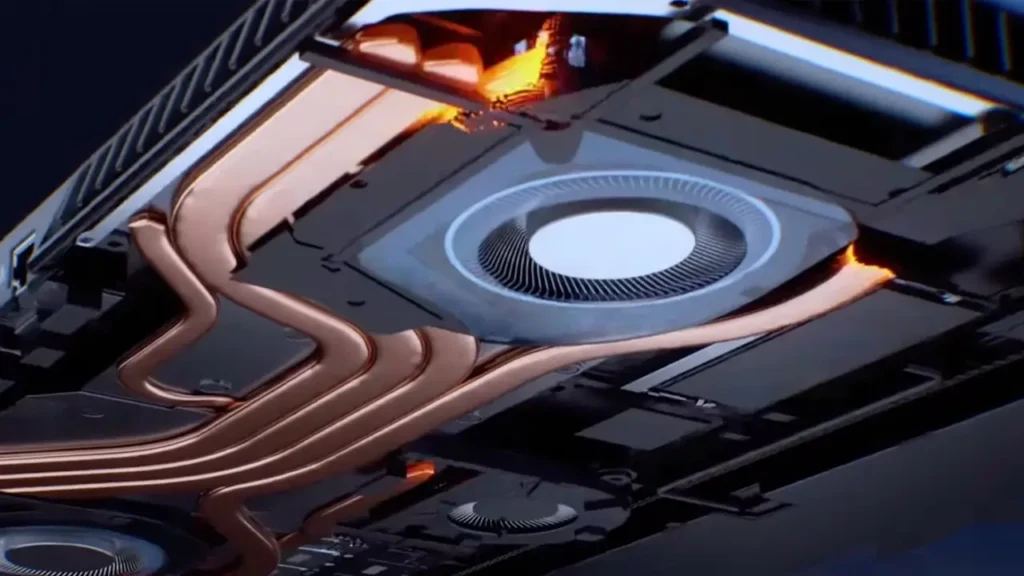
At the Thunderobot booth, the Zero Air was displayed running demanding AAA titles, demonstrating that its 15.9mm chassis wasn’t just a marketing gimmick. The company showcased thermal management through a vapor chamber cooling system paired with dual fans featuring liquid-crystal polymer blades—materials typically reserved for aerospace applications due to their heat resistance and acoustic properties.
What made the CES 2026 announcement particularly notable was the timing: Thunderobot secured early access to Intel’s Panther Lake silicon, positioning the Zero Air as one of the first consumer devices shipping with the Core Ultra 9 386H processor. This gave the company a narrative advantage—being first to market with next-generation architecture often translates to mindshare, even if competitors follow within weeks.
The demo units at CES ran pre-production firmware, so performance numbers should be treated as preliminary. However, Thunderobot claimed 30% better efficiency compared to previous-generation gaming laptops at similar power envelopes, a figure that aligns with Intel’s own projections for Panther Lake’s architectural improvements.
Thunderobot Zero Air Specs — Quick Table
| Component | Specification |
|---|---|
| Display | 15.3-inch OLED, 2560×1600 (16:10), 165Hz, 400 nits, 100% DCI-P3 |
| Processor | Intel Core Ultra 9 386H (Panther Lake), 16 cores, up to 4.9GHz |
| Graphics | NVIDIA GeForce RTX 5070 (8GB GDDR7), 115W TGP |
| Memory | Up to 32GB LPDDR5X-8533 (soldered) |
| Storage | Up to 2TB PCIe Gen 5 NVMe SSD |
| Battery | 80Wh, USB-C PD 3.1 (140W) |
| Dimensions | 349mm × 243mm × 15.9mm |
| Weight | Approximately 1.59kg (3.5 lbs) |
| Connectivity | 2× Thunderbolt 5, 1× USB-A 3.2, HDMI 2.1, 3.5mm combo, Wi-Fi 7 |
| Operating System | Windows 11 Pro |
The specifications reveal a machine designed for high-refresh gaming and content creation without the typical gaming laptop bulk. The 16:10 aspect ratio display provides more vertical space than traditional 16:9 panels—useful for productivity tasks when you’re not gaming.
One notable choice: soldered LPDDR5X memory. This trades upgradeability for speed and efficiency, a compromise that makes sense given the Zero Air’s focus on portability. The 8533MHz memory speed represents a substantial jump over previous-generation gaming laptops, directly benefiting integrated graphics performance and reducing latency for the discrete GPU.
15.9mm Thin Laptop — Design and Build Choices
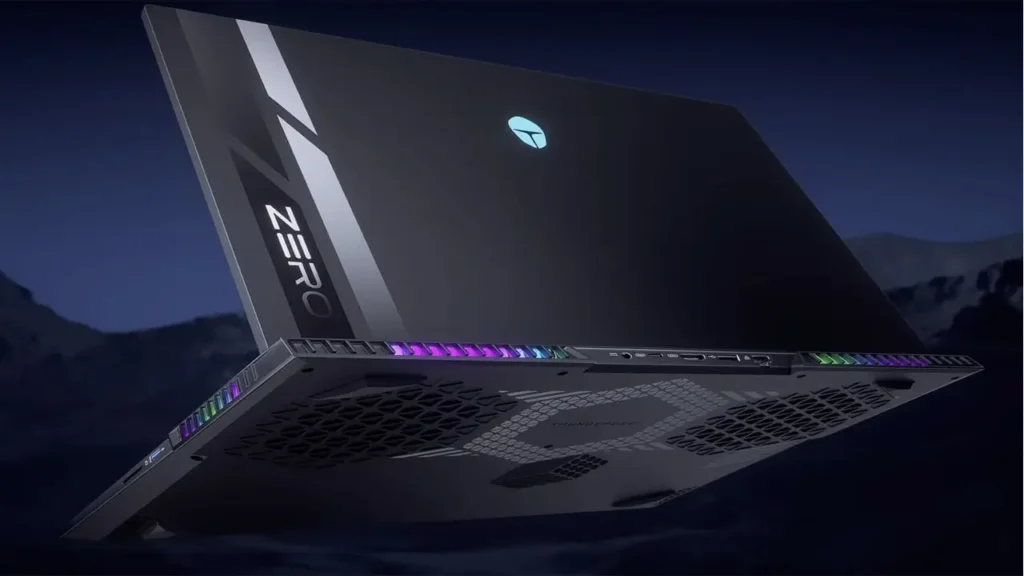
At 15.9mm thin, the Thunderobot Zero Air enters territory typically occupied by ultrabooks, not gaming machines. For context, that’s thinner than a MacBook Pro 16-inch (16.8mm) and significantly slimmer than most RTX-equipped gaming laptops, which typically measure 20-25mm.
Achieving this profile required engineering trade-offs. Thunderobot opted for a CNC-machined aluminum unibody construction, which provides structural rigidity without the thickness penalties of plastic or composite materials. The chassis features internal ribbing patterns visible through teardown images shared at CES—these reinforcements prevent flexing while maintaining the slim profile.
The keyboard sits in a recessed deck, allowing keys to travel 1.5mm despite the tight vertical space. Thunderobot used ultra-low-profile switches with tactile feedback designed to mimic the feel of deeper-travel mechanisms. Whether this succeeds won’t be clear until hands-on reviews arrive, but the approach mirrors what Apple did with recent MacBook Pro models.
Thermal management in a 15.9mm chassis presents obvious challenges. Thunderobot addressed this through a custom vapor chamber covering both the CPU and GPU, with heat pipes extending to vents on the rear and sides. The cooling system uses a “dual-outlet” design—hot air exhausts through the hinge and side vents simultaneously, maximizing airflow without increasing fan speed (and therefore noise).
Port placement reflects the thin design: most connections sit on the sides rather than the rear, with Thunderbolt 5 ports positioned for docking station use. The power input uses USB-C rather than a proprietary barrel connector, allowing the Zero Air to charge from any 140W USB-C PD adapter—a genuinely useful feature for travelers.
The slim profile does create one potential concern: battery capacity. Thunderobot managed to fit an 80Wh battery, which is respectable for this class, but not exceptional. Gaming laptops with 99.9Wh batteries (the maximum allowed on aircraft) offer longer unplugged sessions. The trade-off here is clear—portability versus extended runtime.
15.3 Inch OLED Laptop — Panel, Resolution, Color
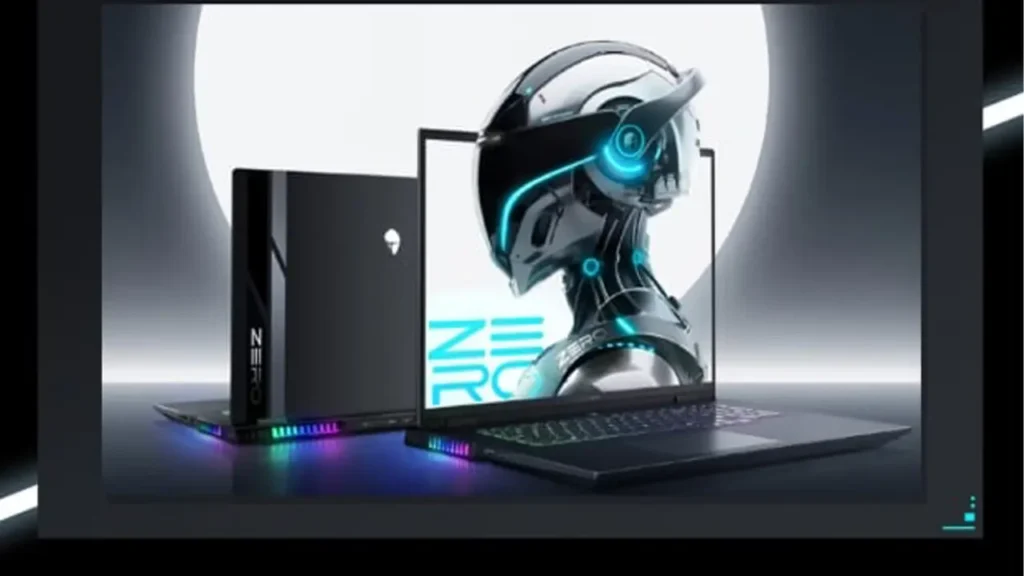
The 15.3-inch OLED laptop display represents one of the Zero Air’s strongest features, offering visual quality that exceeds most gaming laptop panels. OLED technology brings inherent advantages: true blacks (individual pixels turn completely off), infinite contrast ratio, and superior color accuracy compared to traditional IPS or mini-LED displays.
Thunderobot specified a 2560×1600 resolution, which hits a sweet spot for this screen size. It’s sharper than 1920×1200 but doesn’t carry the GPU performance penalty of 4K, making it ideal for gaming where frame rates matter more than pixel density beyond a certain threshold. At 15.3 inches, 2560×1600 delivers approximately 197 pixels per inch—enough that individual pixels aren’t visible at normal viewing distances.
The panel covers 100% of the DCI-P3 color gamut, a cinema-standard color space that’s become the benchmark for premium displays. This translates to vibrant, accurate colors for both gaming and content creation. Photo and video editors will appreciate the color accuracy, though Thunderobot hasn’t specified factory calibration standards (Delta E values), so professional color work may still require calibration.
Peak brightness reaches 400 nits in SDR mode. For an OLED panel, this is adequate but not exceptional—some premium OLED laptops hit 500+ nits. However, OLED’s infinite contrast ratio means content remains visible even at lower brightness levels than LCD panels would require. HDR support wasn’t detailed in the CES specifications, though most modern OLED laptop panels support at least VESA DisplayHDR 400 True Black.
One consideration with OLED: burn-in potential. Static UI elements displayed for extended periods can theoretically cause image retention. Modern OLED panels include pixel-shift and refresh technologies to mitigate this, but users who plan to use the Zero Air primarily for productivity (with static taskbars and icons) should be aware of the risk, however minimal.
The 16:10 aspect ratio deserves emphasis. Compared to traditional 16:9 gaming displays, it provides 11% more vertical space—useful for document editing, web browsing, and even gaming in titles where extra vertical field of view helps (strategy games, MMOs). It’s a thoughtful choice that signals Thunderobot designed the Zero Air for more than just gaming.
165Hz OLED Display — Why It Matters for Gaming
The 165Hz OLED display combines high refresh rates with OLED’s response time advantages, creating an ideal gaming panel. While 165Hz might seem modest compared to 240Hz or 360Hz gaming monitors, it represents the practical sweet spot for laptop GPUs in 2026.
Here’s why 165Hz makes sense for the Zero Air: the RTX 5070 can realistically drive modern AAA games at 1600p resolution (2560×1600) to frame rates in the 100-165 fps range at high settings. Pushing to 240Hz would require either lowering settings significantly or targeting less demanding titles. The 165Hz ceiling matches the GPU’s realistic output in contemporary games.
OLED’s response time advantage cannot be overstated. Traditional LCD panels, even fast IPS models, typically have 3-5ms gray-to-gray response times. OLED panels measure response time in microseconds, not milliseconds—a difference of several orders of magnitude. This near-instantaneous pixel response eliminates motion blur and ghosting, making 165Hz on OLED feel smoother than 240Hz on a typical IPS panel.
For competitive gaming, this matters enormously. In fast-paced shooters or fighting games, the combination of high refresh rate and instant pixel response reduces input lag and improves motion clarity. Your eyes can track moving targets more easily when there’s no pixel transition blur to obscure details.
Variable refresh rate support (G-SYNC Compatible certification expected, given the NVIDIA GPU) eliminates screen tearing without the input lag of traditional V-SYNC. This keeps gameplay smooth even when frame rates fluctuate, which they inevitably will in demanding open-world titles or during graphically intense scenes.
The zero OLED also handles low frame rate content better than LCD alternatives. When frame rates drop below the refresh rate ceiling, OLED’s per-pixel control means less visible judder compared to sample-and-hold LCD displays. This makes the gaming experience more consistent across different titles and settings.
One practical note: running at 165Hz will impact battery life compared to 60Hz. Most gaming laptops include refresh rate switching in their control software, allowing you to toggle between high refresh for gaming and 60Hz for productivity tasks. Expect this on the Zero Air as well.
Intel Panther Lake Laptop — Platform Leap and Efficiency Angle
As an Intel Panther Lake laptop, the Zero Air represents Intel’s first consumer deployment of their next-generation architecture after Meteor Lake and Arrow Lake. Panther Lake marks a significant platform evolution, particularly in power efficiency—a critical factor for thin gaming laptops.
Panther Lake’s architecture introduces several key improvements. The manufacturing process moves to Intel’s 18A node (comparable to TSMC’s 2nm-class process), promising better performance per watt. Intel claims up to 30% efficiency gains over previous generations at equivalent performance levels, which directly translates to longer battery life and lower heat output in constrained chassis like the Zero Air.
The platform also features an upgraded NPU (Neural Processing Unit) targeting AI workloads. While gaming doesn’t heavily leverage NPU acceleration yet, Windows 11’s AI features (including enhanced background blur for video calls, AI-powered image editing, and voice isolation) will run more efficiently without taxing the CPU or GPU. This is genuinely useful for users who multitask between gaming and productivity.
Memory support is another Panther Lake strength. The platform natively supports LPDDR5X-8533, the fastest laptop memory available in early 2026. Higher memory bandwidth benefits both the integrated GPU (for light gaming or productivity) and the discrete RTX 5070 by reducing latency for data transfers between system memory and VRAM.
Thunderbolt 5 integration represents a major connectivity upgrade. With 80Gbps bidirectional bandwidth (or 120Gbps in “boost mode”), Thunderbolt 5 enables true single-cable docking solutions that can drive multiple 4K displays while simultaneously charging the laptop and providing high-speed storage access. For the Zero Air’s target audience—users who want one laptop for gaming, travel, and desk use—this flexibility is genuinely valuable.
Platform security also receives attention in Panther Lake. Intel’s updated Platform Security features include hardware-level threat detection and enhanced firmware protection. While these aren’t flashy features, they matter increasingly as malware becomes more sophisticated and targeted attacks more common.
The efficiency angle deserves emphasis because it’s what makes the Zero Air’s form factor possible. Previous-generation gaming laptops with comparable specs would have required thicker chassis and larger cooling systems simply to manage the heat output. Panther Lake’s improved power efficiency means Thunderobot could design a 15.9mm chassis without thermal throttling becoming a constant issue.
Core Ultra 9 386H — CPU Details Worth Quoting
The Core Ultra 9 386H serves as the Zero Air’s computational engine, and its specifications reveal Intel’s design priorities for premium gaming laptops. This is a 16-core processor configured as 6 Performance cores, 8 Efficiency cores, and 2 Low Power Efficiency cores—a hybrid architecture that balances peak performance with background task efficiency.
Clock speeds reach up to 4.9GHz on the Performance cores, providing the single-threaded performance crucial for gaming. Many games still rely heavily on one or two threads for critical path calculations (physics, AI decision-making), so high peak clocks directly translate to better frame rates in CPU-limited scenarios.
The Efficiency cores handle background tasks—Windows updates, security scans, Discord, browser tabs, music streaming—without interrupting gaming performance. This separation of concerns means you can run OBS for streaming, Discord for voice chat, and Chrome with 30 tabs open without impacting your game’s frame rate.
Intel specifies the 386H’s TDP (Thermal Design Power) range as 28W base, with turbo capabilities up to 115W. In practice, the Zero Air’s cooling system will determine how long the CPU can sustain maximum turbo clocks. Thunderobot’s vapor chamber design should allow extended high-power operation, but this requires real-world testing to confirm.
Cache configuration includes 30MB of L3 cache shared across cores, plus dedicated L2 cache per core. Larger cache reduces memory latency, particularly beneficial for gaming where the same assets (textures, models, game logic) are accessed repeatedly. More cache means fewer trips to main memory, which translates to higher frame rates in memory-sensitive games.
The integrated GPU—an Xe-LPG design with 128 execution units—isn’t intended for gaming (that’s the RTX 5070’s job) but provides several practical benefits. It enables NVIDIA’s Optimus technology, allowing the laptop to switch to integrated graphics for light tasks, dramatically extending battery life. When browsing the web or editing documents, the RTX 5070 can power down completely.
Decode and encode capabilities matter for content creators. The 386H includes hardware acceleration for AV1, H.265, H.264, and VP9 codecs, both encoding and decoding. This means rendering video exports or streaming to Twitch/YouTube uses dedicated hardware rather than the CPU cores, completing faster while using less power.
AI acceleration through the NPU runs at 45 TOPS (Trillion Operations Per Second). While current Windows 11 AI features don’t fully leverage this performance, future applications will. AI-enhanced game upscaling (beyond NVIDIA’s DLSS), real-time translation, advanced voice recognition—these workloads will increasingly shift to the NPU, freeing CPU and GPU resources for other tasks.
One interesting detail: Intel’s Thread Director, now in its fourth generation, dynamically assigns workloads to Performance or Efficiency cores based on real-time analysis of instruction types and power state. This happens at the hardware level, faster than any software scheduler could manage, ensuring optimal performance and efficiency without user intervention.
RTX 5070 Gaming Laptop — Expected Performance Tier
As an RTX 5070 gaming laptop, the Zero Air positions itself in the upper-mid-range performance tier—powerful enough for demanding AAA titles at high settings, but not quite flagship-level performance. Understanding what the RTX 5070 brings requires context from NVIDIA’s broader lineup.
The RTX 5070 in the Zero Air features 8GB of GDDR7 memory, NVIDIA’s newest memory type offering higher bandwidth than previous GDDR6X variants. This matters particularly at higher resolutions like the Zero Air’s native 2560×1600, where more data must move between the GPU and frame buffer every frame. GDDR7’s increased bandwidth reduces potential bottlenecks in memory-intensive scenarios.
Thunderobot specifies a 115W TGP (Total Graphics Power) for the RTX 5070. This is mid-range for this GPU tier—some gaming laptops run the 5070 at 85W (for thinner designs), while others push to 140W (for maximum performance). The 115W configuration balances performance with the Zero Air’s thermal constraints, likely allowing sustained high performance without excessive noise or throttling.
CUDA core count for the RTX 5070 hasn’t been officially disclosed, but based on NVIDIA’s typical generational improvements, expect approximately 5,120 CUDA cores—a meaningful increase over the RTX 4070’s 4,608 cores. Combined with architectural improvements in the Ada Lovelace refresh architecture, this should deliver 15-20% better raw performance than the previous generation.
Ray tracing performance receives particular attention in the RTX 50-series. Third-generation RT cores handle ray-triangle intersection calculations more efficiently, and improved BVH (Bounding Volume Hierarchy) acceleration means complex scenes with multiple light sources perform better. In games like Cyberpunk 2077 or Alan Wake 2 with path tracing enabled, the RTX 5070 should deliver playable frame rates at the Zero Air’s native resolution with DLSS enabled.
Speaking of DLSS: NVIDIA’s Deep Learning Super Sampling technology is now in its fourth generation, offering better image quality with less performance overhead. DLSS 4 introduces multi-frame generation, potentially doubling or tripling frame rates in supported games. While this technology has critics who question whether interpolated frames count as “real” performance, it undeniably makes demanding games more playable at higher settings.
Content creation capabilities matter for many laptop buyers. The RTX 5070 includes dedicated hardware encoders for streaming and video editing (NVENC), now supporting AV1 encoding at higher quality presets than previous generations. This allows streaming to Twitch or YouTube at lower bitrates with better visual quality, or rendering video exports faster in applications like DaVinci Resolve or Adobe Premiere.
Expected real-world performance: at the Zero Air’s 2560×1600 resolution, the RTX 5070 should handle modern AAA titles at 80-120 fps with high settings and DLSS Quality mode enabled. Competitive titles like Counter-Strike 2, Valorant, or Apex Legends should easily hit the display’s 165Hz ceiling at maximum settings. Ray-traced games will require DLSS and potentially reducing settings to maintain smooth frame rates.
One consideration: 8GB of VRAM may become a limitation in future titles, particularly those using ultra-quality texture packs or extensive ray tracing. Currently, most games at 1600p use 6-8GB VRAM at max settings, so there’s minimal headroom. This isn’t an immediate concern but suggests the Zero Air might require settings tweaks in demanding titles 2-3 years from now.
Thunderobot Zero Air Review — Who It’s For + Verdict Framing
This Thunderobot Zero Air review focuses on positioning rather than final recommendations, since full testing hasn’t been completed. However, the specifications and design choices reveal a clear target audience and use case.
The Zero Air is engineered for users who refuse to compromise between gaming performance and portability. Specifically, it targets:
Traveling professionals who game: Consultants, sales engineers, digital nomads—anyone who needs a laptop that can handle work during the day and gaming at night without checking a second device through airport security. The 15.9mm profile and 1.59kg weight make this realistic, while the Panther Lake + RTX 5070 combination ensures AAA gaming remains viable.
College students in gaming-heavy majors: Computer science, game design, engineering students who need powerful hardware for coursework (compiling code, running simulations, 3D modeling) but also want to play games between classes. The Zero Air’s performance covers both bases in a package that fits in a backpack without weighing you down.
Hybrid workers with limited desk space: People working from small apartments who need one device for everything. The Thunderbolt 5 connectivity allows serious docking solutions—drive dual 4K monitors, attach high-speed storage, connect peripherals—turning the Zero Air into a desktop replacement when home, but remaining genuinely portable when needed.
Creative professionals who occasionally game: Video editors, 3D artists, photographers who need color-accurate displays and GPU acceleration for work, but also want to unwind with gaming. The OLED display’s 100% DCI-P3 coverage and the RTX 5070’s encoding capabilities serve professional workflows, while the gaming performance is there when wanted.
Who the Zero Air isn’t for:
Maximum performance seekers: If you want the absolute highest frame rates and don’t care about portability, bulkier gaming laptops with RTX 5080 or 5090 GPUs at 150W+ TGP will outperform the Zero Air. Desktop replacements exist for a reason.
Budget-conscious gamers: The Zero Air’s engineering—OLED display, premium chassis, cutting-edge silicon—commands premium pricing. If you’re maximizing performance per dollar, conventional gaming laptops offer better value.
Users who need maximum upgradeability: The soldered RAM and thin chassis limit future modifications. If you want to swap components or easily access internals, traditional gaming laptop designs provide more flexibility.
Anyone who needs exceptional battery life while gaming: Physics limits what’s possible. Gaming on battery will deplete the 80Wh battery quickly, regardless of efficiency improvements. This is a laptop you’ll want plugged in for extended gaming sessions.
The verdict framing depends on priorities. If portability without sacrificing modern gaming performance is your primary concern, the Zero Air represents exactly the kind of engineering trade-offs that make sense. The OLED display alone distinguishes it from competitors, and Panther Lake’s efficiency gains make the thin chassis viable rather than theoretical.
However, the proof will arrive when independent reviewers test thermal performance under sustained load, measure actual battery life in real-world scenarios, and verify whether Thunderobot’s cooling system can truly sustain both the Core Ultra 9 386H and RTX 5070 at full power without excessive noise or throttling.
The Zero Air’s specifications promise a compelling package—one of the first genuinely portable gaming laptops that doesn’t require significant performance compromises. Whether Thunderobot delivered on that promise will become clear once review units ship and undergo thorough testing. Until then, the Zero Air represents an intriguing direction for gaming laptop design: premium components in a form factor that respects the reality of how many people actually use their machines.
For now, the Thunderobot Zero Air stands as one of the most interesting announcements from CES 2026, showcasing what becomes possible when next-generation silicon meets thoughtful engineering. Whether it succeeds in execution will determine whether it’s remembered as a breakthrough or merely an ambitious attempt. The underlying concept—that gaming laptops can and should be genuinely portable—is absolutely correct. The Zero Air’s job is proving it’s achievable without unacceptable trade-offs.
If you’re building hype around next-gen hardware like the Thunderobot Zero Air, the next step is converting that attention into clicks. That’s where smarter creatives matter: generate banners fast, test angles, and prioritize what’s most likely to win. Here’s a tool focused on CTR scoring and ad-ready visuals: https://aiinnovationhub.shop/adcreative-ai-banner-generator-ctr-scoring/