
The Lenovo Legion Go S SteamOS has sparked genuine excitement in the handheld gaming community, and for good reason. This isn’t just another Windows-based portable trying to squeeze desktop gaming into a pocket-sized form factor. Instead, Lenovo has partnered directly with Valve to bring SteamOS—the same operating system that powers the Steam Deck—to a third-party handheld device for the first time.
Official Lenovo product pages confirm the Legion Go S SteamOS model exists alongside Windows variants, marking a significant shift in how manufacturers approach portable PC gaming. This collaboration signals that SteamOS compatibility is no longer exclusive to Valve’s hardware, opening doors for a broader ecosystem of Linux-powered gaming handhelds that prioritize seamless, console-like experiences over traditional desktop interfaces.
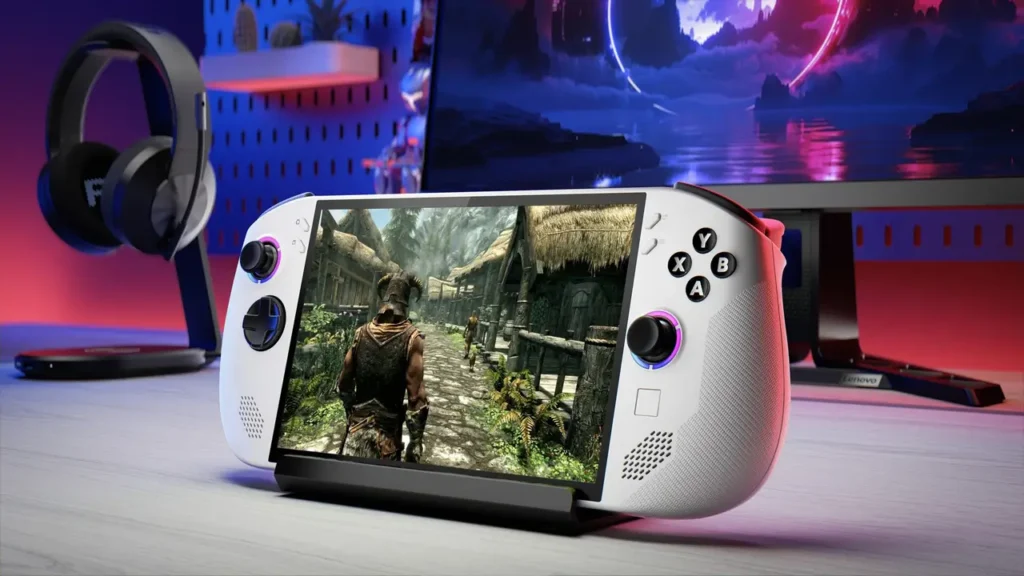
lenovo legion go s steamos Powered by SteamOS — Official Positioning
The Legion Go S powered by SteamOS represents Lenovo’s official entry into the SteamOS hardware ecosystem, as confirmed on Lenovo’s product pages. Unlike the original Legion Go or other Windows-based handhelds that require users to navigate desktop environments, install drivers, and manage Windows updates, this model ships with SteamOS 3.0 pre-installed. The difference matters: SteamOS provides a controller-friendly interface optimized specifically for handheld use, instant suspend/resume functionality, and automatic controller configuration for thousands of games. Lenovo’s official positioning emphasizes that this isn’t a side project or community mod—it’s a factory-certified SteamOS device with full Valve collaboration.
What separates this from simply installing SteamOS yourself on other hardware? Official support. Lenovo and Valve have worked together to ensure hardware drivers, firmware updates, and system optimizations work out of the box. You won’t encounter the quirks or compatibility headaches that sometimes plague unofficial SteamOS installations. The Legion Go S SteamOS edition receives the same SteamOS updates as the Steam Deck, meaning features Valve develops for one device benefit the entire ecosystem. This official partnership also means Lenovo can leverage Valve’s expertise in handheld-specific power management, thermal tuning, and controller latency—areas where Windows handhelds traditionally struggle.
Legion Go S Release Date — What We Know About Timing
Regarding the Legion Go S release date, concrete information points to a May 2025 shipping window based on retailer listings and Lenovo’s announcements at CES 2025. Engadget and other tech outlets covering the CES reveal reported that Lenovo showcased the SteamOS model alongside Windows configurations, with availability slated for spring 2025. Some European retailers have already opened pre-orders with estimated delivery in May, though exact dates vary by region and configuration.
It’s worth noting that the Windows version of the Legion Go S launched slightly earlier, with some configurations available in April 2025. The SteamOS edition follows shortly after, likely due to the additional validation work required between Lenovo and Valve to certify hardware compatibility and optimize the software experience. This staggered rollout isn’t unusual for multi-SKU launches—manufacturers often prioritize the configuration they expect to sell in higher volumes initially (in this case, Windows), then expand availability to specialized variants.
For those tracking availability, checking Lenovo’s official regional sites provides the most accurate release information. North American availability appears to align with the May timeframe, while some Asian markets may see slightly later availability. The phased rollout strategy helps Lenovo manage initial production volumes and gather early user feedback before scaling distribution globally.
Lenovo Legion Go S Price — Pricing Logic and Market Positioning
The Lenovo Legion Go S price varies significantly based on configuration and region, but the SteamOS model positions itself competitively against the Steam Deck OLED and other premium handhelds. Based on official Lenovo listings and retailer pre-orders, the base SteamOS configuration starts around $499-$549 USD, though exact pricing depends on storage options and regional market factors. This places it slightly above the Steam Deck’s entry point but below Windows-based Legion Go S variants with similar specifications.
Why does the SteamOS version sometimes cost less than Windows models with identical hardware? Operating system licensing plays a role. Windows licenses carry costs that manufacturers pass to consumers, while SteamOS is free and open-source. However, pricing differences aren’t always straightforward—some retailers bundle accessories or offer promotional pricing that narrows the gap between configurations. Additionally, the SteamOS model may target different customer priorities: gamers who value console-like simplicity over Windows desktop flexibility might accept fewer bundled extras for a lower entry price.
| Configuration | Storage | Estimated Price (USD) |
|---|---|---|
| Legion Go S SteamOS (Base) | 256GB | $499-$549 |
| Legion Go S SteamOS (Mid) | 512GB | $599-$649 |
| Legion Go S Windows | 512GB | $649-$699 |
Regional pricing fluctuations matter significantly. European prices typically include VAT and run 10-15% higher than US prices, while availability in markets like Australia or Japan may involve additional import considerations. Always verify pricing through official Lenovo channels or authorized retailers to avoid third-party markups.
Lenovo Legion Go S Specs — Display, Ports, and Ergonomics
The Lenovo Legion Go S specs reveal a device designed around portability without sacrificing core gaming functionality. The display measures 8 inches diagonally with a 1920×1200 resolution (16:10 aspect ratio), running at up to 120Hz refresh rate. This higher refresh rate distinguishes the Legion Go S from the Steam Deck’s 60Hz panel, making fast-paced games and competitive titles feel noticeably smoother. The IPS LCD technology delivers good color accuracy and viewing angles, though it lacks the deep blacks of OLED alternatives.
Connectivity stands out as a major spec highlight. According to Lenovo’s official specifications, the Legion Go S includes USB4 (USB-C with 40Gbps bandwidth), which supports DisplayPort output for external monitors and high-speed data transfer. This single port handles charging, video output, and peripheral connections through appropriate hubs or docks. A microSD card slot provides expandable storage—essential given that modern games can easily exceed 100GB. The device also includes a 3.5mm headphone jack, Wi-Fi 6E for low-latency wireless gaming, and Bluetooth 5.3 for controller or audio accessory pairing.
| Specification | Details |
|---|---|
| Display | 8″ IPS LCD, 1920×1200, 120Hz |
| Processor | AMD Ryzen Z2 Go (4 cores, 8 threads) |
| Graphics | AMD Radeon 740M (RDNA 3) |
| RAM | 16GB LPDDR5X-7500 |
| Storage | 256GB/512GB NVMe SSD + microSD |
| Battery | 55.5Wh |
| Ports | 1× USB4, microSD, 3.5mm audio |
| Weight | ~740g (1.63 lbs) |
Ergonomically, the Legion Go S prioritizes all-day comfort. Weighing approximately 740 grams, it’s noticeably lighter than the original 8.8-inch Legion Go (854g) while maintaining similar screen real estate. The controls include full-size analog sticks, haptic feedback triggers, and dedicated Steam/Quick Access buttons that integrate perfectly with SteamOS shortcuts. Lenovo retained the excellent d-pad and face button layout from previous Legion designs, which competitive gamers particularly appreciate for fighting games and platformers.
AMD Ryzen Z2 Go Handheld — Performance Expectations
As an AMD Ryzen Z2 Go handheld, the Legion Go S positions itself in the efficient-performance category rather than maximum-power territory. The Ryzen Z2 Go is AMD’s newest chip designed specifically for compact gaming devices, featuring four Zen 4 cores and eight threads paired with Radeon 740M graphics based on RDNA 3 architecture. This configuration targets 720p-900p gaming at medium-to-high settings, prioritizing battery efficiency over brute force.
Real-world performance expectations align with 30-60 FPS in most modern titles when using appropriate settings. Games like Elden Ring, Cyberpunk 2077, and Baldur’s Gate 3 run smoothly at 800p with medium presets, while older or less demanding titles easily hit the display’s 120Hz cap. The key advantage of the Z2 Go over previous-generation chips lies in its power efficiency—it achieves similar performance to older Z1 processors while drawing 15-20% less power, translating directly to longer battery life.
TDP (thermal design power) flexibility matters significantly in handheld gaming. The Z2 Go supports configurable TDP from 9W to 30W, allowing users to balance performance against battery consumption. At 9W, you might play indie titles for 4-5 hours; at 30W, AAA games drain the battery in 90-120 minutes but deliver noticeably smoother frame rates. SteamOS’s quick access menu makes adjusting these parameters intuitive, letting you shift strategies based on whether you’re commuting or plugged into power.

SteamOS Handheld PC — Console-Like Experience with Linux Inside
Positioning the device as a SteamOS handheld PC highlights the unique middle ground it occupies between traditional PC gaming and console convenience. SteamOS 3.0 runs on a Linux foundation (specifically Arch Linux) but presents an interface that feels nothing like conventional desktop Linux distributions. When you power on the Legion Go S SteamOS edition, you’re greeted by the same Gaming Mode interface Steam Deck users know—a controller-friendly library that lets you browse, purchase, and launch games without ever seeing a file system or terminal window.
This console-like simplicity delivers tangible advantages over Windows handhelds. Boot times from cold start to game take roughly 15-20 seconds versus 45-60 seconds on comparable Windows devices. Suspend and resume functionality works flawlessly—you can pause mid-game, put the device to sleep, and resume exactly where you left off hours later, just like a Nintendo Switch. Game updates download automatically in the background, and the system manages shader compilation proactively so games don’t stutter during initial play sessions.
The Linux foundation isn’t purely cosmetic. SteamOS benefits from lower system overhead compared to Windows, meaning more of the device’s limited RAM and CPU resources go directly to gaming rather than background services. Additionally, Valve’s Proton compatibility layer—which translates Windows game instructions to Linux—has matured to the point where most games run at near-native performance. According to ProtonDB community tracking and Valve’s own compatibility ratings, over 80% of the top 100 Steam games run flawlessly on SteamOS without requiring any user intervention.
For users who occasionally need desktop functionality, SteamOS includes a Desktop Mode that provides a full KDE Plasma environment. This allows installing non-Steam software, managing files, or using the device as a portable Linux workstation. However, most users never need to leave Gaming Mode, which is precisely the point—Lenovo and Valve designed the experience around gaming first, with other capabilities available but not mandatory.
Linux Gaming Handheld — Pros and Cons for Regular Users
As a Linux gaming handheld, the Legion Go S SteamOS edition comes with trade-offs that potential buyers should understand clearly. Let’s address both advantages and limitations honestly, since this helps set appropriate expectations for different user types.
Advantages of the Linux gaming approach:
The most immediate benefit is system stability. Linux-based SteamOS rarely encounters the driver conflicts, mandatory restarts, or performance-degrading background updates that plague Windows gaming setups. The OS feels responsive and predictable—when you press the power button, it turns on quickly and consistently. Battery life typically extends 15-30 minutes longer than equivalent Windows handhelds due to more efficient resource management and absence of bloatware. Privacy-conscious users also appreciate that SteamOS doesn’t include telemetry or data collection beyond basic Steam functionality.
Game performance often matches or exceeds Windows when titles are Proton-compatible. Valve has invested heavily in GPU driver optimization and shader pre-compilation, resulting in smooth frame pacing and minimal stuttering. For competitive multiplayer games that do work on Linux, input latency can actually be slightly lower due to reduced OS overhead. The integrated update system means you’re always running optimized drivers and system software without manual intervention.
Limitations and potential frustrations:
Anti-cheat compatibility remains the biggest practical limitation. Popular competitive games using kernel-level anti-cheat (Easy Anti-Cheat, BattlEye) often don’t work on Linux unless developers explicitly enable Proton support. This means titles like Destiny 2, Valorant, Rainbow Six Siege, and some Call of Duty modes remain unplayable on SteamOS regardless of hardware capability. While the list of supported anti-cheat games grows monthly, competitive shooter fans should verify their favorite titles before purchasing.
Third-party game launchers present another friction point. While Steam games integrate seamlessly, titles from Epic Games Store, EA App, or Xbox Game Pass require workarounds or may not function at all. Community solutions exist (Heroic Games Launcher, Lutris), but they involve more technical setup than the plug-and-play Steam experience. This matters particularly for users with large non-Steam libraries.
| Aspect | Pros | Cons |
|---|---|---|
| Gaming Performance | Near-native with Proton, optimized drivers | Some games incompatible, shader issues rare |
| User Experience | Console-like, fast boot/resume | Limited desktop software compatibility |
| Anti-Cheat | Growing support, single-player perfect | Major competitive titles still blocked |
| Launchers | Steam native, GOG mostly works | Epic/EA/Xbox require technical workarounds |
| Battery Life | 15-30 min longer than Windows | None significant |
| Updates | Seamless, automatic, non-intrusive | Occasional Proton updates break edge cases |
Peripheral support generally works well for mainstream devices but can be unpredictable for niche hardware. Common Bluetooth controllers, USB headsets, and external storage work flawlessly. Specialized racing wheels, flight sticks, or RGB peripherals might lack proper drivers or configuration tools. The Linux community has developed alternatives for many devices, but expect more trial-and-error compared to Windows plug-and-play.
SteamOS Compatibility Rating — How Valve Solves “Will It Run?”
The SteamOS compatibility rating system represents Valve’s solution to Linux gaming’s historically biggest question: will this game actually work? Rather than leaving users to guess or search forums, every game in the Steam catalog now displays one of four ratings specifically for Steam Deck and SteamOS devices: Verified, Playable, Unsupported, or Unknown.
Verified games work perfectly out of the box with no configuration needed. They support the device’s native resolution, correctly recognize built-in controls, display appropriate controller glyphs, and include readable text at the device’s screen size. These titles have been explicitly tested by Valve and represent the smoothest experience possible. As of early 2025, over 7,000 games carry Verified status.
Playable games function but may require minor adjustments or have small issues that don’t prevent enjoyment. This might mean manually selecting a community controller layout, accepting that small text is hard to read, or requiring a one-time launcher workaround. Most Playable games provide excellent experiences despite the rating—the designation simply means perfection wasn’t achieved.
Unsupported games currently don’t function, usually due to anti-cheat incompatibility, missing Linux-specific support, or severe performance issues. This doesn’t necessarily mean “never”—developers regularly update games to improve compatibility, moving titles from Unsupported to Playable or Verified as they enable Proton support for anti-cheat systems.
Unknown means Valve hasn’t yet tested the game. With over 50,000 games on Steam, comprehensive testing takes time. Community reports via ProtonDB often provide guidance for Unknown titles, and they frequently work fine despite lacking official verification.
The brilliance of this system extends beyond just the Steam Deck. Because the Legion Go S runs the same SteamOS, it benefits from all verification work Valve performs. When developers optimize for Steam Deck, they simultaneously optimize for Lenovo’s handheld. This ecosystem effect makes each new SteamOS device stronger—compatibility improvements help all users across all hardware running the platform. The Verge and other tech outlets have noted this as a significant advantage over Windows handhelds, where each manufacturer handles their own driver optimization and support independently.

Lenovo Legion Go S vs Steam Deck — Finding Your Best Fit
The inevitable Lenovo Legion Go S vs Steam Deck comparison comes down to specific priorities rather than one device being objectively superior. Both run identical SteamOS software and play the same games, but hardware differences create distinct user experiences suited to different scenarios.
Screen and performance comparison:
The Legion Go S offers a larger 8-inch display versus the Steam Deck’s 7-inch screen (or 7.4-inch on the OLED model). More importantly, the Legion Go’s 120Hz refresh rate doubles the Steam Deck’s 60Hz maximum. If you primarily play fast-paced action games, racing titles, or competitive shooters that are Linux-compatible, the higher refresh rate creates noticeably smoother motion. However, the Steam Deck OLED’s display technology produces more vibrant colors and perfect blacks, which benefits story-driven games and anything with dark environments.
The AMD Ryzen Z2 Go in the Legion Go S represents newer silicon compared to the Steam Deck’s custom AMD APU, but real-world performance differences are surprisingly minor—typically within 10-15%. Both devices target similar resolution and frame rate goals, and both struggle with the most demanding AAA titles at highest settings. Where the Z2 Go pulls ahead is power efficiency, potentially delivering 20-30 minutes additional battery life in equivalent scenarios.
Ergonomics and build quality:
Steam Deck users consistently praise its comfortable ergonomics during extended sessions. The soft curves, grip texture, and controller placement feel natural even after hours of play. The Legion Go S takes a slightly different approach with a more angular design and lighter weight (740g vs 640g for the LCD Deck, 660g for the OLED). The weight difference matters over multi-hour sessions—lighter devices cause less hand fatigue, but some users find the added heft of the Steam Deck contributes to its premium feel.
Button and stick quality ranks as excellent on both devices, though the Legion Go S uses slightly larger analog sticks that some prefer for precision aiming. The Steam Deck’s trackpads remain unique—no other handheld includes them—and they prove invaluable for certain games that benefit from mouse-like input. If you play strategy games, RTSs, or older PC titles designed around mouse control, the Steam Deck’s trackpads provide clear advantages.
Price and value proposition:
The Steam Deck’s pricing remains aggressive, with the LCD model starting at $399 and the OLED at $549. The Legion Go S SteamOS edition starts closer to $499-$549 depending on configuration. For pure value, the base Steam Deck LCD delivers incredible capability per dollar. However, the Legion Go S includes features that justify its premium: the 120Hz screen, newer processor, USB4 connectivity, and sometimes larger base storage depending on configuration.
Who should choose which:
Consider the Legion Go S if you prioritize screen refresh rate, want the newest hardware, value USB4 for dock and external display use, or prefer lighter weight during long sessions. It’s also ideal if you’re investing in the ecosystem now and expect to keep the device 3-4 years—newer silicon ages better.
Choose the Steam Deck if you want proven hardware with two years of real-world testing, prefer OLED display technology, have a tighter budget, or value trackpads for specific game genres. The Steam Deck also benefits from a more mature accessory ecosystem—cases, screen protectors, and docks have been optimized specifically for its dimensions.
| Feature | Legion Go S SteamOS | Steam Deck (OLED) |
|---|---|---|
| Screen Size | 8 inches | 7.4 inches |
| Display Tech | IPS LCD, 120Hz | OLED, 60Hz (90Hz capable) |
| Processor | AMD Ryzen Z2 Go | Custom AMD APU (2023) |
| Weight | 740g | 660g |
| Battery | 55.5Wh | 50Wh |
| Starting Price | $499-$549 | $549 |
| Trackpads | No | Yes |
| USB4 | Yes | No (USB-C 3.2) |
Making Your Decision: Next Steps
The Lenovo Legion Go S SteamOS represents something genuinely new in handheld gaming: a third-party device that fully embraces Valve’s Linux-based ecosystem with official support from both companies. For gamers who prioritize single-player experiences, indie games, and streamlined user experience, it delivers compelling value through newer hardware, excellent screen technology, and the proven reliability of SteamOS.
Before purchasing, verify your most-played games appear as Verified or Playable on Valve’s compatibility checker. If your library consists heavily of competitive multiplayer titles with aggressive anti-cheat, consider whether the limitation justifies choosing a Windows alternative. For everyone else—especially those who’ve felt frustrated by Windows handheld quirks or want console-like simplicity—the Legion Go S offers an excellent entry into the SteamOS ecosystem.
Check Lenovo’s official product page for your region to confirm exact pricing, storage configurations, and availability dates. Consider joining SteamOS community forums or the Legion Go subreddit to learn from early adopters once devices ship in May 2025. And remember: the beauty of SteamOS is that it keeps improving over time through automatic updates, meaning the device you buy today will be more capable six months from now as Valve and Lenovo continue optimizing the experience.
Ready to explore the Legion Go S further? Visit Lenovo’s official site to see detailed specifications, compare configurations, and sign up for availability notifications. The handheld gaming landscape just got more interesting, and this device proves that SteamOS’s future extends far beyond Valve’s own hardware.

Want to boost conversions before you spend another cent on ads? Check out how AdCreative AI helps generate banner concepts fast and predicts click-through potential with CTR scoring. It’s a smart way to test visuals, sharpen messaging, and scale campaigns with data-backed confidence in minutes, not hours. Learn more: https://aiinnovationhub.shop/adcreative-ai-banner-generator-ctr-scoring/
