
If you’ve been eyeing desktop towers with a mix of envy and dread—envy for the power, dread for the footprint—you’re in for a treat. The ASUS ROG GR70 mini PC and BMAX B9 Power represent two very different takes on cramming desktop-class performance into a book-sized case. Whether you’re a gamer chasing frames, a creator rendering timelines, or an office warrior juggling spreadsheets and virtual meetings, these compact powerhouses deserve a closer look. Let’s dive into what makes each tick, where they shine, and which one might deserve a spot on your desk.
Why the desktop replacement mini PC trend is exploding
Walk into any modern workspace or gaming setup, and you’ll notice something: towers are shrinking. The desktop replacement mini PC movement isn’t just about saving desk real estate (though that’s a huge perk). It’s about rethinking what “performance” looks like in 2025–2026.
For years, serious computing meant a hulking ATX case with room for multiple GPUs, elaborate cooling, and enough RGB to light up a small concert. But as laptop chips caught up—and in some cases, surpassed—their desktop cousins in efficiency, manufacturers realized they could deliver 80–90% of that power in a chassis you could literally fit in a backpack.
Why it matters:
- Space efficiency: Perfect for small apartments, dorm rooms, or minimalist setups where every square inch counts.
- Portability: Take your “desktop” to a LAN party, between home and office, or just move it to another room without a forklift.
- Lower power draw: Modern mini PCs often consume 65–150W under load versus 300–500W for traditional towers, slashing electricity bills.
- Quiet operation: Smaller doesn’t always mean louder. Smart thermal design in 2025 means whisper-quiet fans even under stress.
The catch? You’re trading some raw top-end performance and upgradeability for that compactness. But for most users—even enthusiasts—the trade-off is well worth it.
ASUS overview: Ryzen 9 9955HX3D mini PC in a small chassis
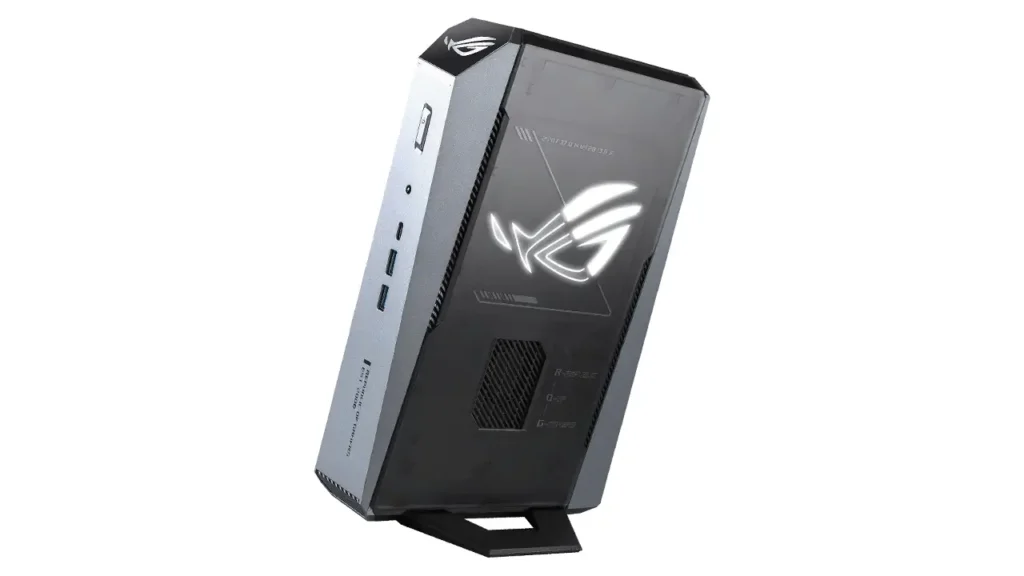
ASUS didn’t just dip a toe into the mini PC pool with the ROG GR70—they cannonballed in. At the heart of this machine sits the Ryzen 9 9955HX3D, AMD’s latest high-performance mobile chip with 3D V-Cache technology. This isn’t your run-of-the-mill laptop processor; it’s a beast designed for gaming laptops and workstations, now squeezed into a chassis roughly the size of a hardcover book.
Key specs (based on official ASUS ROG sources):
- CPU: AMD Ryzen 9 9955HX3D (16 cores, 32 threads, up to 5.4 GHz boost, 3D V-Cache)
- GPU: NVIDIA RTX 5070 Laptop GPU (8GB GDDR6)
- RAM: Up to 64GB DDR5-5600 (dual-channel, user-upgradeable)
- Storage: Dual M.2 NVMe slots (PCIe 4.0)
- Connectivity: Wi-Fi 7, 2.5GbE LAN, Bluetooth 5.3
- Dimensions: Approx. 3L volume (exact measurements ~220 × 140 × 95mm)
- Ports: 2× USB4, 4× USB 3.2 Gen2, HDMI 2.1, DisplayPort 1.4, audio combo jack
The 3D V-Cache is the secret sauce here. By stacking additional L3 cache directly on the CPU die, AMD dramatically improves performance in cache-sensitive workloads—think gaming, video editing, and simulations. In practice, this means the GR70 punches well above its weight class, often matching or exceeding desktop chips in gaming benchmarks.
Who is this for?
Gamers who want high refresh rates at 1440p, content creators working with 4K timelines, or anyone who needs serious CPU grunt without dedicating an entire desk to a tower. It’s overkill for basic office work, but if you’ve ever muttered “I wish my laptop was faster” while staring at a progress bar, the GR70 speaks your language.
Gaming angle: RTX 5070 laptop GPU mini PC expectations
Let’s address the elephant in the room: the RTX 5070 laptop GPU inside the ASUS ROG GR70 isn’t the desktop RTX 5070. It’s a mobile variant, which means lower power limits (typically 115–140W TGP) and slightly reduced core counts. But before you dismiss it, consider what NVIDIA has achieved with recent mobile GPUs.
| Aspect | RTX 5070 Laptop GPU | Notes |
|---|---|---|
| CUDA Cores | ~4608 (typical) | Varies by TGP config |
| Memory | 8GB GDDR6 | 256-bit bus |
| 1080p Ultra | 100+ FPS (AAA titles) | DLSS 3.5 capable |
| 1440p High | 70–90 FPS | Sweet spot for this GPU |
| 4K Medium | 40–60 FPS | DLSS recommended |
| Ray Tracing | Good at 1080p/1440p | Struggles at native 4K |
Real-world expectations:
The RTX 5070 laptop GPU in a mini gaming PC like the GR70 handles modern AAA titles beautifully at 1440p. Games like Cyberpunk 2077, Alan Wake 2, and Starfield run smoothly with high settings and DLSS enabled. Esports titles (Valorant, CS2, Apex Legends) easily hit 200+ FPS at 1080p, making this a fantastic choice for competitive gamers.
Where it stumbles: native 4K gaming without upscaling. The 8GB VRAM can also be a bottleneck in VRAM-hungry titles at ultra textures. But honestly? For a machine this small, it’s an engineering marvel. You’re getting 85–90% of desktop RTX 4070 performance in a 3-liter box.
Creator workloads:
The RTX 5070’s tensor cores accelerate AI tasks in Adobe Premiere, DaVinci Resolve, and Stable Diffusion. Expect 4K timeline scrubbing without stutters and GPU-accelerated renders that smoke CPU-only solutions.
Connectivity: why Wi-Fi 7 mini PC matters
Buried in the specs of the ASUS ROG GR70 is a feature that might not sound sexy but absolutely is: Wi-Fi 7. If you’re still rocking Wi-Fi 5 or even Wi-Fi 6, strap in—this is a game-changer.
Wi-Fi 7 (802.11be) highlights:
- Theoretical speeds: Up to 46 Gbps (real-world: 5–8 Gbps under ideal conditions)
- Latency: Sub-5ms in optimized environments, crucial for cloud gaming and competitive multiplayer
- Multi-Link Operation (MLO): Simultaneously uses 2.4GHz, 5GHz, and 6GHz bands for rock-solid connections
- 320 MHz channels: Double the bandwidth of Wi-Fi 6’s 160 MHz
Why it matters in a mini PC:
Many users place mini PCs in living rooms, bedrooms, or tight spaces where running Ethernet isn’t practical. Wi-Fi 7 means you can stream 4K gameplay to Twitch, download 100GB game updates in minutes, and maintain stable connections in crowded wireless environments (apartments, dorms) without choking.
For cloud gaming platforms like GeForce Now or Xbox Cloud Gaming, Wi-Fi 7’s low latency is the difference between “playable” and “feels like local hardware.” The GR70’s dual connectivity (Wi-Fi 7 + 2.5GbE LAN) also future-proofs you as home networks upgrade.
Practical note:
You’ll need a Wi-Fi 7 router to unlock full speeds, and those are still pricey in early 2026. But even connecting to Wi-Fi 6E networks, the GR70’s advanced radio delivers noticeably better performance than older devices.
BMAX value proposition: BMAX B9 Power mini PC in 2025–2026 reality
Now let’s pivot to the BMAX B9 Power mini PC, a machine targeting a very different buyer. Where the ASUS GR70 screams “gaming and creative workstation,” the B9 Power whispers “reliable, affordable Windows mini workstation.”
BMAX B9 Power specs (from official BMAX sources):
- CPU: Intel Core i9-12900HK (14 cores, 20 threads, up to 5.0 GHz)
- GPU: Intel Iris Xe Graphics (integrated)
- RAM: 32GB DDR4-3200 (expandable to 64GB)
- Storage: 1TB NVMe SSD (single M.2 slot)
- Connectivity: Wi-Fi 6, Gigabit Ethernet, Bluetooth 5.2
- Dimensions: Compact 3L chassis (similar footprint to GR70)
- Ports: 4× USB 3.2, 2× HDMI 2.0, 1× USB-C, audio jack, SD card reader
The pitch:
BMAX isn’t trying to compete with ASUS in raw gaming power. Instead, they’re delivering a compact 3L mini PC that handles everyday computing, office productivity, and light creative work at a fraction of the cost. Think of it as the Toyota Camry to the ASUS’s Porsche—less thrilling, but dependable and sensible.
Who buys this?
- Office power users: Running multiple Excel macros, Chrome tabs, and Zoom calls simultaneously
- Students/educators: Affordable yet capable for research, coding, and presentations
- Home media centers: 4K video playback, Plex server duties, modest photo editing
- Small businesses: Deployable in bulk for reception desks, POS systems, or backend tasks
The Intel Core i9-12900HK is a strong CPU—don’t let the “12th gen” badge fool you. It’s still plenty fast for non-gaming workloads in 2026, and the hybrid architecture (6 P-cores + 8 E-cores) juggles multitasking beautifully.
The trade-off:
No discrete GPU means gaming is limited to older/indie titles at 1080p low settings. Video editing is CPU-bound. But if your workflow doesn’t demand GPU acceleration, you’re saving $500–$800 compared to the GR70.
CPU workhorse: Intel Core i9-12900HK mini PC performance notes
Let’s dig deeper into the Intel Core i9-12900HK mini PC experience with the BMAX B9 Power. Released in early 2022 as part of Intel’s Alder Lake-H lineup, the 12900HK was a flagship mobile chip—and it still holds up surprisingly well.
| Benchmark | i9-12900HK Score | Context |
|---|---|---|
| Cinebench R23 Multi | ~19,000 pts | Excellent for video encoding |
| Geekbench 6 Single | ~2,400 | Snappy for daily tasks |
| Geekbench 6 Multi | ~14,500 | Strong multitasking |
| 7-Zip Compression | ~85 GIPS | Fast file handling |
| Adobe Premiere 4K Export | ~3.5 min (5-min clip) | CPU-only, no GPU accel |
Honest assessment:
The 12900HK isn’t the “newest” chip in 2026—Intel’s 14th and 15th gen parts have since launched—but it’s far from obsolete. According to Notebookcheck reviews, it trades blows with newer mid-range chips like the Core i7-13700H in many workloads, thanks to its higher core count and mature drivers.
Thermal reality:
In the BMAX B9’s compact chassis, the 12900HK can hit thermal limits (90–95°C) under sustained all-core loads. BMAX uses a dual-fan, dual-heatpipe design that keeps things stable but audible under stress. For burst workloads (compiling code, quick renders), it’s fantastic. For sustained 100% CPU tasks, consider improving airflow around the chassis.
Power efficiency:
Compared to the Ryzen 9 9955HX3D, the 12900HK draws slightly more power for similar performance in threaded tasks. Expect 45–65W sustained vs. the Ryzen’s 35–55W. Not a dealbreaker, but worth noting if you’re running 24/7 workloads.

Size & cooling: the appeal of a compact 3L mini PC
Both the ASUS ROG GR70 and BMAX B9 Power clock in around 3 liters of volume—roughly 220mm × 140mm × 95mm. To put that in perspective, you could stack three of these in the space a single mid-tower ATX case occupies.
Why 3L is the sweet spot:
- Thermal headroom: Just enough volume for dual fans and proper heatpipe routing without exotic solutions (liquid cooling, vapor chambers)
- Port density: Room for full-size HDMI, USB-A, and Ethernet without dongles
- Component access: Larger than ultra-compact “NUC-style” PCs, making RAM/SSD upgrades less fiddly
- Aesthetic flexibility: Fits horizontally under monitors, vertically beside them, or tucked in AV cabinets
Cooling deep-dive (ASUS GR70):
ASUS employs a “vapor chamber + dual-fan” design. The vapor chamber (essentially a flat heat pipe) spreads heat from the CPU and GPU across a finned heatsink, which dual 50mm fans exhaust out the rear. Under gaming loads, fan noise peaks around 42–45 dBA (think quiet conversation). Silent modes drop that to near-inaudible levels but throttle performance ~10%.
Cooling deep-dive (BMAX B9):
BMAX sticks with traditional heatpipes. Two 6mm copper pipes draw heat from the CPU to a shared heatsink, vented by 40mm fans. It’s louder under load (45–50 dBA) but still reasonable for office use. The lack of a discrete GPU means thermal density is lower, so cooling the CPU is the only real challenge.
Pro tip:
Place your compact 3L mini PC on a hard surface with 2–3 inches of clearance on all sides. Avoid carpets (dust) and enclosed cabinets without ventilation. A simple laptop cooling pad can knock 5–8°C off temps if you’re pushing limits.
Upgrades & longevity: mini PC upgradeable RAM SSD checklist
One of the smartest moves you can make before buying any mini PC upgradeable RAM SSD system is understanding what you can (and can’t) swap out down the line. Here’s your pre-purchase checklist.
ASUS ROG GR70 upgradeability:
- RAM: 2× SO-DIMM slots, DDR5-5600, officially supports up to 64GB (32GB modules). User-accessible via bottom panel (4 screws).
- Storage: 2× M.2 NVMe slots (PCIe 4.0 x4). One typically ships with the OS drive; the second is empty for expansion. Supports drives up to 2TB each (4TB total).
- GPU: Soldered. No upgrades.
- CPU: Soldered. No upgrades.
- Wi-Fi/BT: M.2 2230 module, technically replaceable but warranty-voiding.
BMAX B9 Power upgradeability:
- RAM: 2× SO-DIMM slots, DDR4-3200, supports up to 64GB. Accessed via rear panel (2 screws).
- Storage: 1× M.2 NVMe slot (PCIe 3.0 x4), supports up to 2TB. Ships with 1TB drive.
- GPU: Integrated (Iris Xe). No upgrades.
- CPU: Soldered. No upgrades.
- Wi-Fi/BT: M.2 2230 module, user-replaceable without voiding warranty (confirmed by BMAX support).
| Component | ASUS ROG GR70 | BMAX B9 Power |
|---|---|---|
| RAM Slots | 2× SO-DIMM (DDR5) | 2× SO-DIMM (DDR4) |
| Max RAM | 64GB | 64GB |
| Storage Slots | 2× M.2 NVMe (PCIe 4.0) | 1× M.2 NVMe (PCIe 3.0) |
| Max Storage | 4TB (2× 2TB) | 2TB |
| Wi-Fi Upgrade | Possible (voids warranty) | User-replaceable |
| Ease of Access | Bottom panel (easy) | Rear panel (very easy) |
What to check before buying:
- RAM type & speed: DDR5 is faster but pricier than DDR4. Confirm your budget for future upgrades.
- Storage expansion: Need big local storage for games/projects? Prioritize dual M.2 slots.
- Warranty terms: Some manufacturers (looking at you, ASUS) void warranties if you crack the case. BMAX is more lenient per user reports on PC Gamer forums.
- Spare parts availability: Check if replacement fans, RAM, or SSDs are sold directly by the manufacturer or widely available aftermarket.
Longevity perspective:
With 64GB RAM and 4TB storage potential, the GR70 can realistically serve 4–5 years before feeling cramped. The B9 Power’s single M.2 slot is the main limitation, but external Thunderbolt SSDs are a workaround.

FAQ: Common questions about these mini PCs
Is the ASUS ROG GR70 mini PC good for 1440p gaming?
Absolutely. The combination of the Ryzen 9 9955HX3D and RTX 5070 laptop GPU makes the GR70 a stellar 1440p gaming rig. In demanding titles like Cyberpunk 2077 or Starfield, expect 70–90 FPS on high settings with DLSS Quality mode enabled. Competitive games (Valorant, Overwatch 2) easily hit 144+ FPS, perfect for high-refresh monitors. The 3D V-Cache on the Ryzen chip also reduces CPU bottlenecks, squeezing extra frames in CPU-limited scenarios. For 1440p gaming in a book-sized package, the GR70 is one of the best mini gaming PC options in 2026.
Does BMAX B9 Power mini PC support dual or triple 4K displays?
Yes, the BMAX B9 Power officially supports dual 4K displays at 60Hz via its two HDMI 2.0 ports. According to the BMAX website, the Intel Iris Xe integrated graphics can drive up to three displays total if you use the USB-C port (with DisplayPort Alt Mode) alongside the HDMI outputs, though the third display would need to be 1080p or 1440p to maintain stable performance. For office work, spreadsheets, and productivity apps across multiple 4K monitors, the B9 handles it smoothly. Just don’t expect to game or edit 4K video on all three simultaneously—the integrated GPU will struggle.
Can you upgrade RAM and SSD on these mini PCs?
Both the ASUS ROG GR70 and BMAX B9 Power feature user-accessible RAM and SSD slots, making them genuinely upgradeable mini PCs. The GR70 offers two SO-DIMM slots for DDR5 RAM (up to 64GB) and dual M.2 slots for NVMe SSDs (total 4TB capacity). Access requires removing four screws on the bottom panel—straightforward for anyone comfortable building PCs.
The BMAX B9 Power similarly has two DDR4 SO-DIMM slots and one M.2 slot, accessed via a rear panel held by just two screws. According to user reports on PC Gamer, BMAX doesn’t void warranties for RAM/SSD upgrades, while ASUS’s policy is stricter (always check your region’s warranty terms). In short: yes, both are upgrade-friendly, but plan your storage needs carefully with the B9’s single M.2 slot.
Ryzen 9 9955HX3D mini PC vs Intel Core i9-12900HK mini PC: which is better for productivity?
For pure productivity (office apps, web browsing, light multitasking), the Intel Core i9-12900HK in the BMAX B9 is perfectly capable and costs less. It handles Excel macros, Zoom calls, and dozens of Chrome tabs without breaking a sweat. However, if your “productivity” includes GPU-accelerated tasks—video editing in Premiere, 3D rendering in Blender, AI workloads—the Ryzen 9 9955HX3D mini PC in the ASUS GR70 pulls ahead thanks to the discrete RTX 5070.
The Ryzen’s 3D V-Cache also shines in database work, code compilation, and virtualization, offering lower latency and better cache efficiency than the 12900HK. In multithreaded benchmarks, the Ryzen edges out the Intel by ~15–20%, while consuming less power. If money is no object and you want the fastest mini workstation, go Ryzen. If you’re budget-conscious and don’t need GPU acceleration, the Intel is a smart pick.
What about noise levels during heavy workloads?
The ASUS ROG GR70 peaks around 42–45 dBA under full gaming loads, roughly equivalent to a quiet office environment or soft background music. ASUS’s Silent mode drops it to near-silent (~35 dBA) but throttles performance by 10–15%. The BMAX B9 Power is slightly louder at 45–50 dBA when the CPU is maxed out, noticeable in quiet rooms but still acceptable for most office settings. Both machines idle almost silently (~30 dBA) during web browsing or document work. If noise is a dealbreaker, the GR70’s superior cooling gives it the edge—just expect to pay more for that engineering.

Verdict: which mini gaming PC style fits you
After comparing the ASUS ROG GR70 mini PC and BMAX B9 Power mini PC across specs, performance, upgrades, and real-world use cases, the right choice boils down to three user personas:
The Gamer:
If you’re chasing high refresh rates, AAA titles, and VR-ready performance in a compact form factor, the ASUS ROG GR70 is the clear winner. The Ryzen 9 9955HX3D and RTX 5070 combo delivers desktop-class gaming at 1440p, with enough CPU muscle for streaming or background recording. Wi-Fi 7 ensures your online matches stay lag-free, and dual M.2 slots mean you can hoard games without constant uninstalls. Yes, it’s pricier—expect $1,800–$2,200 depending on configuration—but you’re getting a mini gaming PC that won’t feel outdated in three years.
The Creator:
Video editors, 3D artists, and photographers will also gravitate toward the GR70. GPU-accelerated renders in Premiere, Blender, or Stable Diffusion make the discrete RTX 5070 non-negotiable. The Ryzen’s 16 cores handle multitasking (render exports while editing timelines) with aplomb. If your workflow is lighter—photo retouching, vector graphics, hobbyist video editing—the BMAX B9 Power’s Intel Core i9-12900HK can handle it, especially if you lean on CPU-based encoding. But once you taste GPU acceleration, there’s no going back.
The Office Power User:
For everyone else—remote workers, students, small business owners, media center enthusiasts—the BMAX B9 Power hits the sweet spot. It’s half the price of the GR70 (typically $900–$1,200), yet delivers snappy performance in Excel, PowerPoint, Chrome with 50 tabs, and Zoom marathons. The Intel Iris Xe handles dual 4K displays for productivity setups, and the compact 3L chassis fits anywhere. You’re sacrificing gaming chops and GPU acceleration, but if those aren’t on your radar, why pay for them?
Final thought:
The desktop replacement mini PC category has matured beautifully in 2025–2026. Whether you choose the ASUS ROG GR70’s fire-breathing performance or the BMAX B9 Power’s sensible value, you’re getting power and portability that would’ve seemed impossible five years ago. The days of choosing between “powerful” and “compact” are over. Now the only question is: which flavor of awesome do you want on your desk?
If you think tech prices are unpredictable, wait until you see what’s happening with EV ownership costs in China. Insurance is becoming the next big “hidden upgrade,” and 2026 could change the math for every buyer. Here’s a clear breakdown of what’s driving the increase and what it means next: https://autochina.blog/chinese-ev-insurance-cost-increase-2026/
