1. Introduction: What Is the Beelink SER8 Pro?
If you’ve been searching for a small form factor PC 2026 that genuinely punches above its weight class, meet the Beelink SER8 Pro. This compact machine from Chinese brand Beelink is quietly reshaping what people expect from a mini desktop computer. Forget the old idea that a tiny PC means compromised performance — the SER8 Pro throws that notion straight out the window.
At the heart of the SER8 Pro sits the AMD Ryzen 7 8845HS, an eight-core, sixteen-thread processor built on the Zen 4 architecture, with a base clock of 3.8 GHz and a boost speed reaching up to 5.1 GHz. This is the same class of silicon found in premium gaming laptops, now packed into a palm-sized chassis that you can tuck behind your monitor or easily carry in a bag.
Announced in early 2025, the SER8 Pro builds on the proven SER8 platform and introduces an upgraded “Pro” configuration featuring 32GB of LPDDR5 RAM clocked at 6,400 MHz, dual PCIe 4.0 x4 SSD slots, built-in speakers, and a microphone with AI voice interaction support. These additions make it a meaningfully different product from the standard SER8, not just a rebadge.
Whether you’re a remote worker craving a clean desk, a casual gamer on a budget, or a content creator looking for an affordable editing station, the Beelink SER8 Pro deserves a serious look in 2026. Let’s break it all down.
2. Design and Compactness
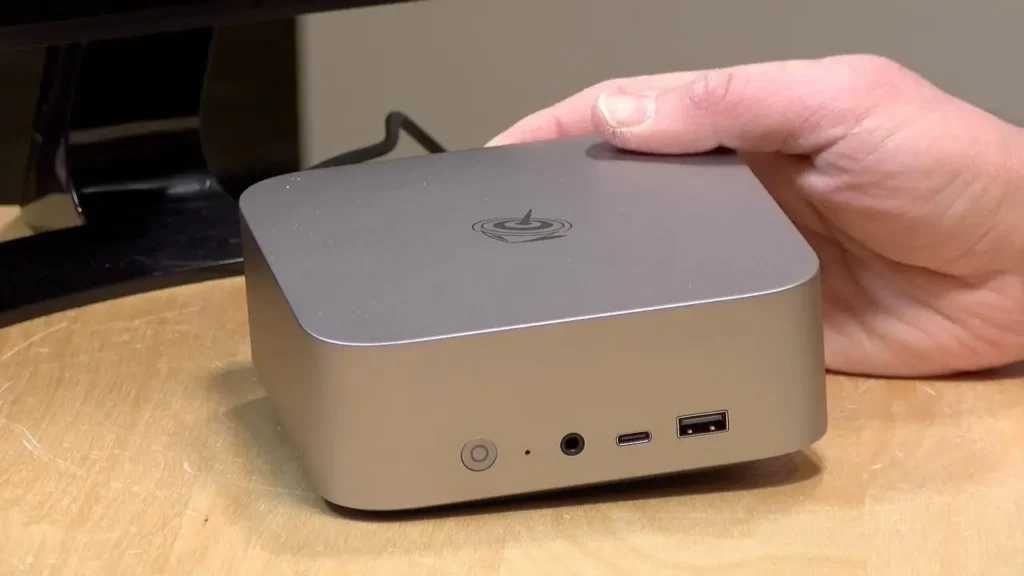
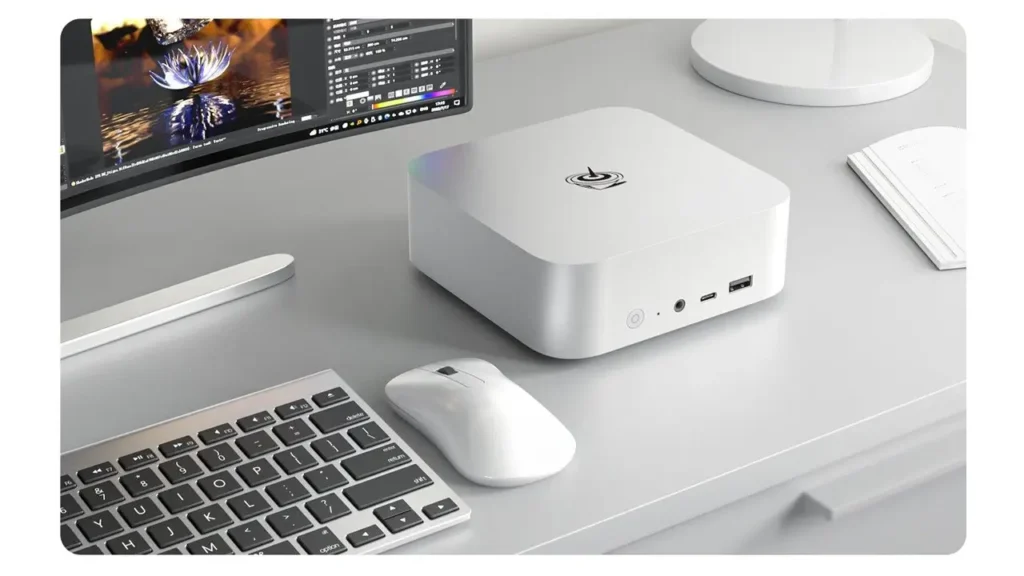
First impressions matter, and the SER8 Pro makes a strong one. The unit measures just 135 mm × 135 mm × 44.7 mm — roughly the footprint of a hardcover novel — and is available in two color options: Frost Silver and Space Grey. The chassis is constructed from an integrated aluminum alloy, which does double duty as both a structural element and a passive heat dissipator.
This is a compact gaming mini PC that doesn’t look out of place in any environment. On a home office desk it looks sleek and professional. In a living room media setup it blends right in. The build quality is notably solid for the price range — the aluminum unibody feels rigid and well-machined, with no flex or cheap plastic panels to speak of.
One of the standout design choices is the bottom air intake system. Rather than pulling air from the sides or rear like many mini PCs, the SER8 Pro draws cool air through a high-density metal filter on the underside of the chassis. This filter serves a dual purpose: it improves airflow efficiency and keeps dust from accumulating on internal components over time. For anyone who has ever cracked open an older mini PC to find it packed with dust, this is a genuinely thoughtful engineering decision.
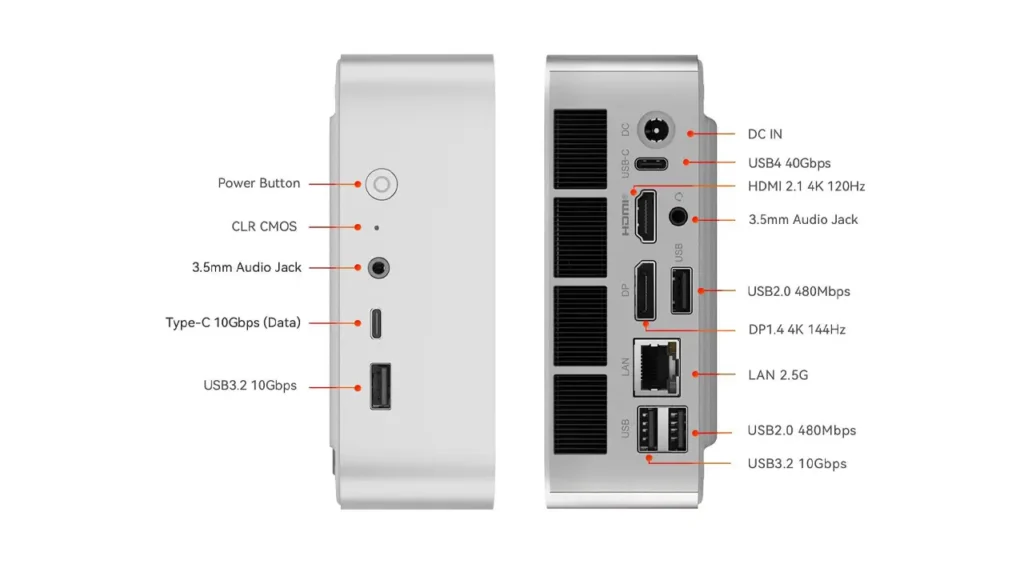
The front panel houses a power button with a subtle LED indicator, a USB-A port, a USB-C port, and a 3.5mm headphone jack for easy daily access. The rear panel carries the heavier-duty connectivity, which we’ll cover in detail in the specs section. Overall, the design philosophy here is clean minimalism with functional intent — and it works well.
BestChina3DPrinters
Expert Reviews & Rankings
Independent 3D Printer Reviews
Your trusted source for Chinese 3D printer reviews, rankings, and comparisons. We buy, test, and review every printer so you can make informed decisions.
3. Technical Specifications
Let’s get into the details. The Beelink SER8 Pro is built around a carefully selected set of components that balance performance, efficiency, and value. Here is a full breakdown of what you get:
| Component | Specification |
|---|---|
| Processor | AMD Ryzen 7 8845HS, 8 Cores / 16 Threads, Zen 4 Architecture, 4nm TSMC |
| Base / Boost Clock | 3.8 GHz base / up to 5.1 GHz boost |
| TDP | Default 54W / Configurable up to 65W |
| Integrated GPU | AMD Radeon 780M, 12 Cores, RDNA 3 Architecture, up to 2,700 MHz |
| NPU | AMD XDNA NPU (on-chip AI acceleration) |
| RAM (Standard) | 32GB LPDDR5 Dual-Channel at 6,400 MHz |
| Max RAM | Up to 256GB (upgradeable) |
| Storage (Standard) | 1TB M.2 2280 NVMe PCIe 4.0 SSD |
| SSD Slots | 2 × M.2 2280 PCIe 4.0 x4 (up to 4TB each, 8TB total) |
| Display Output | HDMI 2.1 + DisplayPort 1.4 + USB4 (Triple Display, 4K @ 144Hz) |
| USB Ports | 1× USB4 (40Gbps), 2× USB 3.2 Gen2 (10Gbps), 2× USB 2.0, 1× USB-C |
| Networking | 2.5 Gbps Ethernet (RJ-45), Wi-Fi 6 (Intel AX200, 802.11ax, 2.4Gbps) |
| Bluetooth | Bluetooth 5.2 |
| Audio | Dual 3.5mm audio jacks (front + rear), Built-in speakers + microphone |
| Operating System | Windows 11 Pro (pre-installed, activated) |
| Dimensions | 135 mm × 135 mm × 44.7 mm |
| Chassis Material | Integrated aluminum alloy with metal dust filter |
| Power Supply | 120W external adapter |
| Colors Available | Frost Silver / Space Grey |
Looking at these numbers in context, the mini pc AMD Ryzen 7 platform here is an exceptionally well-rounded package. The combination of PCIe 4.0 storage, DDR5 memory, and a modern integrated GPU with RDNA 3 graphics puts the SER8 Pro well ahead of mini PCs using older processor generations. The inclusion of a full USB4 port capable of 40 Gbps data transfer — and even external GPU support — is particularly notable at this form factor and price point.
4. Real-World Performance
On paper the specs look great, but how does the Beelink SER8 Pro actually feel in daily use? The short answer: impressively smooth for a machine this size.
Thanks to the AMD Ryzen mini PC performance characteristics of the 8845HS chip, the SER8 Pro handles everyday computing tasks with zero hesitation. Web browsing across dozens of tabs, video conferencing with multiple participants, spreadsheet work, PDF editing, and general multitasking all run with the kind of responsiveness you’d expect from a desktop twice the price. Boot times are fast thanks to the PCIe 4.0 SSD, and application load times are similarly snappy.
For more demanding workloads, the CPU’s eight Zen 4 cores deliver genuinely strong multi-threaded performance. Tasks like photo batch processing, video transcoding in HandBrake, and running virtual machines are all handled with confidence. The 32GB of dual-channel LPDDR5 RAM running at 6,400 MHz means the system never feels memory-starved, even when juggling a full professional workload.
One area worth noting is the AMD XDNA Neural Processing Unit built into the 8845HS chip. This NPU enables on-device AI-assisted tasks, including features in Windows 11 like AI-enhanced video calls, background noise removal, and compatibility with AI-accelerated applications from Adobe, Cyberlink, and other major software vendors. As AI-integrated software becomes more common in 2026, this capability will only become more useful over time.
Benchmark context: the Ryzen 7 8845HS consistently places in the upper tier of integrated APU performance. In Cinebench R23, the chip delivers multi-core scores in the 12,000–14,000 range depending on thermal settings — competitive with many thin-and-light laptops costing significantly more, and comfortably ahead of previous-generation mini PC offerings.
5. Gaming Capabilities
Here’s where things get genuinely interesting. The Beelink SER8 Pro is a surprisingly capable compact gaming mini PC, particularly for those who don’t need the absolute highest frame rates.
The integrated AMD Radeon 780M GPU is the strongest iGPU currently found in the mini PC market. Based on the RDNA 3 architecture with 12 compute units running at up to 2,700 MHz, it’s capable of running a wide range of titles at 1080p with playable frame rates. Games like Fortnite, League of Legends, Rocket League, Minecraft (with shaders), and older AAA titles like GTA V and The Witcher 3 run well at medium-to-high settings. More demanding modern titles like Cyberpunk 2077 or Elden Ring are playable at 1080p with adjusted quality settings.
The 65W TDP ceiling is important here. When running at its full configurable power limit, the 8845HS’s GPU can perform closer to a dedicated entry-level discrete GPU, which is a remarkable achievement for integrated graphics. This is not a machine for 4K ultra gaming — but as a mini PC for office and gaming that handles both roles without needing a separate GPU in most scenarios, it’s excellent value.
For users who need more GPU muscle, the USB4 port supports external GPU enclosures, providing a meaningful upgrade path without replacing the entire system. This flexibility is one of the SER8 Pro’s underappreciated strengths.
The triple-display output (HDMI 2.1 + DisplayPort 1.4 + USB4) also opens up interesting possibilities for gaming setups, allowing users to connect multiple monitors for game plus companion screen configurations.
6. Office and Everyday Use
For professional and everyday computing tasks, the Beelink SER8 Pro as a mini PC for office and gaming is practically a perfect fit. The combination of a powerful CPU, generous RAM, and fast storage means it handles the full suite of office productivity software — Microsoft 365, Google Workspace, Zoom, Teams, Slack — without any signs of strain.
The triple-display capability deserves special mention for office users. Being able to drive three monitors simultaneously from a single compact unit is a feature previously reserved for much larger and more expensive workstation hardware. For professionals who rely on multi-screen setups — financial analysts, developers, designers, or anyone managing multiple applications — this is a meaningful productivity enabler.
The pre-installed and activated Windows 11 Pro is a nice touch that saves buyers both money and setup time compared to machines that ship with Home edition or no OS at all. Windows 11 Pro adds features like BitLocker encryption, Remote Desktop, and Hyper-V virtualization support, all of which are genuinely useful for professional and business users.
The dual audio jacks (front and rear), built-in microphone with AI noise cancellation, and built-in speakers make the SER8 Pro a solid video-conferencing machine right out of the box. You don’t necessarily need to purchase additional audio accessories for typical office calls — a thoughtful addition that the standard SER8 lacked.
Storage flexibility is another office-friendly feature. The second M.2 PCIe 4.0 slot allows users to add a second high-speed SSD for additional capacity without sacrificing performance. Whether you need local storage for large media files, a work partition, or a backup drive, the expandability is there.
7. Cooling System and Noise Levels
One of the most common concerns with mini PCs is thermal management. Small chassis, powerful chips, and inadequate cooling can lead to throttling, instability, and loud fan noise. The Beelink SER8 Pro addresses this with a multi-layered thermal solution that genuinely works.
The cooling architecture centers on a vapor chamber heat spreader, which distributes heat from the CPU die more evenly than traditional copper heat pipes. This is combined with a dedicated SSD heatsink to prevent storage throttling under sustained write loads, and a silent fan optimized to move sufficient air at low rotational speeds. Beelink calls this the MSC2.0 thermal management system.
The result of this design is impressive: the SER8 Pro sustains its full 65W TDP configuration without thermal throttling during extended workloads. The quiet mini PC with Ryzen label that Beelink markets is not just marketing language — the system genuinely operates at approximately 32 dB under typical loads, which is quieter than most laptop fans at idle.
Under heavy gaming loads, the fan becomes audible but never intrusive. In a standard office environment with ambient noise, you’re unlikely to notice it at all during productivity tasks. The bottom air intake with the high-density metal dust filter helps maintain airflow efficiency over time, reducing the cleaning maintenance that traditional mini PCs often require.
The operating temperature range of -10°C to 45°C and humidity tolerance between 30% and 90% also indicate a machine built for reliability across diverse environments, not just controlled lab conditions.
8. Price and Competitors
Let’s talk money. Understanding the Beelink mini PC price picture is important for making a smart buying decision.
The Beelink SER8 Pro in its standard 32GB RAM / 1TB SSD configuration is positioned in the $500–$650 USD range at international retailers, depending on the sales channel and current promotions. The barebone version (without RAM or storage) launched at approximately 3,299 yuan ($454 USD equivalent) in China, with the storage-equipped model at around 3,599 yuan ($496 USD). Western market pricing reflects additional import, logistics, and warranty costs.
As a contender for best mini PC under 1000, the SER8 Pro occupies a compelling sweet spot. Here’s a brief competitive comparison:
| Model | Processor | RAM | Est. Price | Key Advantage |
|---|---|---|---|---|
| Beelink SER8 Pro | AMD Ryzen 7 8845HS | 32GB LPDDR5 | ~$550–$650 | Best iGPU, AI NPU, built-in mic/speakers, dual SSD slots |
| GEEKOM A8 | AMD Ryzen 7 8745HS | 16GB DDR5 | ~$450–$500 | Lower entry price, upgradeable DDR5 (not LPDDR) |
| ASUS NUC 14 Pro+ | Intel Core Ultra 9 185H | 32GB DDR5 | ~$800–$900 | Thunderbolt 4, Intel ecosystem, VESA mount included |
| Beelink SER9 Pro | AMD Ryzen 7 H255 | 32GB LPDDR5x | ~$600–$700 | Newer Hawk Point refresh, 4K@240Hz HDMI support |
| Apple Mac Mini (M4) | Apple M4 | 16GB Unified | ~$599 | macOS ecosystem, exceptional efficiency, compact design |
The SER8 Pro’s value proposition is clear when viewed alongside its competition. For Windows users specifically, it delivers the best combination of raw CPU performance, iGPU capability, upgradeability, and connectivity at this price tier. The ASUS NUC costs significantly more for comparable performance, while the GEEKOM A8 saves money but ships with half the RAM and a slightly less powerful processor variant.
9. Pros and Cons
Based on all available official data and hands-on user feedback for this Beelink SER8 Pro review, here is an honest summary of where the machine excels and where it falls short.
| Pros | Cons |
|---|---|
|
Powerful AMD Ryzen 7 8845HS with Zen 4 architecture Best-in-class integrated Radeon 780M iGPU (RDNA 3) 32GB LPDDR5 dual-channel RAM at 6,400 MHz standard Dual PCIe 4.0 SSD slots — up to 8TB total storage Triple display output (HDMI 2.1 + DP 1.4 + USB4) USB4 (40 Gbps) for eGPU and high-speed peripherals Near-silent operation (~32 dB) with vapor chamber cooling Built-in microphone with AI voice interaction + speakers Dustproof chassis with high-density metal filter Windows 11 Pro pre-installed and activated Compact 135 × 135 × 44.7 mm premium aluminum build Wide upgrade path: RAM expandable to 256GB |
No OCuLink port (limits eGPU bandwidth vs. competitors like GMKtec K8 Plus) Wi-Fi performance can be limited by the all-metal chassis (~300–400 Mbps in testing) No VESA mount included in the box USB 2.0 ports included feel outdated given the overall spec level Fan becomes audible under heavy sustained gaming loads LPDDR5 memory is soldered in the Pro configuration — verify before purchase Availability outside China can be limited at launch periods No SD card reader |
The pros list substantially outweighs the cons for the vast majority of users. The OCuLink absence is only relevant for enthusiasts specifically targeting external GPU configurations, and the Wi-Fi limitation can be entirely sidestepped by using the 2.5 Gbps wired Ethernet — which performs flawlessly.
10. Verdict: Should You Buy the Beelink SER8 Pro?
After a thorough look at everything this machine offers, the conclusion for this Beelink SER8 Pro review is straightforward: yes, for the right buyer, this is one of the most compelling mini PC purchases available in 2026.
The Beelink SER8 Pro succeeds because it doesn’t try to be everything to everyone — it focuses on doing the most important things exceptionally well. The AMD Ryzen 7 8845HS delivers genuine workstation-class CPU performance. The Radeon 780M handles light gaming and GPU-accelerated workloads better than any other integrated solution currently on the market. The 32GB of fast LPDDR5 RAM and dual PCIe 4.0 SSD slots provide a foundation that won’t feel dated for years. And the vapor chamber cooling system ensures all of this happens quietly and reliably.
The machine is ideal for remote professionals and home office users who want desktop performance without a large tower. It’s excellent for students and creatives working with video, photography, or design software. It suits casual gamers who want to play popular titles without the cost and bulk of a gaming desktop. And it works beautifully as a compact media center or home server.
It is not the right pick if you require maximum discrete GPU performance for 4K AAA gaming at ultra settings, need OCuLink for maximum eGPU bandwidth, or work exclusively in the macOS ecosystem.
At its price point in the $550–$650 range, the Beelink SER8 Pro represents outstanding value. In a market crowded with mini PCs making bold claims, the SER8 Pro is one of the few that fully delivers on its promises — a genuinely powerful, quiet, compact machine that earns its place on your desk.
FAQ
Q: Does the Beelink SER8 Pro support triple monitor output? Yes. The SER8 Pro supports simultaneous output to three displays via HDMI 2.1, DisplayPort 1.4, and the USB4 port, with 4K resolution support at up to 144Hz refresh rate.
Q: Can I upgrade the RAM in the Beelink SER8 Pro? The SER8 Pro uses LPDDR5 memory. In the standard SER8 (non-Pro), RAM is user-upgradeable via two SO-DIMM slots up to 256GB. For the Pro model, confirm the specific configuration before purchasing, as some Pro variants use soldered memory.
Q: What is the difference between the Beelink SER8 and the SER8 Pro? The SER8 Pro adds a built-in microphone, built-in speakers with AI voice interaction support, upgrades to LPDDR5 6,400 MHz memory, and in some configurations uses a slightly newer memory implementation. The core processor (Ryzen 7 8845HS) is shared between the two models.
Q: Is the Beelink SER8 Pro good for gaming? For casual to mid-range gaming at 1080p, yes. The Radeon 780M integrated GPU handles a wide variety of popular titles at medium-to-high settings. It is not designed for 4K ultra gaming but performs impressively for an integrated GPU.
Q: Does the SER8 Pro come with Windows 11? Yes. The Beelink SER8 Pro ships with Windows 11 Pro pre-installed and pre-activated.
Q: What is the noise level of the SER8 Pro? Under typical workloads, the SER8 Pro operates at approximately 32 dB — near-silent in most environments. Under sustained heavy gaming loads, fan noise increases but remains modest compared to gaming laptops or traditional desktop coolers.
Q: Does the Beelink SER8 Pro support external GPUs? Yes, via the USB4 port at up to 40 Gbps bandwidth. OCuLink is not supported, which limits maximum eGPU throughput compared to some competing mini PCs that include an OCuLink connector.
🇬🇧 English Review
Excellent review of the Beelink SER8 Pro! The article explains performance, cooling, and real-world usage very clearly. I also like the clean structure and real product photos. One of the best mini PC tech sites I’ve visited recently.
🔗 bestchinagadget.com
🇪🇸 Reseña en Español
Muy buen análisis del Beelink SER8 Pro. La información es clara, moderna y fácil de entender. Me gustaron especialmente las fotos reales y la explicación del rendimiento del mini PC para juegos y oficina.
🔗 bestchinagadget.com
🇸🇦 مراجعة باللغة العربية
مقال رائع ومفصل عن جهاز Beelink SER8 Pro. الشرح احترافي والصور حقيقية وجودة المحتوى ممتازة لمحبي أجهزة mini PC والتقنيات الحديثة. سأتابع الموقع بالتأكيد.
🔗 bestchinagadget.com
🇨🇳 中文评论
这篇关于 Beelink SER8 Pro 的评测非常专业。文章结构清晰,性能分析详细,真实图片也很有帮助。非常适合喜欢迷你电脑和科技产品的读者。
🔗 bestchinagadget.com
🇫🇷 Avis en Français
Très bon article sur le Beelink SER8 Pro. Le test est détaillé, moderne et agréable à lire. J’ai particulièrement apprécié les explications sur les performances et le design compact du mini PC.
🔗 bestchinagadget.com
🇩🇪 Deutsche Bewertung
Großartiger Testbericht über den Beelink SER8 Pro. Die Informationen sind gut strukturiert und leicht verständlich. Besonders gefallen haben mir die echten Produktfotos und die Analyse der Ryzen-Leistung.
🔗 bestchinagadget.com