
1. Introduction: Why Portable Monitor 144Hz Is Trending
Let’s be honest — the way we work and play has changed dramatically over the last few years. Remote work, hybrid setups, digital nomad lifestyles, and on-the-go gaming have all pushed one simple question to the forefront: why are we still stuck with just one screen?
The demand for a reliable portable monitor 144hz has absolutely skyrocketed. Whether you’re a freelancer bouncing between coffee shops, a student who needs more screen real estate in a tiny dorm room, or a gamer who refuses to sacrifice frame rates just because you’re traveling — the market has heard you loud and clear.
A few years ago, portable monitors were clunky, dim, and frankly not worth the money. Today? The technology has caught up in a big way. We’re talking thin, lightweight panels with buttery-smooth refresh rates, plug-and-play USB-C connectivity, and price tags that won’t make your wallet cry. The budget portable monitor category in particular has exploded, giving everyday users access to features that once cost a small fortune.
One name keeps coming up in online communities, Reddit threads, and YouTube reviews: the Arzopa Z1FC. It’s been making waves as one of the most affordable 144Hz portable monitors on the market, and in this review, we’re going to dig deep into whether it lives up to the hype. We’ll cover design, display performance, connectivity, real-world use cases, and how it stacks up against the competition.
If you’ve been sitting on the fence about picking up a portable second screen, stick with us — by the end of this article, you’ll know exactly whether the Arzopa Z1FC is the right move for you.
2. What Is Arzopa Z1FC and Who Is It For?
Before we get into the nitty-gritty specs, let’s talk about the brand. Arzopa is a consumer electronics company that has carved out a solid niche in the portable display market. They focus on delivering feature-rich monitors at accessible price points, and the Z1FC is arguably their most popular product to date.
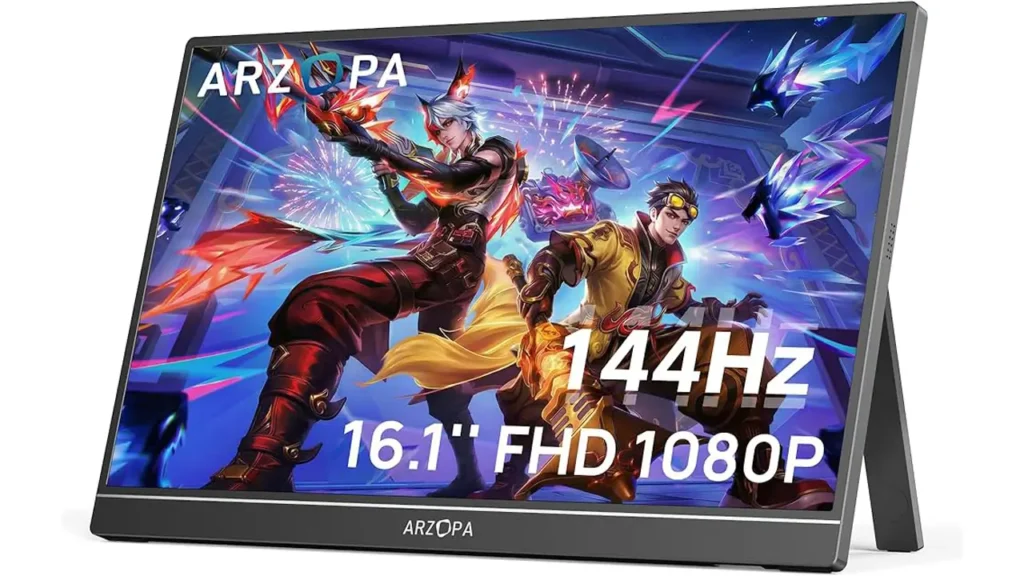
So what exactly is the Arzopa Z1FC? In simple terms, it’s a 15.6-inch Full HD portable monitor with a 144Hz refresh rate — and it’s designed to be your perfect second screen wherever life takes you. The “FC” in the name stands for Full Color, which hints at the display’s wide color gamut capabilities.
Now, who is this monitor actually built for? The short answer: a lot of people.
For gamers, the 144Hz refresh rate is the headline feature. Whether you’re playing fast-paced shooters, racing games, or action RPGs, 144Hz makes motion look dramatically smoother compared to the standard 60Hz displays most portable monitors ship with. If you’ve ever gamed on a high-refresh-rate display and then gone back to 60Hz, you know exactly how painful that transition feels. The Z1FC keeps you in the smooth zone even when you’re away from your main setup.
For remote workers and students, this is a genuine productivity booster. Having a second screen means you can keep your email or Slack open on one display while working in your main application on another. Research consistently shows that dual-screen setups can improve productivity by a meaningful margin — and the Z1FC makes that setup portable.
For travelers, the slim profile and lightweight build make it easy to toss in a backpack alongside your laptop. It’s one of the best cheap portable monitors available if you need something that won’t weigh you down on a long journey.
In short, the Arzopa Z1FC targets the sweet spot between price, performance, and portability — and it does so more successfully than most monitors in its price range.
3. Design & Build Quality
First impressions matter, and the Arzopa Z1FC makes a pretty strong one right out of the box. The monitor features a sleek, all-black chassis with a matte finish that feels premium without being over-the-top. It doesn’t scream “budget product” — and that’s a genuine compliment.
As a slim external monitor, the Z1FC checks the right boxes. The panel itself is impressively thin, measuring just around 8mm at its slimmest point. The bezels are relatively narrow on the top and sides, giving you a clean, modern look that feels right at home next to a MacBook or a premium Windows laptop.
Weight-wise, the Z1FC comes in at approximately 900 grams (around 2 lbs), which is on the lighter side for a 15.6-inch display. It’s not so light that it feels flimsy, but it’s definitely light enough to carry comfortably in a laptop bag without making your shoulder regret the decision.
The monitor ships with a smart cover/stand that doubles as both a protective sleeve during transport and a kickstand when you’re ready to set up. The stand is foldable and supports multiple viewing angles, which is practical for different use scenarios — whether you’re sitting at a desk, working on a coffee table, or using it alongside a console on a hotel TV stand.
Build quality, for the price, is genuinely solid. The plastic housing feels sturdy and there’s no excessive flex when you pick it up or adjust the angle. The hinge mechanism on the stand feels appropriately firm — it won’t flop around or drift out of position during use.
Is it as robust as a premium Dell or ASUS monitor? No, and you shouldn’t expect it to be at this price point. But for a travel monitor for laptop users who need something that can handle daily packing and unpacking without falling apart, it holds up admirably well.
One minor design note: the buttons for the OSD (on-screen display) menu are located on the back-right edge of the monitor. They’re a little small and can take a moment to get used to, but this is a fairly common design compromise in the portable monitor space.
BestChina3DPrinters
Expert Reviews & Rankings
Independent 3D Printer Reviews
Your trusted source for Chinese 3D printer reviews, rankings, and comparisons. We buy, test, and review every printer so you can make informed decisions.
4. Display & 144Hz Performance
Here’s where things get really interesting — and where the Arzopa Z1FC genuinely shines.
The display is a 15.6-inch IPS panel with a resolution of 1920×1080 (Full HD). Paired with a 144Hz refresh rate, this combination delivers a viewing experience that punches well above its weight class.
Let’s start with color. The Z1FC covers 100% sRGB color space, which means colors are vibrant and accurate for general use, content consumption, and even light creative work. The IPS technology ensures good viewing angles — you can tilt the screen or view it from the side without significant color shift or brightness drop-off.
Brightness comes in at around 300 nits, which is sufficient for indoor use and moderately lit environments. It’s not a display you’d want to use in direct sunlight outdoors, but for offices, cafes, hotel rooms, and home setups, it handles itself well.
Now, the star of the show: 144Hz. Using this as a portable gaming monitor 144hz is where the Z1FC really earns its reputation. The difference between 60Hz and 144Hz is immediately visible in fast-moving content. Games feel more responsive, animations look smoother, and there’s a general sense of visual fluidity that you simply can’t get from a standard-refresh display.
The panel also supports FreeSync, which is AMD’s adaptive sync technology. This helps eliminate screen tearing when your frame rate fluctuates — a common occurrence in gaming. If you’re using an AMD GPU or a device with FreeSync support, this adds a meaningful layer of visual polish.
Response time is rated at 5ms (GtG), which is reasonable for an IPS panel and keeps ghosting to a minimum during fast-paced gameplay. It’s not the sharpest response time in the world, but for the vast majority of gaming scenarios, you won’t notice any issues.
One thing worth noting: to achieve 144Hz, you’ll need to connect via USB-C with DisplayPort Alt Mode or via the Mini HDMI port (more on connectivity in the next section). Make sure your source device supports the necessary output specs — some older devices may cap out at 60Hz depending on their hardware.
5. Connectivity & Ports
Let’s talk ports, because connectivity is everything when it comes to a portable monitor.
The Arzopa Z1FC keeps things clean and practical with the following port lineup:
| Port / Feature | Details | Use Case |
|---|---|---|
| USB-C (Full Function) ×2 | DisplayPort Alt Mode + Power Delivery | Laptops, smartphones, tablets, MacBook |
| Mini HDMI ×1 | Up to 144Hz output | Gaming consoles, desktops, older laptops |
| 3.5mm Audio Jack ×1 | Headphone/speaker output | Private listening, headset use |
| Built-in Speakers | Dual speakers (basic quality) | Casual audio, video calls |
The two full-function USB-C ports are the headline connectivity feature. These support DisplayPort Alternate Mode, meaning they can carry video signal, and they also support Power Delivery, which means your laptop can charge the monitor and the monitor can power itself — all through a single cable. For a USB-C portable monitor, this is the cleanest possible setup: one cable, zero clutter.
The Mini HDMI port is a great addition for users who want to connect gaming consoles like the Nintendo Switch, PlayStation, or Xbox. Keep in mind you’ll need a Mini HDMI to HDMI cable or adapter — these are widely available and inexpensive.
One thing that makes the Z1FC particularly flexible is that it can draw power either from a USB-C connection (if the source device provides enough power) or from a separate USB-C power adapter. This means you’re not stuck scrambling for an outlet if your laptop’s USB-C port delivers sufficient wattage.

6. Setup: Turn Your Laptop Into a Dual Screen Setup
One of the best things about the Arzopa Z1FC is how incredibly easy it is to set up. Seriously — if you’ve been intimidated by the idea of adding a second screen, this monitor will change your mind fast.
For most modern laptops, here’s the complete setup process:
Step 1: Place the Z1FC next to your laptop using the included smart stand cover.
Step 2: Connect one end of the USB-C cable to the monitor and the other end to your laptop’s USB-C / Thunderbolt port.
Step 3: Your operating system (Windows or macOS) should automatically detect the new display within seconds.
Step 4: Go into your display settings to configure how you want to use the screen — extend your desktop, mirror your display, or use it as your primary monitor.
That’s genuinely it. No driver installation required for most setups. No complicated software. No proprietary dongle. Just plug in and start working.
For a dual screen setup laptop workflow, the Z1FC is practically plug-and-play perfection. You can keep your primary work application on your laptop’s built-in display and use the Z1FC as your reference screen, communication hub, or media viewer.
For those setting up a second screen for laptop use in a more permanent home-office configuration, you can also use a USB-C hub or docking station to connect the Z1FC alongside other peripherals — keeping your desk tidy while maximizing screen real estate.
If you’re connecting via Mini HDMI (for a console or a laptop without USB-C), you may need to power the monitor separately via one of its USB-C ports. The included cable kit covers most common scenarios, but it’s worth double-checking what cables come in the box and what you might need to source separately.
7. Compatibility: Windows, MacBook, and Consoles
Compatibility is often where budget portable monitors trip up — but the Z1FC handles a surprisingly wide range of devices.
Windows laptops: Near-universal compatibility. Any modern Windows laptop with a USB-C port that supports DisplayPort Alt Mode will work perfectly. If your laptop only has a standard HDMI output, the Mini HDMI port has you covered (with the appropriate adapter cable).
MacBook (Apple Silicon & Intel): The Z1FC works well as a portable monitor for MacBook. MacBooks with Thunderbolt / USB-C ports can connect via USB-C cable and the display is recognized automatically in macOS. You can configure it through System Settings > Displays just like any other external monitor. The full 144Hz refresh rate is accessible depending on your MacBook model and its display output capabilities.
iPad Pro / iPad Air (USB-C models): With Stage Manager enabled on compatible iPads running iPadOS 16 or later, the Z1FC can function as an external display for your tablet — a genuinely impressive use case for creative professionals or students on the go.
Nintendo Switch: Connect via the official Switch dock’s HDMI output using a Mini HDMI cable and you’ve got a portable gaming station. The Switch maxes out at 60Hz in docked mode, so you won’t use the 144Hz here, but the screen quality is still a major upgrade over the Switch’s built-in display.
PlayStation 5 / Xbox Series X: Both consoles support HDMI output and can be connected via the Mini HDMI port. The PS5 and Xbox Series X support 120Hz at 1080p, so while you won’t quite hit the full 144Hz ceiling, you’ll still get an exceptionally smooth gaming experience.
Android smartphones (USB-C with DisplayPort): Select Android phones with DisplayPort Alt Mode support can output video to the Z1FC — useful for Samsung DeX users or anyone who wants to run a desktop-like experience from their phone.
| Device | Connection Method | Max Refresh Rate | Notes |
|---|---|---|---|
| Windows Laptop | USB-C / Mini HDMI | 144Hz | Full compatibility |
| MacBook Pro/Air | USB-C / Thunderbolt | Up to 144Hz | Varies by model |
| iPad Pro (USB-C) | USB-C | 60Hz | Requires Stage Manager |
| Nintendo Switch | Mini HDMI (via dock) | 60Hz | Switch hardware limit |
| PS5 / Xbox Series X | Mini HDMI | 120Hz | Console-dependent |
| Android (DeX-capable) | USB-C | 60Hz | Device-dependent |
8. Real Use Cases: Work, Gaming, and Travel
The best way to understand a product is to see it in action across real-world scenarios. Here’s how the Arzopa Z1FC performs in the situations most buyers care about.
Work & Productivity
Imagine you’re working remotely from a hotel room, a co-working space, or a client’s office. You pull out your laptop, unpack the Z1FC, plug in one cable, and suddenly you’ve got a proper dual-monitor workstation. Your email and calendar sit on the left screen. Your main work — spreadsheets, writing, design tools — takes up the right. Productivity goes up, stress goes down.
For developers, the Z1FC is a natural companion. Keep your code editor on your laptop screen and your terminal or documentation on the portable monitor. Writers can keep their research browser open on one screen while drafting on the other. Analysts can spread out their data across both displays. The use case practically sells itself.
Gaming
This is where the 144Hz refresh rate proves its worth as a portable gaming monitor 144hz. Fast-paced games — Counter-Strike, Valorant, Call of Duty, Apex Legends — all benefit enormously from the smooth motion that 144Hz delivers. The display’s FreeSync support keeps tearing at bay, and the 5ms response time keeps ghosting minimal.
Even slower-paced games look better at 144Hz. RPGs, strategy games, and open-world titles all have smoother camera pans, sharper animation, and a more immersive overall feel. If you’re a laptop gamer who travels and refuses to compromise on your gaming experience, the Z1FC is one of the most cost-effective ways to keep your setup sharp on the road.
Travel
As a travel monitor for laptop users, the Z1FC’s lightweight build and protective smart cover make it genuinely travel-friendly. The cover wraps around the monitor and acts as a stand, meaning there’s one less accessory to pack. The single-cable USB-C setup eliminates adapter chaos. You can be set up and working within about 60 seconds of arriving at your destination.
Frequent flyers, digital nomads, and business travelers will appreciate just how low-friction the Z1FC experience is. It doesn’t demand much — just a bag, a laptop, and a cable.

9. Price vs Competitors
Let’s talk money — because at the end of the day, value is what separates a good product from a great one.
The Arzopa Z1FC typically retails in the $130–$160 USD range, depending on sales and the retailer. At that price, it’s competing against some well-known alternatives from larger brands.
| Monitor | Size | Resolution | Refresh Rate | Approx. Price |
|---|---|---|---|---|
| Arzopa Z1FC | 15.6″ | 1920×1080 | 144Hz | ~$130–$160 |
| ASUS ZenScreen MB16AHT | 15.6″ | 1920×1080 | 60Hz | ~$250–$300 |
| Dell 14 Portable Monitor | 14″ | 1920×1200 | 60Hz | ~$300–$350 |
| ViewSonic VG1655 | 15.6″ | 1920×1080 | 60Hz | ~$170–$200 |
| Lepow Z1 Gamut | 15.6″ | 1920×1080 | 60Hz | ~$120–$140 |
What jumps out immediately is that the Arzopa Z1FC is the only monitor on this list offering 144Hz at this price point. The ASUS ZenScreen and Dell portable monitors are excellent products with strong brand reputations — but they cost roughly twice as much and only offer 60Hz. For users who prioritize refresh rate, that’s a significant gap in value.
The Lepow Z1 Gamut comes in at a similar price but caps at 60Hz, making the Z1FC the stronger pick for gamers and anyone who appreciates smooth visuals.
For a budget portable monitor, the Z1FC’s combination of specs, connectivity, and build quality is genuinely hard to beat in the current market. The premium brands offer better warranty support, more refined software ecosystems, and slightly better build quality at the top end — but if your budget is tight and performance matters, the Arzopa Z1FC is where the smart money goes.

10. Final Verdict: Is the Arzopa Z1FC Worth It?
After everything we’ve covered — the specs, the real-world performance, the compatibility, and the price comparison — it’s time to give you a straight answer.
Yes. The Arzopa Z1FC is absolutely worth it for most buyers.
Here’s the quick summary of what you’re getting:
A 15.6-inch Full HD IPS display with genuine 144Hz performance — something most competitors at this price can’t touch. A slim, travel-ready design that won’t feel like a burden in your bag. Plug-and-play USB-C connectivity that works with the vast majority of modern laptops, including MacBooks. Mini HDMI support for consoles and older devices. FreeSync for tear-free gaming. All of this for around $130–$160.
It’s not a perfect product. The OSD buttons are a bit fiddly, the built-in speakers are mediocre at best, and the maximum brightness won’t win any awards for outdoor use. If you need a monitor with 4K resolution, HDR, or a premium build that rivals ASUS or Dell’s flagship offerings, you’ll need to spend more.
But here’s the thing: if you’re looking for the best portable monitor 144hz under $200 — one that genuinely delivers on the promise of smooth, responsive, vibrant visuals in a portable form factor — the Arzopa Z1FC hits the target cleanly. It’s a product that doesn’t ask you to compromise on the features that matter most.
For students, remote workers, travelers, and budget-conscious gamers alike, this monitor represents one of the best value propositions in the portable display market right now. It earns its reputation honestly, and if you’ve been searching for a second screen that won’t let you down, your search may very well be over.
Quick Specs Summary
| Specification | Detail |
|---|---|
| Screen Size | 15.6 inches |
| Resolution | 1920 × 1080 (Full HD) |
| Panel Type | IPS |
| Refresh Rate | 144Hz |
| Response Time | 5ms (GtG) |
| Color Gamut | 100% sRGB |
| Brightness | 300 nits |
| Ports | 2× USB-C, 1× Mini HDMI, 3.5mm Audio |
| Adaptive Sync | FreeSync |
| Weight | ~900g |
| Price Range | ~$130–$160 USD |
The Arzopa Z1FC isn’t trying to be everything to everyone — and that focus is exactly what makes it so good at what it does. For anyone serious about finding the best value portable monitor 144hz available today, this one belongs at the top of your shortlist.
