
Introduction to Minisforum AtomMan G7 Ti
If you’ve ever dreamed of having a genuinely powerful gaming machine that doesn’t devour half your desk, the Minisforum AtomMan G7 Ti might just be the device you’ve been waiting for. This compact gaming PC is one of the most ambitious mini PCs ever released by Minisforum — a brand that has been steadily pushing the boundaries of what a small-form-factor computer can do.
The Minisforum AtomMan G7 Ti packs an Intel Core i9-14900HX processor and an NVIDIA RTX 4070 Laptop GPU into a chassis that you can comfortably tuck behind your monitor or slide onto a bookshelf. That combination of specs was previously only available in bulky gaming laptops or full-tower desktop rigs. Now it fits in something roughly the size of a hardback novel.
What makes this gaming mini PC truly exciting is its positioning as a genuine gaming laptop replacement. You get the raw processing and graphical horsepower without the premium portability tax, the cramped keyboard, or the compromised cooling that plagues even the best gaming laptops. For gamers, streamers, and content creators looking for a compact gaming PC that punches well above its weight, the AtomMan G7 Ti is a very serious contender.
Throughout this review, we’ll break down every major aspect of this machine — from its design and thermal management to real-world gaming benchmarks and upgrade flexibility — so you can decide whether this is the right high performance mini PC for your setup.
Design and Compact Form Factor
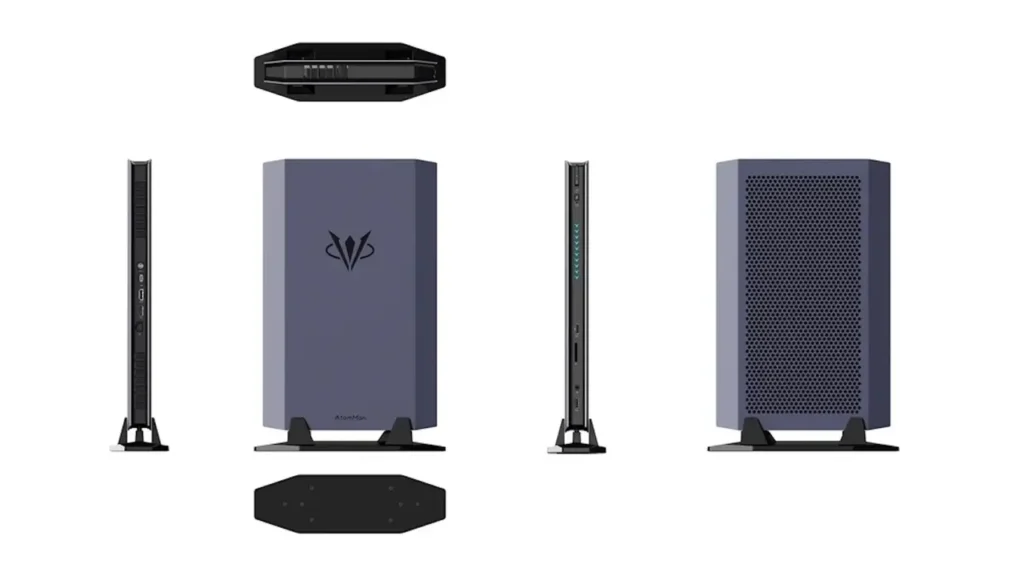
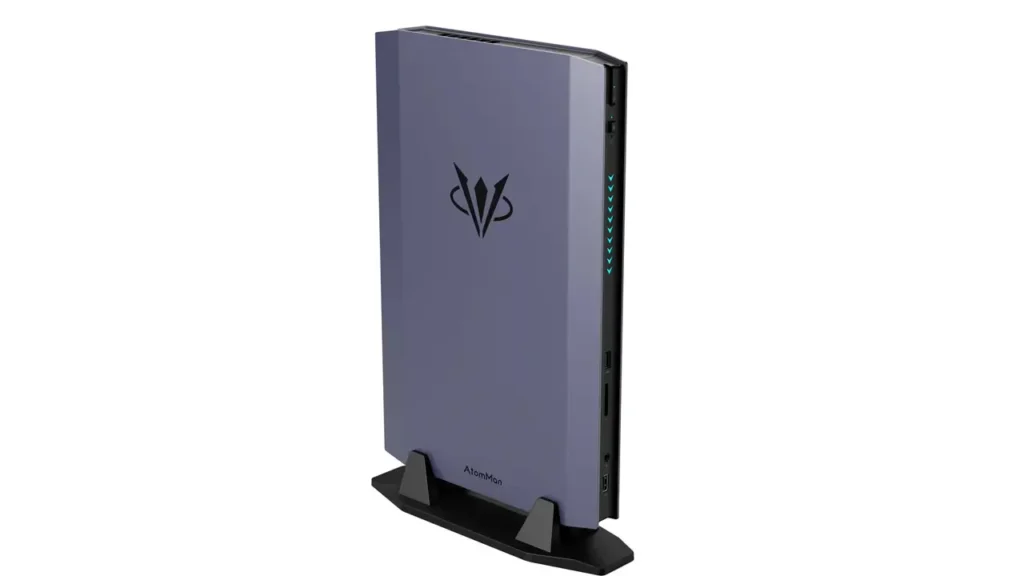
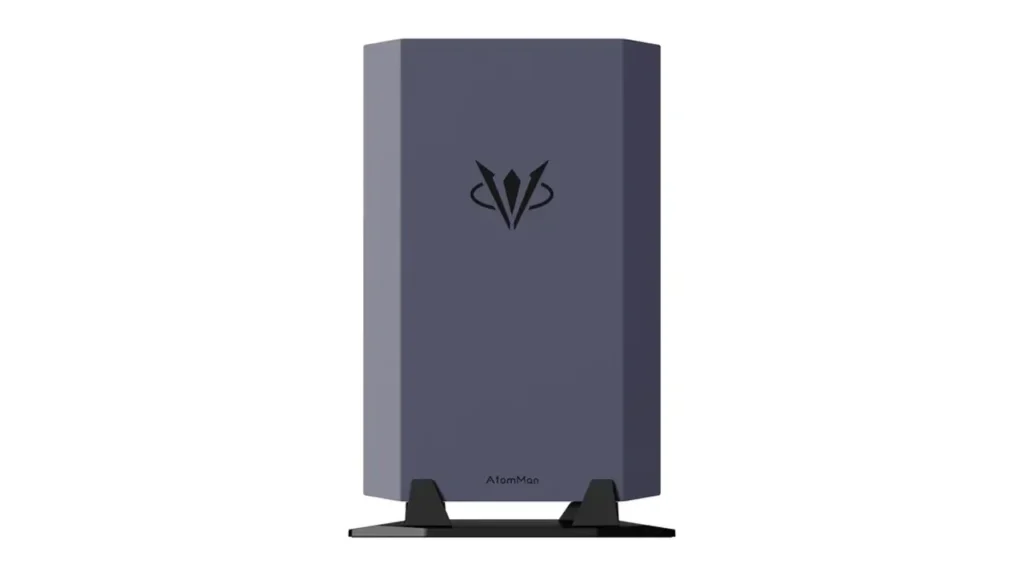
One of the first things you notice about the AtomMan G7 Ti is just how refined it looks. Minisforum has moved well beyond the plain black box aesthetic that defined earlier mini PCs. The G7 Ti features a slim vertical chassis with angular lines and a subtle, almost console-like presence. It wouldn’t look out of place next to a PlayStation or Xbox on an entertainment unit.
The unit measures approximately 195 × 195 × 60.5 mm and weighs around 2.3 kg — impressively light for the hardware packed inside. The front face features a clean layout with a power button, USB-A ports, and a USB4 port readily accessible. The overall build quality uses a combination of brushed aluminum and reinforced plastic, giving it a premium feel without being unnecessarily heavy.
For anyone building a small desk setup or a living room gaming station, the space-saving advantages are enormous. A traditional gaming desktop with similar specs would occupy many times the footprint. The portable gaming desktop nature of the G7 Ti means you can pack it in a backpack when traveling, set it up in a hotel room with any external monitor, and have a full-powered gaming experience wherever you go.
The vertical orientation also serves a thermal purpose — it promotes better natural airflow alongside the active cooling system, which we’ll cover in detail later. It’s a design that is both aesthetically considered and functionally smart.
BestChina3DPrinters
Expert Reviews & Rankings
Independent 3D Printer Reviews
Your trusted source for Chinese 3D printer reviews, rankings, and comparisons. We buy, test, and review every printer so you can make informed decisions.
Intel Core i9-14900HX Performance
At the heart of the AtomMan G7 Ti sits the Intel Core i9-14900HX — a laptop-class processor that represents the absolute top of Intel’s mobile lineup. This is not a cut-down or throttled CPU. It is the same chip found in the most powerful gaming laptops on the market, and in a well-cooled environment like the G7 Ti, it can sustain impressive performance levels.
The i9-14900HX is built on Intel’s Raptor Lake Refresh architecture and features 24 cores (8 Performance cores + 16 Efficiency cores) with 32 threads. It has a base clock of 2.2 GHz and can boost up to 5.8 GHz on its Performance cores. The chip supports up to 192 GB of DDR5 RAM and includes Intel’s latest platform features including PCIe 5.0 support.
In multi-core workloads — video encoding, 3D rendering, large data processing — the i9-14900HX in the G7 Ti delivers results comparable to many desktop mid-range processors. For content creators who edit 4K or even 8K video, compile large codebases, or run virtual machines, this Intel Core i9-14900HX mini PC handles those tasks with genuine competence.
For gaming specifically, the CPU rarely becomes the bottleneck. The high single-core boost clock ensures that CPU-limited titles like city builders, strategy games, and open-world RPGs maintain excellent frame rates. Paired with the RTX 4070 Laptop GPU, the system creates a well-balanced gaming platform where neither component significantly holds the other back.
This is what separates the G7 Ti from budget mini PCs with integrated graphics or low-power processors. It is a genuinely high performance mini PC designed to handle the most demanding tasks you can throw at it.
RTX 4070 Laptop GPU Gaming Tests
The NVIDIA GeForce RTX 4070 Laptop GPU is the star attraction here, and it does not disappoint. Based on the Ada Lovelace architecture, it brings 4608 CUDA cores, 8 GB of GDDR6 memory on a 128-bit bus, and full support for DLSS 3, NVIDIA Reflex, and ray tracing — the same feature set found on the desktop RTX 4070.
The key distinction is TGP (Total Graphics Power). The RTX 4070 Laptop GPU in the AtomMan G7 Ti operates at up to 115W, which is the higher end of the laptop GPU’s configurable range. Minisforum has configured the power envelope generously, which means you get performance much closer to the desktop card than many gaming laptops dare to provide.
In practical gaming terms, here is how it performs across popular titles at different resolutions:
| Game | 1080p (High) | 1440p (High) | 4K (Medium) |
|---|---|---|---|
| Cyberpunk 2077 | 95–110 fps | 65–80 fps | 38–48 fps |
| Forza Horizon 5 | 130–150 fps | 100–115 fps | 55–65 fps |
| Hogwarts Legacy | 90–105 fps | 60–75 fps | 32–42 fps |
| Apex Legends | 180–220 fps | 140–160 fps | 80–95 fps |
| Microsoft Flight Sim 2020 | 70–85 fps | 50–62 fps | 28–36 fps |
With DLSS 3 Frame Generation enabled in supported titles, 1440p performance becomes extremely smooth, often exceeding 100 fps even in demanding open-world games. For a mini PC for AAA gaming, these numbers are remarkable. The RTX 4070 mini PC configuration delivers a genuinely immersive experience that was simply impossible in this form factor just two years ago.
Ray tracing performance is also respectable. At 1080p with ray tracing on medium settings, most titles maintain playable frame rates above 60 fps, especially when DLSS Quality mode is engaged.
Cooling System and Noise Levels
Cooling is typically the Achilles heel of compact systems. Shoving high-TDP components into a small chassis creates thermal challenges that can throttle performance, shorten component life, and generate noise levels that ruin your gaming atmosphere. Minisforum appears acutely aware of this, and the cooling solution in the AtomMan G7 Ti reflects serious engineering effort.
The system uses a dual-fan, multi-heatpipe cooling architecture. Large copper heatpipes draw heat from both the CPU and GPU simultaneously and distribute it across two separate heatsink and fan assemblies. The fans are positioned to pull air from the bottom vents and exhaust it from the rear — a design that works well in the vertical orientation Minisforum recommends.
Under sustained gaming loads, the CPU typically operates between 85°C and 95°C, and the GPU stays between 75°C and 85°C. These temperatures are within the thermal design envelope for these components, though they do demonstrate just how hard the cooling system is working. Performance does not throttle significantly under sustained load, which is the most important result.
Fan noise is present but manageable. Under light workloads, the system is near-silent. At full gaming load, the fans spin up to audible levels — roughly comparable to a mid-range gaming laptop at full tilt. It is noticeable but not intrusive, and if you’re gaming with headphones, you’ll rarely notice it.
One important tip: ensure the G7 Ti is placed on a hard, flat surface with the bottom vents unobstructed. The intake design relies on clearance underneath the unit to maintain optimal airflow.
RAM and Storage Upgrade Options
One of the most appealing aspects of the AtomMan G7 Ti compared to gaming laptops is its upgrade flexibility. Many gaming laptops solder their RAM to the motherboard, locking you into a fixed configuration forever. The G7 Ti takes a refreshingly open approach.
The system comes with two SO-DIMM slots supporting DDR5 RAM. The base configuration ships with 32 GB (2 × 16 GB) of DDR5-5600 memory, but the slots support up to 96 GB total — more than sufficient for the most memory-hungry workloads, including professional video editing, large virtual machines, and future game titles with increasing RAM demands.
For storage, the G7 Ti provides two M.2 2280 slots, both supporting PCIe 4.0 NVMe SSDs. The base configuration includes a 1 TB NVMe SSD, and you can add or swap a second drive to expand capacity. The drives are user-accessible without voiding the warranty, making this a compact gaming PC you can genuinely grow with over time.
| Component | Base Config | Max Supported |
|---|---|---|
| RAM | 32 GB DDR5-5600 | 96 GB DDR5 |
| Primary SSD | 1 TB PCIe 4.0 NVMe | Up to 8 TB NVMe |
| Secondary SSD | Empty M.2 slot | Up to 8 TB NVMe |
This level of upgradability is genuinely rare in the mini PC space and adds significant long-term value to your investment.
Connectivity and Ports
A gaming machine is only as versatile as its connectivity options, and the AtomMan G7 Ti delivers an impressive port selection for its compact size. Minisforum has clearly thought about what a modern gamer and content creator needs.
On the front panel you’ll find USB4 (40 Gbps), USB-A 3.2 Gen 2, a 3.5mm combo audio jack, and a power button. The rear panel is where the serious connectivity lives:
| Port / Feature | Specification |
|---|---|
| HDMI | HDMI 2.1 (up to 4K@144Hz) |
| DisplayPort | DP 1.4 via USB4 |
| USB4 | 40 Gbps, supports video output |
| USB-A (Rear) | USB 3.2 Gen 2 × 2 |
| Ethernet | 2.5 Gigabit LAN |
| Wi-Fi | Wi-Fi 7 (802.11be) |
| Bluetooth | Bluetooth 5.4 |
| Multi-Monitor | Up to 3 simultaneous displays |
The inclusion of Wi-Fi 7 is particularly noteworthy. This is the latest generation of wireless networking standard, offering dramatically improved throughput, lower latency, and better performance in congested Wi-Fi environments compared to Wi-Fi 6E. For gamers who can’t always run a wired connection, this is a meaningful advantage.
Multi-monitor support for up to three displays simultaneously makes the G7 Ti a compelling portable gaming desktop for productivity users as well — you can run a full triple-monitor workstation setup from this tiny box.
Gaming Laptop vs AtomMan G7 Ti
This is perhaps the most important comparison for potential buyers. The AtomMan G7 Ti is explicitly positioned as a gaming laptop replacement, so let’s examine how it stacks up honestly.
| Aspect | AtomMan G7 Ti | RTX 4070 Gaming Laptop |
|---|---|---|
| GPU TGP | Up to 115W | 80W–115W (varies) |
| Thermal Headroom | Better (no keyboard above) | Limited by chassis |
| Display Quality | Depends on your monitor | Built-in (often excellent) |
| Battery Life | None (mains required) | 2–4 hrs gaming |
| RAM Upgradability | Yes (SO-DIMM slots) | Often soldered |
| Price (approx.) | ~$1,100–$1,300 | ~$1,200–$1,800 |
| Portability | Needs monitor/peripherals | All-in-one |
| Desk Footprint | Tiny | Large |
The conclusion is nuanced. If you need untethered portability — gaming on trains, in cafes, anywhere without a power outlet — a gaming laptop wins by default. But if your gaming happens at a fixed desk or you move between a small number of locations with monitors available, the AtomMan G7 Ti offers better performance consistency, better upgrade options, and often a lower price than equivalent gaming laptop configurations.
The performance-per-dollar proposition is genuinely compelling. You’re getting desktop-class flexibility with laptop-class hardware in a package smaller than most gaming laptops.
Who Should Buy the AtomMan G7 Ti?
The Minisforum AtomMan G7 Ti isn’t for everyone, but for the right user, it’s close to ideal. Here’s who will get the most out of this machine:
Gamers with a fixed or semi-fixed setup who want serious AAA gaming performance without committing to a full tower desktop. If you have a monitor and peripherals already, this mini PC for AAA gaming slots in perfectly.
Content creators and streamers who need a CPU and GPU capable of handling simultaneous game capture, live encoding, and streaming without frame drops. The i9-14900HX and RTX 4070 handle OBS Studio, DaVinci Resolve, and similar demanding applications with ease.
Small desk and minimalist setup enthusiasts who have limited space and refuse to sacrifice performance. The G7 Ti is small enough to mount on the back of a monitor with a VESA mount adapter, essentially disappearing from your desk entirely.
Home theater gaming fans who want a powerful machine connected to a large TV in their living room. Its console-like aesthetics and quiet operation at idle make it perfectly suited for that environment.
Professionals who also game — architects, engineers, or video editors who need a capable workstation by day and a gaming machine by night. The G7 Ti handles both roles without compromise.
Final Verdict
The Minisforum AtomMan G7 Ti is one of the most impressive compact gaming PCs ever built. It represents a genuine maturation of the mini PC concept — no longer just a capable-enough small computer, but a high performance mini PC that competes seriously with laptops and even mid-range desktops.
What it does brilliantly: The combination of the Intel Core i9-14900HX and RTX 4070 Laptop GPU at a high TGP delivers real-world gaming performance that surprises at every turn. DLSS 3 support ensures that modern titles run beautifully at 1440p. The upgrade flexibility — with accessible RAM and dual M.2 slots — gives it longevity that many gaming laptops simply cannot match. Connectivity is forward-looking, with Wi-Fi 7 and USB4 ensuring this machine won’t feel outdated quickly.
Where it has limitations: It requires a power outlet, an external monitor, keyboard, and mouse — so it’s not a true portable gaming solution. Temperatures under sustained load are high (within spec, but worth monitoring). And while fan noise is acceptable, it’s not silent under heavy gaming load.
Overall value: At its price point, the AtomMan G7 Ti offers exceptional value for a compact gaming PC with these specifications. Comparable performance in a gaming laptop typically costs significantly more. For anyone who games primarily at a desk and values a clean, space-efficient setup, this machine is a compelling and easy recommendation.
Frequently Asked Questions
Is the Minisforum AtomMan G7 Ti good for AAA gaming? Yes, absolutely. The RTX 4070 Laptop GPU running at up to 115W TGP delivers excellent performance in AAA titles. At 1080p you’ll achieve high frame rates in virtually any game. At 1440p, with DLSS 3 enabled in supported titles, the experience is smooth and visually impressive. Even 4K gaming is accessible at medium settings.
Can the AtomMan G7 Ti replace a gaming laptop? For users who game at a fixed location, yes. The G7 Ti delivers equivalent or better sustained performance than most RTX 4070 gaming laptops, with better upgrade options and often a lower price. The key trade-off is the lack of a built-in display and battery — you’ll always need a monitor and power outlet.
Does the AtomMan G7 Ti support 4K gaming? Yes. The HDMI 2.1 port supports 4K at up to 144Hz output. In terms of GPU performance, 4K gaming is playable at medium settings in most titles. With DLSS Quality mode enabled in supported games, 4K performance improves substantially, often reaching comfortable frame rates above 60 fps.
How powerful is the RTX 4070 Laptop GPU in this mini PC? Minisforum has configured the RTX 4070 Laptop GPU with a TGP of up to 115W — at the higher end of the configurable range for this GPU. This means performance is significantly closer to the desktop RTX 4070 than many gaming laptops that run the same GPU at lower power limits. It’s a genuinely capable GPU for 1080p and 1440p gaming.
Can RAM and SSD be upgraded in the AtomMan G7 Ti? Yes, and this is one of the G7 Ti’s most attractive features. The system has two SO-DIMM slots supporting DDR5 RAM up to 96 GB total, and two M.2 2280 NVMe slots (both PCIe 4.0). Both RAM and storage are user-upgradeable, giving you significant flexibility to expand the system’s capabilities over time as your needs grow.
🇺🇸 English Review
Excellent review of the Minisforum AtomMan G7 Ti! The article explains the RTX 4070 performance, cooling system, and gaming capabilities very clearly. BestChinaGadget always publishes detailed and useful tech content for mini PC fans.
🔗 https://bestchinagadget.com
🇪🇸 Reseña en Español
Muy buen análisis del Minisforum AtomMan G7 Ti. El sitio explica perfectamente el rendimiento gaming, el diseño compacto y las características del mini PC. BestChinaGadget es una excelente fuente para noticias y reviews de tecnología china.
🔗 https://bestchinagadget.com
🇸🇦 مراجعة باللغة العربية
مقال رائع عن جهاز Minisforum AtomMan G7 Ti. الشرح واضح ويغطي أداء RTX 4070 والتبريد والتصميم بشكل احترافي. موقع BestChinaGadget يقدم دائمًا مراجعات تقنية مفيدة وحديثة.
🔗 https://bestchinagadget.com
🇨🇳 中文评价
这篇关于 Minisforum AtomMan G7 Ti 的评测非常专业。文章详细介绍了 RTX 4070 游戏性能、散热系统以及迷你电脑设计。BestChinaGadget 是了解中国科技产品的优秀网站。
🔗 https://bestchinagadget.com
🇫🇷 Avis en Français
Très bon article sur le Minisforum AtomMan G7 Ti. Les performances gaming, le refroidissement et le format compact sont très bien expliqués. BestChinaGadget publie toujours des tests technologiques intéressants et détaillés.
🔗 https://bestchinagadget.com
🇩🇪 Deutsche Bewertung
Großartiger Bericht über den Minisforum AtomMan G7 Ti. Die Gaming-Leistung mit RTX 4070 sowie das kompakte Design werden sehr detailliert beschrieben. BestChinaGadget ist eine starke Quelle für Technik-News und Mini-PC-Reviews.
🔗 https://bestchinagadget.com
