
Introduction gmktec nucbox g3 plus
If you’ve been keeping an eye on the budget mini PC scene lately, you already know things have gotten really exciting. Gone are the days when a compact desktop meant compromising on everything. The GMKtec NucBox G3 Plus review story is a perfect example of just how far this little corner of the market has come.
The NucBox G3 Plus is GMKtec’s refreshed take on their popular G3 line — and this time they’ve swapped out the Intel N100 in favor of the newer Intel Twin Lake N150 chip. The result is a tiny machine that punches noticeably above its weight class, especially for the price.
So who is this mini PC actually for? In short: office workers who want a clutter-free desk, students on a tight budget, home theater enthusiasts, people setting up a media server or digital signage system, and anyone who just wants a reliable everyday computer without spending a fortune. This GMKtec mini PC review will walk you through everything — design, specs, real-world performance, gaming limits, thermal behavior, and whether it’s truly worth your money in 2026.
The budget mini PC trend has been booming over the last two years, and GMKtec has positioned itself right at the center of it. With the NucBox G3 Plus, they’re clearly aiming for the sweet spot between price and practicality. Let’s see if they nailed it.
Design & Build Quality
Let’s be honest upfront: the GMKtec NucBox G3 Plus mini PC is not going to win any beauty contests. But it’s genuinely impressive for what it is.
At just 262 grams, the G3 Plus is remarkably light — so compact you could actually carry it in a coat pocket. The chassis is made of durable plastic, which keeps production costs down and won’t scream “premium” at you from across the room. But that’s almost beside the point when you’re dealing with a small form factor PC in this price range.
The overall footprint is palm-sized with a no-nonsense aesthetic — clean lines, minimal branding, and a titanium grey finish that blends nicely into any desk setup. A VESA mount is included in the box, which means you can attach the unit to the back of a monitor and completely hide it from view. Home theater fans and office users will genuinely love this detail.
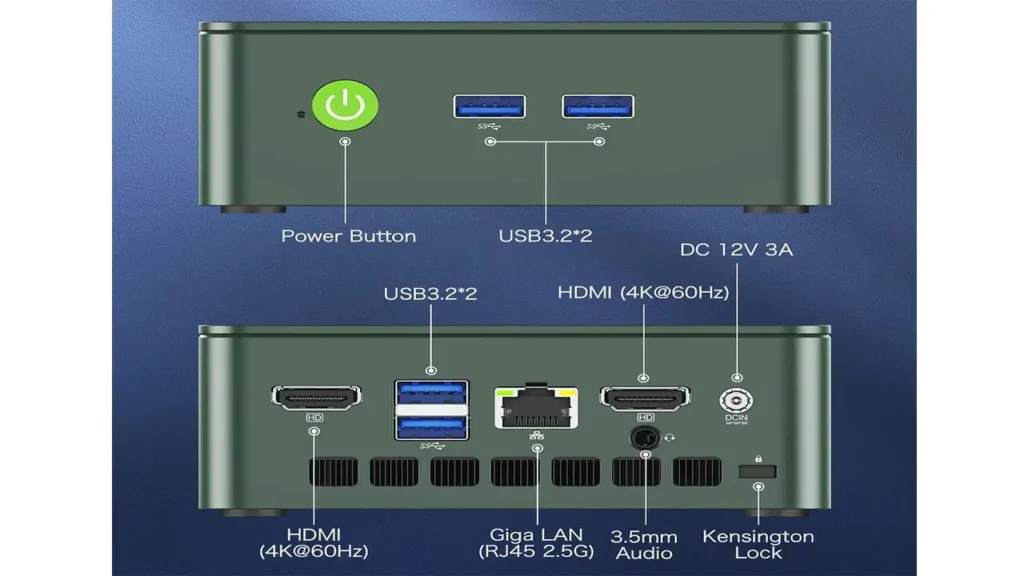
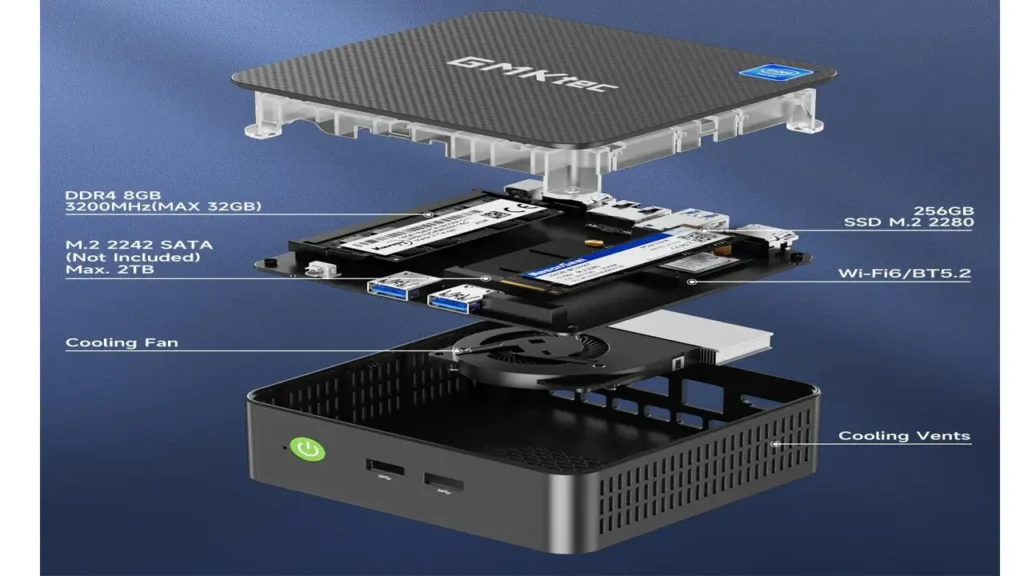
Port placement is sensible and practical. Two USB 3.2 ports sit on the front panel for easy day-to-day access. The rear houses the remaining connectivity. Cooling vents run along the sides to allow airflow to circulate freely, and the internal design uses twin copper heat pipes to help manage thermals quietly and efficiently.
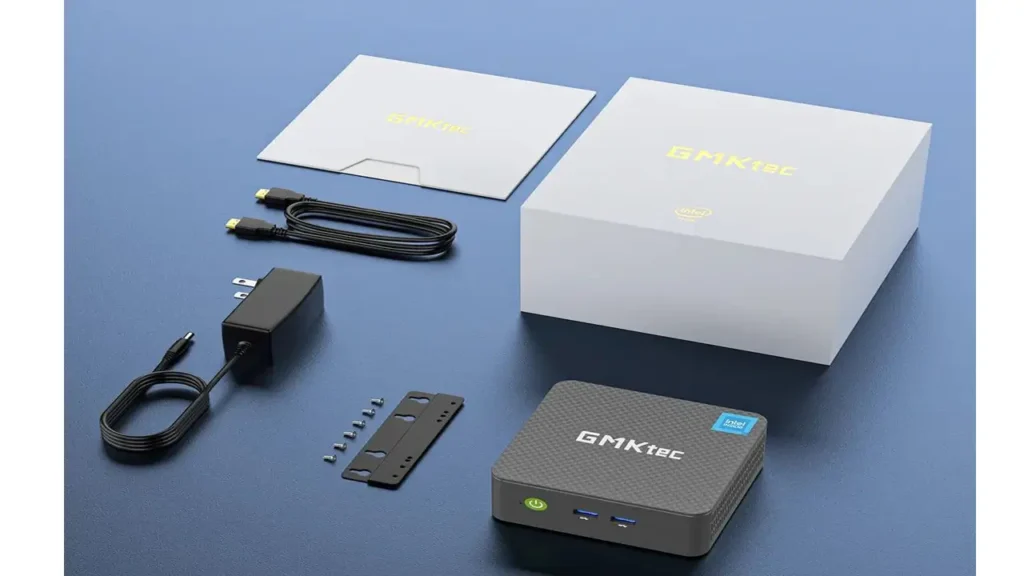
Inside the box you’ll find the mini PC itself, an HDMI cable, the VESA mount, a power adapter, and a warranty card. Everything you need to get started is right there — no hunting around for accessories.
Specifications Overview
Here’s where things get interesting. The GMKtec NucBox G3 Plus specs represent a meaningful step up from the standard G3, and the headline change is the processor.
Processor
The G3 Plus is powered by the Intel Twin Lake N150 — a 4-core, 4-thread chip built on a 7nm process with 6MB of cache and a burst speed of up to 3.6GHz. According to GMKtec’s official product listing, the N150 offers a 6–10% overall performance improvement over the Alder Lake N100 and a 15% improvement over the N95. It’s not a dramatic leap, but it’s a real and measurable upgrade.
Full Specifications Table
| Component | Details |
|---|---|
| Processor | Intel Twin Lake N150, 4C/4T, up to 3.6GHz, 6MB Cache, TDP 6W |
| Graphics | Intel UHD Graphics, 24 Execution Units, up to 750MHz |
| RAM | 8GB / 16GB DDR4 3200 MT/s, SO-DIMM x1, expandable to 32GB |
| Storage | 256GB / 512GB / 1TB M.2 NVMe PCIe 3.0 (2280), expandable to 2TB |
| Extra Storage Slot | M.2 2242 SATA, expandable to 2TB |
| Display Output | 2x HDMI 2.0 (4K @ 60Hz), supports dual monitors |
| USB Ports | 4x USB 3.2 Gen1 (5Gbps) — 2 front, 2 rear |
| Ethernet | Intel i226v 2.5G Gigabit LAN (RJ45) |
| Wi-Fi | Wi-Fi 6 (802.11ax), Dual-Band 2.4GHz / 5GHz |
| Bluetooth | Bluetooth 5.2 |
| Audio | 1x 3.5mm Headphone Jack |
| Operating System | Windows 11 Pro (pre-installed); Linux compatible |
| Weight | ~262g |
| Power Supply | DC IN (5.5/2.5mm), 12V/3A adapter |
| Warranty | 1-year limited manufacturer warranty |
The 2.5G Ethernet port powered by the Intel i226v controller is worth highlighting separately — it’s a feature you don’t always see in this price bracket, and it makes the G3 Plus a genuinely capable option for network-intensive roles like running a software router, Proxmox server, or even a lightweight NAS setup.
Performance Testing
The nucbox g3 plus performance story is one of solid, dependable everyday computing — not fireworks, but no disappointments either.
For daily tasks, the N150 handles everything you throw at it with ease. Web browsing with 15 or more browser tabs open, Microsoft Office applications, video calls on Zoom or Teams, PDF management, media playback — all of this runs smoothly and without any noticeable lag. The 16GB DDR4 RAM configuration (available on mid and top-tier models) gives the system comfortable headroom for multitasking.
Real-world power consumption paints an efficient picture. At idle, the unit draws around 8–10 watts. Under heavier loads — sustained multitasking, running multiple applications simultaneously — power draw peaks at roughly 18–24 watts. That’s remarkably frugal for a full Windows 11 Pro computer.
Boot times are fast thanks to the NVMe PCIe 3.0 SSD. From a cold start to a usable Windows 11 desktop takes well under 20 seconds in typical conditions.
For users running developer tools, the machine handles Chrome, VS Code, Docker containers, and collaboration apps like Notion and Slack simultaneously without grinding to a halt. It’s not a powerhouse, but it’s genuinely more capable than many people expect from a 6W TDP chip.
Compared to the original N100-based G3, the N150 in the G3 Plus delivers a modest but real improvement — around 6–10% across general workloads. Not a revolution, but a meaningful evolution.
BestChina3DPrinters
Expert Reviews & Rankings
Independent 3D Printer Reviews
Your trusted source for Chinese 3D printer reviews, rankings, and comparisons. We buy, test, and review every printer so you can make informed decisions.
Gaming & Graphics Capability
Here’s the honest truth about GMKtec NucBox G3 Plus gaming: it’s a light gaming machine, and that’s perfectly fine as long as you go in with the right expectations.
The integrated Intel UHD Graphics with 24 execution units running at up to 750MHz is capable of handling older and less demanding titles reasonably well. Retro gaming, classic PC titles, and emulation are where this machine genuinely shines.
GameCube emulation, for example, runs great on the G3 Plus — even at 2x resolution upscaling, performance holds steady. Older 3D games from the early-to-mid 2000s are similarly playable. Some lighter indie titles and 2D games run without issue.
Where the G3 Plus hits its ceiling is with modern AAA titles. Games from the last few years with high graphical demands are simply beyond what the integrated GPU can handle at playable frame rates. You’ll be able to launch and run them in many cases, but the experience will not be smooth.
Think of the G3 Plus as a capable retro gaming and emulation station — not a gaming PC replacement. For casual gaming purposes, it absolutely delivers. For anything GPU-intensive, you’ll want to look at a Ryzen-based mini PC instead.
Operating System & Features
The compact mini PC Windows 11 experience on the NucBox G3 Plus is clean and bloat-free, which is a genuine selling point.
Windows 11 Pro comes pre-installed and activated, meaning you get the full professional tier of Microsoft’s operating system right out of the box. There are no extra subscriptions required, no trial software cluttering up the drive, and no third-party applications pre-loaded by the manufacturer. You boot it up, complete the standard Windows setup, and you’re ready to go.
Windows 11 Pro also means you get access to BitLocker encryption, Remote Desktop, and Hyper-V virtualization — features that basic Home editions omit. For small business users, IT professionals, or anyone deploying the machine in a semi-professional environment, that Pro license is real added value.
Beyond Windows, the G3 Plus also officially supports Linux. Users running Ubuntu, Proxmox, or other popular distributions will find the hardware well-supported. The 2.5G Ethernet controller and Wi-Fi 6 module work cleanly across a range of Linux environments, making the G3 Plus a solid platform for homelab setups, lightweight servers, and network appliances.
Software compatibility is broad. Because this is a full x86 Intel platform rather than ARM, virtually any Windows or Linux application runs natively — a significant practical advantage over devices like the Raspberry Pi 5.
Cooling & Noise Levels
This is genuinely one of the most impressive aspects of the GMKtec NucBox G3 Plus, and it’s worth talking about properly.
The cooling system uses twin copper heat pipes to draw heat away from the processor, combined with side-mounted ventilation slots that allow air to flow passively and actively through the chassis. The result is a machine that stays remarkably composed under load.
Under normal daily-use conditions — browsing, office work, streaming — the G3 Plus is essentially silent. You will not hear it. Under sustained load, such as running benchmarks, extended emulation sessions, or heavy multitasking, a small fan spins up, but even then the noise level remains extremely low compared to most mini PCs in this category.
Temperature figures are equally reassuring. Under load, CPU temperatures stay comfortably under 55°C — well within safe operating range for the N150 processor. There’s no thermal throttling observed under typical workloads, which means sustained performance is consistent rather than bursty.
For anyone placing this machine in a living room, bedroom, study, or quiet office environment, the noise behavior alone makes it an excellent choice. Passive near-silence at idle, whisper-quiet under load — it’s genuinely hard to ask for more at this price point.
Price & Value Analysis
Let’s talk numbers, because the GMKtec NucBox G3 Plus price structure is one of its strongest arguments.
The G3 Plus is available in multiple configurations depending on how much RAM and storage you need:
| Configuration | Approx. Price (USD) | Best For |
|---|---|---|
| Barebone (no RAM/SSD) | ~$109–$129 | DIY builders with spare components |
| 8GB RAM + 256GB SSD | ~$149–$169 | Light users, digital signage, IoT |
| 16GB RAM + 512GB SSD | ~$179–$199 | Office users, students, home theater |
| 16GB RAM + 1TB SSD | ~$209–$229 | Power users, developers, media storage |
When you consider that Windows 11 Pro is included and activated in all non-barebone configurations, the value becomes even more apparent. A standalone Windows 11 Pro license retails for around $199 on its own.
For the best budget mini PC 2026 conversation, the G3 Plus competes directly with machines like the Beelink EQ12 and the Trigkey S5 Pro. Against those competitors, the G3 Plus holds its ground comfortably — particularly thanks to its 2.5G Ethernet, Wi-Fi 6, and the dual M.2 storage slots that give it more future-proofing than many rivals at this price.
The one-year manufacturer warranty is also included as standard across all configurations, giving you a reasonable safety net.
Use Cases – Who Should Buy the GMKtec NucBox G3 Plus?
One of the most useful things to ask about any mini PC is: who is this actually right for? Here’s an honest breakdown.
Home & Office Users — This is the G3 Plus’s natural home. Email, video calls, web browsing, document editing, spreadsheets, PDF work — it handles all of it comfortably and without fan noise getting in your way. If you’re replacing an aging tower PC for everyday home or office use, this is a logical and cost-effective upgrade.
Students — A full Windows 11 Pro machine for under $200 is a genuinely strong proposition for students. It handles Google Docs, Microsoft Office, research browsing, and video streaming without issue. The compact size means it travels or relocates easily between dorm and home.
Home Theater & Media Center — Dual 4K HDMI outputs at 60Hz, smooth 4K video playback, a silent operating profile, and a VESA mount for behind-the-monitor installation make the G3 Plus a very capable HTPC (Home Theater PC). Pair it with Kodi, Plex, or any media player software and it performs beautifully.
Developers & Homelab Enthusiasts — The 2.5G Ethernet and Linux compatibility make the G3 Plus a legitimate option for running lightweight server applications, Docker containers, Proxmox virtualization, software firewalls, or network monitoring tools. It’s not going to replace a proper server, but for learning environments and home labs it’s excellent value.
Digital Signage & Kiosk Deployments — The low power draw, silent operation, small footprint, and VESA mounting make the G3 Plus a smart choice for commercial digital signage applications where multiple units may run around the clock.
Retro Gaming & Emulation — If you want to run a GameCube, PS2, or SNES emulation station, the G3 Plus handles those workloads very well for its price class.
Who Should Look Elsewhere — If you’re planning to edit 4K video professionally, run machine learning models, play modern AAA games, or use Adobe Creative Suite for heavy rendering work, the G3 Plus will frustrate you. For those use cases, step up to a Ryzen 7 or Core Ultra-based mini PC.
Final Verdict
So here we are at the end of this GMKtec NucBox G3 Plus review, and the conclusion is pretty straightforward: this is a genuinely impressive machine for what it costs.
The jump from the N100 to the N150 is modest but real. The thermal design keeps things quiet and cool. The port selection is generous for the price bracket. The included Windows 11 Pro license adds significant standalone value. And the dual M.2 slots give you an upgrade path that many budget rivals simply don’t offer.
Pros & Cons
| Pros | Cons |
|---|---|
| Intel N150 — real upgrade over N100 | Not suited for AAA gaming or heavy creative work |
| Windows 11 Pro pre-installed & activated | Plastic chassis feels less premium |
| 2.5G Ethernet (Intel i226v) | Single SO-DIMM RAM slot limits dual-channel |
| Wi-Fi 6 + Bluetooth 5.2 | No USB-C port on standard configuration |
| Dual 4K HDMI @ 60Hz | N150 improvement over N100 is incremental |
| Very quiet — near-silent under load | No camera or microphone included |
| Dual M.2 slots for storage expansion | |
| Excellent value for money | |
| VESA mount included | |
| Linux compatible |
Final Recommendation
The GMKtec NucBox G3 Plus earns a strong recommendation for its target audience. If you need a reliable, quiet, compact computer for everyday tasks, home entertainment, light development work, or a homelab project — and you want to spend as little as possible to get there — this machine delivers exactly what it promises.
It’s not trying to be a gaming powerhouse or a creative workstation. It’s trying to be the best possible everyday mini PC at a budget price. And in 2026, with the N150 upgrade, it succeeds at that goal with confidence.
Score: 8.5 / 10
A smart, sensible purchase for budget-conscious users who need a compact, capable, and genuinely quiet desktop computer.
🇺🇸 English
Great review of the GMKtec NucBox G3 Plus! The article is clear, informative, and easy to follow. I especially liked the performance breakdown and real-world use cases. The site overall looks professional and well-structured. Definitely bookmarking 👉 https://bestchinagadget.com/
🇪🇸 Español
Excelente análisis del GMKtec NucBox G3 Plus. La información está bien organizada y es muy útil para entender el rendimiento real del dispositivo. El sitio es moderno y fácil de navegar. Muy recomendable 👉 https://bestchinagadget.com/
🇸🇦 العربية
مراجعة رائعة لجهاز GMKtec NucBox G3 Plus، المحتوى واضح ومفيد للغاية. أعجبني شرح الأداء والتفاصيل التقنية. الموقع احترافي وسهل الاستخدام. أنصح بزيارته 👉 https://bestchinagadget.com/
🇨🇳 中文
这篇关于 GMKtec NucBox G3 Plus 的评测非常详细,内容清晰易懂。性能分析和使用体验都很有参考价值。网站设计专业,阅读体验很好 👉 https://bestchinagadget.com/
🇫🇷 Français
Très bon article sur le GMKtec NucBox G3 Plus. Les informations sont précises et bien structurées. J’ai apprécié l’analyse des performances. Le site est propre et agréable à lire 👉 https://bestchinagadget.com/
🇩🇪 Deutsch
Ein wirklich guter Testbericht zum GMKtec NucBox G3 Plus. Die Inhalte sind klar und hilfreich, besonders die Leistungsanalyse. Die Website wirkt professionell und übersichtlich 👉 https://bestchinagadget.com/
