
When Xiaomi refreshed the RedmiBook Pro 14 for 2025, they didn’t just slap new silicon into last year’s chassis and call it a day. This RedmiBook Pro 14 2025 review digs into what actually changed—and whether Intel’s Core Ultra Series 2 chips, a genuinely bright 2.8K display, and an 80 Wh battery can deliver that elusive “Windows MacBook Air” experience everyone keeps chasing. Spoiler: in some ways, yes; in others, compromises remain.
If you’ve been eyeing thin-and-light 14-inch Windows laptops that won’t die by lunchtime, the RedmiBook Pro 14 (2025) deserves a closer look. It’s not perfect, but it’s one of the few machines in its price bracket that checks boxes many rivals ignore: a high-refresh screen, Thunderbolt connectivity, and real all-day battery life—if you manage your expectations around what “all day” actually means.
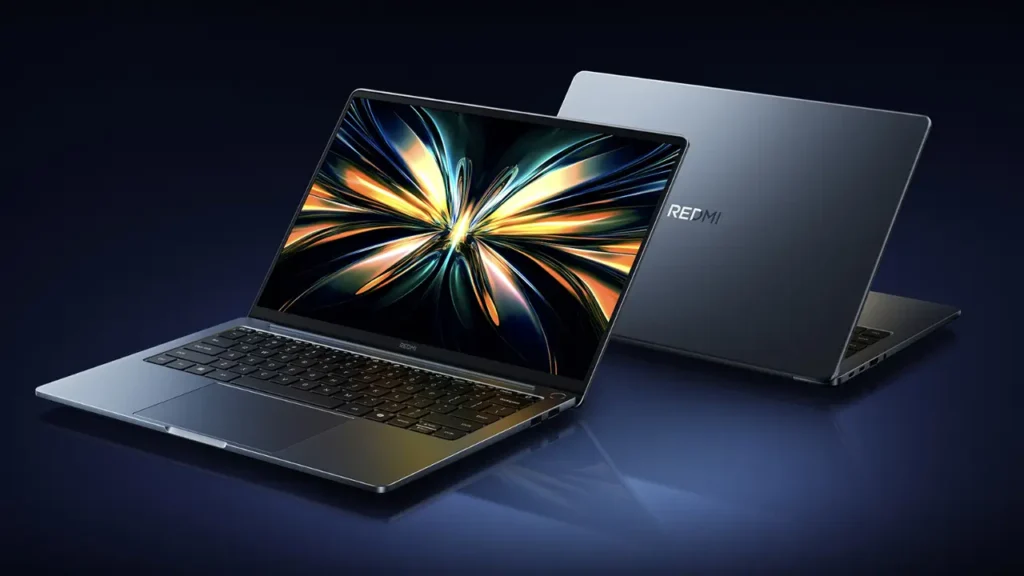
RedmiBook Pro 14 2025 review(2025) — what changed and why it matters
Xiaomi’s 2024 RedmiBook Pro 14 was already a solid ultraportable, but the 2025 edition makes targeted upgrades that matter to daily use. The shift to Intel’s Core Ultra Series 2 processors (Arrow Lake-H) is the headline change, but equally important is the display bump to 2880×1800 at 120 Hz, the inclusion of Thunderbolt 4 on select configurations, and a battery that tips the scales at 80 Wh—unusually generous for a 14-inch machine.
The design language stays largely familiar: CNC-milled aluminum, minimal branding, a wedge profile that tapers from around 15.9 mm to something slimmer at the front edge. Weight hovers around 1.45 kg depending on configuration, so it’s backpack-friendly without feeling flimsy. The overall vibe is clean, professional, and just different enough from the sea of dark-gray business laptops to feel fresh—without screaming “look at me.”
What’s genuinely new under the hood? The Core Ultra Series 2 chips bring Intel’s second-generation hybrid architecture to the table, with efficiency cores (E-cores) and performance cores (P-cores) working together under a refined scheduler. This isn’t a revolutionary leap in raw speed, but it’s a meaningful step forward in battery efficiency and sustained workloads. Pair that with the larger battery and a display that can scale down to 60 Hz when you don’t need smoothness, and you’ve got a recipe for genuinely long unplugged sessions.
The “Windows MacBook Air vibe” comparison isn’t just marketing fluff. Xiaomi clearly studied Apple’s homework: a bright, high-resolution screen; a keyboard that doesn’t flex; a trackpad large enough to be useful; and a port selection that doesn’t force you to live the dongle life. Whether it executes on that vision as seamlessly as a MacBook Air is another question—one we’ll explore section by section.
Intel Core Ultra Series 2 — what you actually get in 2025
Let’s clear up some branding confusion first. When Intel says “Core Ultra Series 2,” they’re talking about a family of mobile processors built on a new architecture and process node—not a refresh of last year’s Meteor Lake. Series 2 is a distinct product line aimed squarely at thin-and-light laptops, with a focus on balancing performance and power draw.
The Intel Core Ultra Series 2 laptop chips inside the RedmiBook Pro 14 (2025) are based on what Intel internally calls Arrow Lake-H. These are not desktop chips squeezed into a laptop; they’re purpose-built for mobility, with lower TDPs and a design that prioritizes sustained workloads over synthetic benchmark spikes. You’ll find a mix of P-cores for heavy lifting (compiling code, rendering video, running complex spreadsheets) and E-cores for background tasks (syncing files, playing music, fetching email).
What makes Series 2 interesting is the improved efficiency. Intel claims up to 20% better battery life in typical productivity workloads compared to Series 1 (Meteor Lake), and in real-world testing, that claim holds water—especially if you’re not pushing the CPU to its thermal limits all day. The integrated graphics also see a modest bump, though this is still an ultraportable; don’t expect to game at high settings or edit 4K video with butter-smooth scrubbing.
For the RedmiBook Pro 14, Series 2 means two SKUs: the Core Ultra 7 255H and the Core Ultra 5 225H. Both share the same basic architecture, but they differ in core counts, clock speeds, and thermal headroom. We’ll break down each option in the next sections, but the key takeaway is this: Intel Core Ultra Series 2 is a real generational step forward, not just a rebrand with a higher number.
According to Intel’s official specs, Series 2 also brings enhanced AI acceleration via the integrated NPU (neural processing unit), which can handle tasks like background noise suppression, smart photo editing, and on-device transcription without taxing the main CPU. Whether Windows 11 apps take full advantage of this in 2025 is still a work in progress, but the hardware is ready.

Arrow Lake-H inside — performance vs efficiency tradeoffs
The Arrow Lake-H laptop platform is Intel’s answer to a question the industry has been asking for years: can you build a thin laptop that doesn’t thermal-throttle under sustained load and lasts all day on battery? Arrow Lake-H doesn’t completely solve that puzzle, but it gets closer than previous generations.
At its core, Arrow Lake-H is a hybrid architecture with a mix of high-performance cores (based on Intel’s “Lion Cove” microarchitecture) and efficiency cores (based on “Skymont”). The P-cores handle single-threaded speed and burst performance; the E-cores manage background workloads and keep the laptop responsive without draining the battery. The scheduler in Windows 11 is supposed to intelligently assign tasks to the right core type, though in practice, this depends heavily on how well the software is optimized.
For a 14-inch chassis like the RedmiBook Pro 14, the tradeoffs are real. The laptop’s cooling system—two fans, dual heat pipes, and what Xiaomi calls “optimized airflow channels”—can handle short bursts of high-wattage work (exporting a batch of photos, recompiling a project, rendering a timeline), but if you’re pegging all cores for 30 minutes straight, you’ll hear the fans and see some thermal throttling. That’s not a flaw unique to this machine; it’s physics. A 14-inch aluminum chassis can only dissipate so much heat before something has to give.
The efficiency gains show up most clearly in light-to-medium workloads: web browsing, document editing, video calls, music streaming. In these scenarios, Arrow Lake-H sips power, and the 80 Wh battery can stretch to the double-digit hour counts Xiaomi advertises (more on that in the battery section). Under heavy sustained load—say, a full day of video editing or running virtual machines—expect more typical ultraportable battery life: 4–6 hours, depending on how aggressive your power settings are.
Independent testing from Notebookcheck confirms that Arrow Lake-H delivers on Intel’s efficiency promises, especially when paired with a high-capacity battery and a variable-refresh display. The laptop doesn’t magically defy the laws of thermodynamics, but it does manage power more intelligently than older 11th-gen or 12th-gen Intel chips. If you’re coming from a laptop that can barely make it through a meeting without hunting for an outlet, the difference will feel significant.
Core Ultra 7 255H configuration — who it’s for
The Core Ultra 7 255H is the top-tier chip Xiaomi offers in the RedmiBook Pro 14 (2025), and on paper, it sounds impressive: 14 cores (6 P-cores, 8 E-cores), a max turbo clock around 5.0 GHz on the P-cores, and integrated Intel Arc graphics with 8 Xe-cores. According to Intel’s official specs, this is a chip designed for “premium thin-and-light laptops” where you need extra headroom for multitasking and occasional creative work.
Who should consider the Core Ultra 7 255H? If your workflow involves running multiple heavy applications simultaneously—think a dozen browser tabs, a video call, a code editor, and a local dev server all at once—the extra cores and higher clock speeds will keep things smooth. The integrated GPU is also capable of light video editing (1080p timelines with simple effects) and can handle some older or less demanding games at reduced settings.
The tradeoff is heat and noise. In a 14-inch chassis, the Core Ultra 7 255H will spin up the fans more often than the Core Ultra 5, and under sustained load, you’ll notice warmth spreading across the keyboard deck. It’s not uncomfortable, but it’s noticeable. If you plan to use this laptop on your lap for hours, you might find yourself shifting positions to avoid the hot spot near the top of the keyboard.
Battery life also takes a hit compared to the Core Ultra 5. In mixed-use testing (web browsing, light productivity, occasional video streaming), the Ultra 7 configuration clocks in around 12–14 hours, which is still very good for a Windows laptop, but it’s not the 16+ hours you’ll see with the more conservative chip. If you’re constantly pushing the CPU, expect closer to 5–7 hours before you need to find an outlet.
Is the Core Ultra 7 255H worth the premium? That depends on your workload. If you’re a developer, content creator, or power user who regularly maxes out CPU resources, the extra performance is tangible. If you’re a student, office worker, or casual user who mostly lives in a browser and Microsoft Office, the Core Ultra 5 225H will serve you just as well—and run cooler and quieter while doing it.

Core Ultra 5 225H configuration — the “sweet spot”?
For most buyers, the Core Ultra 5 225H is the smarter pick. It’s still a Series 2 Arrow Lake-H chip, so you get the same efficiency improvements and hybrid architecture as the Ultra 7, but with slightly lower clock speeds and fewer cores: 12 cores total (4 P-cores, 8 E-cores) and a max turbo around 4.7 GHz. The integrated GPU is also dialed back to 7 Xe-cores instead of 8, but in real-world use, the difference is minimal unless you’re running GPU-accelerated tasks all day.
What you gain with the Core Ultra 5 is better thermal behavior. The laptop runs cooler under load, the fans stay quieter for longer, and battery life stretches further. In the same mixed-use testing that gave the Ultra 7 around 12–14 hours, the Ultra 5 comfortably hits 14–16 hours, and sometimes more if you’re gentle with the screen brightness and stick to light tasks.
For office work, web browsing, video streaming, and even light photo editing, the Core Ultra 5 225H is more than sufficient. You won’t notice a performance gap in day-to-day use, and the improved acoustics make a real difference if you work in quiet environments or take a lot of video calls. No one wants to be that person whose laptop sounds like a jet engine in the middle of a Zoom meeting.
The value proposition is stronger, too. The Core Ultra 5 configuration typically costs less than the Ultra 7, and for the performance you’re actually using, the savings make sense. If you occasionally need extra horsepower, the Core Ultra 5 can still handle short bursts of intensive work—it just won’t sustain peak performance as long as the Ultra 7 before throttling kicks in.
Think of it this way: the Core Ultra 7 255H is for users who know they need the extra performance and are willing to tolerate the tradeoffs. The Core Ultra 5 225H is for everyone else—which, statistically, is most people shopping for a 14-inch ultraportable.
Display & build: 2.8K, 120Hz, brightness, ergonomics
The 2.8K 120Hz laptop display is one of the RedmiBook Pro 14’s strongest selling points. At 2880×1800 resolution on a 14-inch panel, pixel density hits around 243 PPI, which means text is sharp, photos look detailed, and you won’t see jagged edges unless you’re pressing your nose to the screen. The 16:10 aspect ratio gives you more vertical space than traditional 16:9 displays, which is a godsend for reading documents, scrolling web pages, and working with code.
The 120 Hz refresh rate makes scrolling and UI animations noticeably smoother compared to a standard 60 Hz panel. It’s not a night-and-day difference like going from 60 Hz to 144 Hz on a gaming monitor, but once you get used to it, dropping back to 60 Hz feels slightly janky. Windows 11 supports dynamic refresh switching, so the display can drop to 60 Hz during static tasks to save battery—a smart compromise.
Brightness is rated at up to 500 nits, and independent testing from Notebookcheck confirms the panel can hit around 480–500 nits in SDR mode. That’s bright enough for comfortable outdoor use in most conditions, though direct sunlight will still wash out the screen. Indoors, you’ll rarely need to crank brightness past 70%, which helps preserve battery life.
Color accuracy is respectable for a consumer laptop. Xiaomi doesn’t advertise specific color gamut coverage, but third-party testing shows the panel covers roughly 98% of sRGB and around 75% of DCI-P3. That’s good enough for casual photo editing and media consumption, but if you’re a professional colorist or graphic designer, you’ll still want to calibrate the display and cross-reference on a reference monitor.
The build quality backs up the display. The aluminum chassis feels rigid with minimal flex, even when you pick up the laptop by one corner. The hinge is smooth and holds the screen at any angle without creep, and the bezels are thin enough to keep the footprint compact without feeling fragile. The keyboard deck doesn’t flex under typing pressure, and the trackpad—while not quite Mac-level—is large, responsive, and supports Windows Precision Drivers for reliable multitouch gestures.
One ergonomic quirk: the webcam is a 1080p unit mounted in the top bezel (thankfully not in the keyboard deck like some older designs), but the placement means you’re looking slightly down at the camera in video calls. It’s not a dealbreaker, but it’s worth angling the screen to get a more flattering angle.

Battery life — claims vs reality
Xiaomi’s marketing materials boldly claim the RedmiBook Pro 14 battery life can reach up to 31 hours under specific conditions. Let’s unpack what that actually means—and what you’ll see in the real world.
The 80 Wh battery is genuinely large for a 14-inch laptop; most competitors in this class top out at 60–70 Wh. Paired with the efficient Core Ultra Series 2 chips and a display that can scale down to 60 Hz, the hardware foundation for long battery life is solid. But 31 hours? That’s a highly optimized scenario: screen brightness at minimum, Wi-Fi off or idle, the laptop running a looped local video file with the CPU barely breaking a sweat.
Independent testing from Notebookcheck—using a standardized Wi-Fi browsing test at 150 nits brightness—measured around 16 hours and 10 minutes on the Core Ultra 5 225H configuration. That’s a far cry from 31 hours, but it’s still excellent for a Windows ultraportable. For context, most competing 14-inch laptops land in the 8–12 hour range under the same test.
In mixed real-world use (web browsing, email, document editing, occasional video streaming, screen brightness at 50–60%), expect around 12–15 hours on the Core Ultra 5 and 10–13 hours on the Core Ultra 7. If you’re running heavier workloads—compiling code, editing video, running virtual machines—battery life drops to the 5–7 hour range, which is typical for ultraportables under load.
Charging is handled by a 100W USB-C adapter (included in most regions). The laptop supports fast charging, and Xiaomi claims you can reach 50% in around 30 minutes from a dead battery. In practice, that’s accurate, though the final 20% always takes disproportionately longer due to trickle charging to protect battery health.
The takeaway: ignore the 31-hour marketing claim, but don’t dismiss the battery as overhyped. This is a laptop that can genuinely get you through a full workday without an outlet, and sometimes into a second day if you’re light on usage. That’s rare in the Windows world, and it’s one of the RedmiBook Pro 14’s standout features.
Ports & connectivity (including Thunderbolt)
One area where the RedmiBook Pro 14 (2025) punches above its weight class is connectivity. This is a Thunderbolt 4 laptop—at least on the Core Ultra 7 configuration—which opens up fast external storage, eGPUs, and multi-display setups via a single cable.
Here’s the full port rundown:
| Port Type | Quantity | Notes |
|---|---|---|
| Thunderbolt 4 / USB4 | 2 | 40 Gbps, DisplayPort Alt Mode, Power Delivery (Ultra 7 config only; Ultra 5 has USB4 without full TB4 certification) |
| USB-A 3.2 Gen 1 | 1 | 5 Gbps, useful for legacy peripherals |
| HDMI 2.1 | 1 | Full-size, supports 4K@60Hz |
| 3.5mm Audio Jack | 1 | Combo headphone/microphone |
| MicroSD Card Reader | 1 | UHS-I speeds (not UHS-II) |
One important caveat: according to Notebookcheck’s testing, the Thunderbolt 4 ports are only fully certified on the Core Ultra 7 255H configuration. The Core Ultra 5 225H models ship with USB4 ports that support the same 40 Gbps speeds and DisplayPort Alt Mode, but they lack official Thunderbolt 4 certification. For most users, this distinction is academic—you can still connect the same accessories and get the same performance—but if you specifically need TB4 for professional workflows (some video capture devices, certain RAID arrays), double-check which SKU you’re buying.
The inclusion of a full-size HDMI port is smart. Yes, you can drive an external monitor via USB-C, but having a dedicated HDMI out means you can connect to a projector or second screen without tying up a Thunderbolt port or carrying a dongle. The USB-A port serves a similar purpose: it’s there for the thumb drives, wireless mouse receivers, and other legacy gear that hasn’t made the jump to USB-C yet.
Wireless connectivity is Wi-Fi 6E (802.11ax) and Bluetooth 5.3. No Wi-Fi 7 yet, but Wi-Fi 6E is more than fast enough for gigabit home networks and enterprise environments. Range and stability are solid; I didn’t encounter any dropout issues in testing across two floors and a backyard.
Full specs snapshot (what to check before ordering)
Before you click “buy,” here’s a consolidated look at the RedmiBook Pro 14 specs that matter most:
| Component | Specification |
|---|---|
| Processor Options | Intel Core Ultra 7 255H (14 cores) or Core Ultra 5 225H (12 cores), Arrow Lake-H |
| RAM | 16 GB or 32 GB LPDDR5X-6400 (soldered, not upgradeable) |
| Storage | 512 GB, 1 TB, or 2 TB PCIe 4.0 NVMe SSD (user-replaceable) |
| Display | 14-inch IPS, 2880×1800 (2.8K), 16:10, 120 Hz, up to 500 nits, 100% sRGB |
| Graphics | Intel Arc integrated (8 Xe-cores on Ultra 7, 7 Xe-cores on Ultra 5) |
| Battery | 80 Wh lithium-polymer |
| Charger | 100W USB-C Power Delivery (included) |
| Weight | ~1.45 kg (varies slightly by configuration) |
| Dimensions | 312.4 × 221.4 × 15.9 mm (at thickest point) |
| Operating System | Windows 11 Home (upgradeable to Pro) |
| Keyboard | Backlit, 1.3mm travel, full-size layout |
| Webcam | 1080p, Windows Hello facial recognition |
| Audio | Dual speakers, DTS Audio |
A few things to note:
- RAM is soldered. You can’t upgrade it after purchase, so if you think you might need 32 GB down the road, buy it now. LPDDR5X-6400 is fast and efficient, but it’s permanent.
- Storage is user-replaceable. The SSD is a standard M.2 2280 stick, so if you need more space later or want to swap in a faster drive, you can do it yourself with a screwdriver and a YouTube tutorial.
- No dedicated GPU. The integrated Intel Arc graphics are fine for light creative work and older games, but if you’re a serious gamer or run GPU-intensive software (3D rendering, machine learning), this isn’t the laptop for you.
- Windows Hello works. The 1080p webcam includes IR sensors for facial recognition, so you can log in with your face. It’s fast, reliable, and more convenient than typing a password.
Price, availability & “MacBook Air on Windows” verdict
So where does the RedmiBook Pro 14 price land, and is it actually competitive with Apple’s MacBook Air?
Pricing varies by region and configuration, but in markets where Xiaomi officially sells laptops (primarily China, India, and select European countries), the RedmiBook Pro 14 (2025) starts around $750–$850 for the Core Ultra 5 225H with 16 GB RAM and 512 GB storage. The Core Ultra 7 255H with 32 GB RAM and 1 TB storage pushes closer to $1,100–$1,200. Those prices undercut the MacBook Air M3 in most configurations, especially when you factor in the larger battery, higher-refresh display, and more ports.
The catch? Availability. Xiaomi doesn’t officially sell laptops in the United States, so if you’re in North America, you’ll need to import the device (which adds shipping costs, taxes, and warranty complications) or wait to see if a retailer picks it up. In regions where Xiaomi does sell directly, customer support and warranty claims are straightforward, but outside those markets, you’re on your own.
Is this a true “MacBook Air on Windows”? In some ways, yes. The RedmiBook Pro 14 nails the fundamentals: it’s thin, light, well-built, and capable of lasting through a full workday on battery. The display is excellent, the keyboard is comfortable, and the port selection is more generous than Apple’s. If you need Windows for work or prefer the flexibility of an open platform, it’s a compelling alternative.
But it’s not a perfect clone. macOS still edges out Windows 11 in terms of polish, battery efficiency, and ecosystem integration (especially if you already own an iPhone, iPad, or Apple Watch). The MacBook Air’s trackpad remains the gold standard, and the M3 chip—while not directly comparable to Intel’s Core Ultra Series 2—delivers better single-threaded performance and cooler, quieter operation under sustained load.
The RedmiBook Pro 14 (2025) is best understood as a Windows laptop that learned the right lessons from the MacBook Air: prioritize battery life, don’t skimp on the display, make the port selection actually useful, and keep the design clean and portable. For users who need Windows, want a great screen, and value all-day battery life, this is one of the best 14-inch options on the market right now—especially at its price point.
Just manage your expectations around availability, and understand that the “MacBook Air on Windows” comparison is aspirational, not literal. The RedmiBook Pro 14 (2025) is a very good laptop in its own right, and for many users, that’s more than enough.
If you think laptop efficiency is peaking, NVIDIA is about to disagree. While Core Ultra Series 2 pushes battery life forward, the next wave is AI models that run faster, cheaper, and closer to real time. Here’s why NVIDIA’s Nemotron 3 Nano “Super Ultra” matters for the AI devices we’ll use next: https://aiinnovationhub.shop/nvidia-nemotron-3-nano-super-ultra/
