
Tecno MEGABOOK T15 360 Pro Review: Specs, Price & 2-in-1 Power
Introduction: A Flagship Convertible Debuts at IFA Berlin
Tecno MEGABOOK T15 360 Pro is the first laptop from the brand with a rotating touchscreen, and it made its debut at the IFA show in Berlin. For years, Tecno has built its reputation on aggressive pricing and surprisingly polished hardware. Until now, though, that reputation belonged mostly to smartphones, tablets and conventional clamshell notebooks. This new model changes the conversation. It takes the flagship-level silicon you would expect in a premium ultrabook and wraps it in a form factor that most budget-minded brands never attempt.
The idea behind this machine is simple but ambitious. Buyers who want a true 2-in-1 convertible laptop have traditionally faced an uncomfortable choice. They could pay a steep premium for a well-known luxury convertible, or they could settle for a modest machine with a weak processor, a dim screen and a flimsy hinge. Tecno is betting that there is a large group of people in the middle: students, designers, freelancers, remote workers and small-business owners who want serious power, a sharp display and a flexible body without paying a “prestige” surcharge.
In this review we walk through everything that matters. We start with the headline specifications and how the Pro model differs from the base T15 360. Then we look at the all-metal body and its four usage modes, the high-resolution 120 Hz display, the stylus and keyboard experience, the processor and AI capabilities, the memory and storage design, the battery and charger, the connectivity and ecosystem features, and finally the pricing and our verdict.
If you are shopping for a convertible and want to know whether this newcomer deserves a place on your shortlist, read on. By the end you will know where it shines, where it asks for compromises, and which type of buyer will get the most from it.
Tecno MEGABOOK T15 360 Pro Specs & Key Features
Here are the Tecno MEGABOOK T15 360 Pro specs at a glance, laid out so you can compare the Pro version with the standard T15 360 quickly. The most important differences are the screen, the available processor options and the storage flexibility, all of which push the Pro model clearly into a higher tier.
| Feature | Tecno MEGABOOK T15 360 Pro |
|---|---|
| Form factor | 2-in-1 convertible with 360° rotating hinge |
| Body | CNC-machined metal chassis |
| Display | 15.6-inch touchscreen, 2560×1440 (2.5K) |
| Refresh rate | 120 Hz |
| Brightness | 350 nits |
| Color coverage | 100% sRGB |
| Touch | 10-point multi-touch |
| Stylus | MPP 2.0 active stylus support |
| Processor | Up to Intel Core Ultra 9 185H (16 cores) |
| Memory | LPDDR5X, 7467 MT/s |
| Storage | PCIe M.2 2280 SSD, second M.2 slot on selected configurations |
| Battery | 70 Wh |
| Charger | 65 W GaN adapter |
| Wireless | Wi-Fi 6E, Bluetooth 5.4 |
| Ports | 7 built-in physical ports |
| Extras | Fingerprint sensor in the power button, dual microphones, OneLeap ecosystem |
What Separates the Pro From the Base Model
The standard T15 360 is a capable machine, but it is built around a Full HD panel running at 60 Hz and a more modest processor tier. The Pro version raises the bar in three places. First, the display jumps to a 2560×1440 panel with a 120 Hz refresh rate, which affects everything from reading text to drawing to scrolling a web page. Second, the processor options reach all the way to a top-tier Core Ultra part, which is rare in this category. Third, the internal layout supports more flexible storage, which matters to anyone who plans to keep the laptop for several years.
Why the Specification Sheet Matters
A spec sheet on its own never tells the full story, but this one hints at a clear design philosophy. Tecno has not chased the thinnest possible body at the expense of cooling, ports or battery capacity. Instead, the company seems to have prioritized the things that working users actually notice every day: a bright and sharp screen, enough ports to avoid carrying a dongle, a large battery and the option to upgrade storage later. Each of those decisions is explored in the sections below.
Metal Build and Four Modes: Design and Ergonomics
The first thing you notice when you pick up the machine is how solid it feels. The chassis is machined from metal using a CNC process, and the result is a body with very little flex in the keyboard deck or the lid. Many convertibles feel fragile because the hinge has to carry a large screen through a full rotation, so they can wobble when you type or when you touch the display. The Tecno MEGABOOK T15 360 Pro avoids most of that fragility, and the sturdy construction gives the laptop a premium impression that belies its price class.
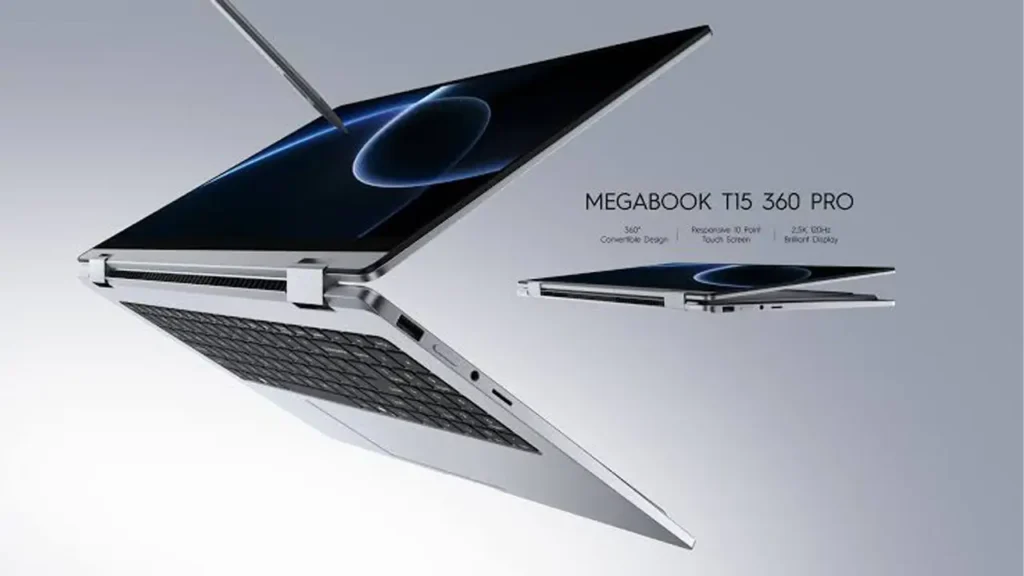
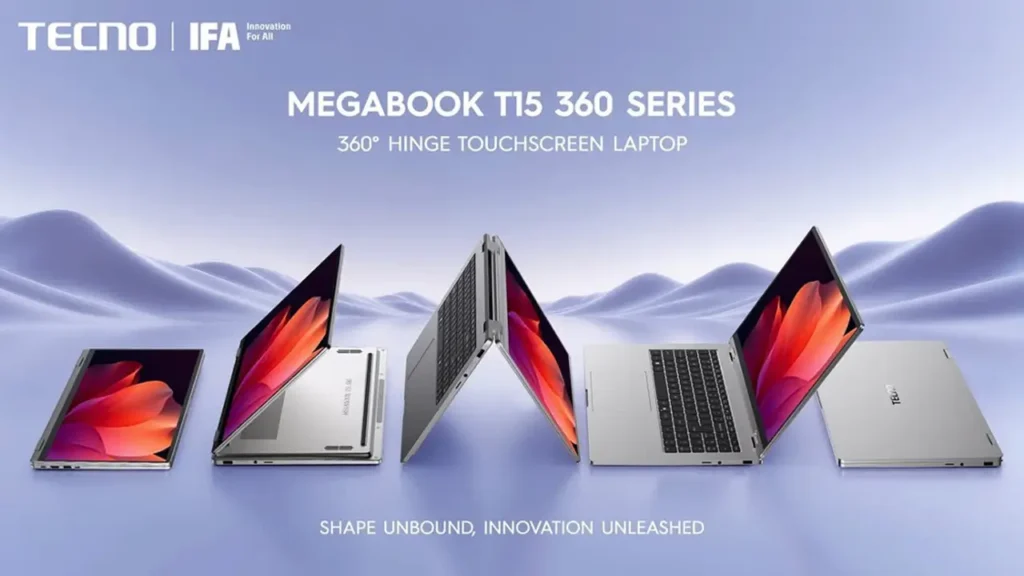
The star of the design is the 360-degree hinge laptop mechanism. The display opens past the usual angle, continues to the back of the keyboard deck and folds flat against the underside of the machine. That single rotation unlocks four distinct ways to use the device, and each one suits a different scenario.
Laptop Mode
In standard laptop mode the machine behaves like any other 15.6-inch notebook. You get a large screen, a full keyboard and a spacious touchpad. This is the mode most people will use for email, documents, spreadsheets, browsing and video calls.
Tablet Mode
When you rotate the screen all the way around, the keyboard faces down and the laptop becomes a large tablet. At this screen size it is not a one-hand device, but it is excellent for reading, annotating documents, sketching and reviewing designs. The keys are deactivated automatically, so you will not trigger accidental presses while holding the body.
Tent Mode
Tent mode stands the laptop on its keyboard edge with the display facing outward in an inverted V shape. It takes up little desk space and works nicely for watching video, giving a presentation to a small group or following a recipe on a kitchen counter.
Stand Mode
Stand mode places the screen in front of the keyboard, which is lying flat and facing down. The display is closer to you than in tent mode, so it is the best choice for touch-heavy tasks such as playing casual games, browsing media or using the on-screen interface without a keyboard in the way.
The practical value of these modes comes from how smoothly the transitions work. A hinge that is too stiff makes switching annoying, and one that is too loose makes the screen bounce when you tap it. Tecno aims for a middle ground that holds the display steady at the angle you choose while still allowing a deliberate push to move it. For a laptop designed around flexibility, that balance is arguably the most important mechanical detail.
BestChina3DPrinters
Expert Reviews & Rankings
Independent 3D Printer Reviews
Your trusted source for Chinese 3D printer reviews, rankings, and comparisons. We buy, test, and review every printer so you can make informed decisions.
📊 Expert Rankings ✅ Independent Tests 📝 In-Depth Reviews 🎯 Unbiased Advice FDM Printers Resin Printers Comparisons Guides Visit BestChina3DPrinters →Screen Quality: A 120 Hz 2.5K Panel Changes Everything
The Tecno MEGABOOK T15 360 Pro treats its display as the main selling point, and the contrast with the standard Full HD 60 Hz version is substantial. The base model gives you a perfectly usable screen for office work. The Pro model gives you a screen that feels closer to what you find on far more expensive notebooks, and the difference shows up the moment you start scrolling.
The panel measures 15.6 inches diagonally and has a resolution of 2560×1440 pixels. That is the combination people usually describe as 2.5K, and it sits in a sweet spot between Full HD and 4K. Text looks crisp without the battery drain and scaling headaches of an ultra-high-resolution panel. On a screen of this size, the pixel density is high enough that small fonts, thin lines and fine interface elements appear clean and sharp.
Smoothness and Touch
The 120Hz 2.5K touchscreen display refreshes twice as often as a typical laptop panel, which makes scrolling, window dragging and stylus strokes feel fluid. Handwriting is the best example. When ink follows the tip of the pen with less visible lag, the writing experience feels far more natural. The panel also supports 10-point multi-touch, so pinch-to-zoom, multi-finger gestures and rotating objects in design software all work as expected.
Brightness and Color
Brightness reaches 350 nits, which is sufficient for typical indoor use, including a bright office or a classroom. It will not match the peak figures of an OLED flagship, so working in direct sunlight outdoors may still be a challenge. Color coverage, however, is excellent for the category. The panel covers 100% of the sRGB gamut, so photos, web graphics and social-media content appear accurate and vivid. For students and content creators who publish mostly to the web, sRGB coverage is the number that matters most.
Why the Screen Is the Best Reason to Choose the Pro
If you spend most of your day looking at text, the sharper image will reduce eye strain over long sessions. If you draw or annotate, the high refresh rate and touch accuracy improve precision. If you watch video, the extra resolution and color coverage deliver a more satisfying picture. For a convertible laptop, where the screen is both the output device and the input device, this is exactly the right place to invest.
Creative Freedom: Stylus, Keyboard and Everyday Input
Many people buy a convertible because they want one device that can replace both a laptop and a graphics tablet. The Tecno MEGABOOK T15 360 Pro makes that goal realistic. Folding the screen into tablet mode turns it into a comfortable drawing surface, and the large 15.6-inch canvas gives illustrators and designers plenty of room to work without constantly zooming in and out.
Pen Support for Notes and Sketching
The laptop supports an MPP 2.0 active stylus, which is a widely adopted pen standard with pressure sensitivity and low-latency tracking. That means you can write handwritten notes in class, mark up PDFs in a meeting, sketch an idea in a drawing app or sign a document without printing it. Because the refresh rate is 120 Hz, the digital ink looks smoother than on a typical 60 Hz screen, and the delay between pen movement and line appearance is reduced.
For students, the benefits are obvious. You can take lecture notes by hand, annotate slides directly and convert handwriting to text in compatible apps. For designers, storyboarders and illustrators, the combination of a large display and pressure-sensitive pen input makes quick concept work possible without carrying a second device.
A Full Keyboard Where It Counts
A convertible should not sacrifice typing comfort, and this one does not. The keyboard is full-sized and includes a dedicated numeric keypad, a feature that accountants, analysts and anyone who works with spreadsheets will appreciate. Larger notebooks in this class often include one, but many compact convertibles drop it to save space. The key spacing and travel are comfortable for long writing sessions, and the layout follows the standard arrangement, which avoids the learning curve of cramped, compromised keys.
Security Built Into the Power Button
The fingerprint sensor is integrated into the power button, which is a smart design choice. You press the button to wake the machine and, in the same motion, the sensor reads your finger and signs you in through Windows Hello. There is no separate sensor to find, and the process works whether you are using the device as a laptop or as a tablet.
One Device, Many Workflows
The result is a machine that adapts to the task. Type a report in laptop mode, flip the screen to annotate a contract, then stand it up to review images with a client. The ability to move between these activities without changing devices is the core promise of a convertible, and the hardware here delivers on it.
Flagship Performance Without Compromise
The Tecno MEGABOOK T15 360 Pro is powered by a processor that would not look out of place in a high-end business ultrabook, which is surprising for a convertible at this price. Many 2-in-1 machines use efficient but modest chips, since thin bodies and rotating hinges leave little room for cooling. Tecno has chosen to push in the opposite direction and offer genuine horsepower.
The Top-Tier Processor Option
At the top of the range sits the Intel Core Ultra 9 185H, a 16-core processor designed for demanding mobile workloads. In its maximum configuration it can reach high peak power for short bursts, which is exactly what you need for exporting a video, compiling code, rendering a 3D scene or processing a batch of photos. Lower-tier configurations are also available for people who want a cheaper entry point, but the flagship chip shows how serious the company is about this model.
Built for Modern AI Workloads
The Core Ultra family includes a dedicated neural processing unit alongside the CPU and integrated graphics. That matters because more and more software now uses on-device AI for tasks such as background blur in video calls, noise suppression, transcription, image generation, photo enhancement and local assistants. Running those features on a dedicated engine rather than the main CPU saves power and keeps the system responsive. For a laptop that you may use unplugged, that efficiency is valuable.
Heavy Tasks in a Thin Body
Rendering, multitasking and creative work all benefit from a high core count. You can keep a browser with dozens of tabs open, run a video call, edit a document and render a clip in the background without the experience falling apart. The integrated graphics are also capable enough for photo editing, light video work and casual gaming, although this is not a replacement for a dedicated gaming laptop.
What to Expect in Everyday Use
Most people will not push the processor to its limit every day. The more important point is headroom. A machine with a fast chip feels responsive for longer, ages more gracefully and handles future software updates better. If you plan to keep your laptop for four or five years, that headroom is the difference between a device that still feels quick and one that starts to drag.
AndreevWebStudio.com
Professional web development and design services. Custom WordPress sites, landing pages, e-commerce solutions, and 3D printing content creation for businesses and creators.
- • WordPress Development
- • Custom Web Design
- • E-Commerce Solutions
- • 3D Printing Content
Memory and Storage: Upgrade Flexibility Rarely Seen in Convertibles
Fast silicon needs fast memory, and this is another area where the machine looks impressive on paper. It uses high-speed LPDDR5X memory running at 7467 MT/s, which delivers excellent bandwidth for multitasking, creative applications and integrated graphics. Integrated graphics in particular depend on memory speed, because they share the system RAM. A faster memory pool means smoother performance in graphics-heavy tasks.
LPDDR5X RAM and Dual M.2 SSD
The combination of LPDDR5X RAM and dual M.2 SSD support is one of the most interesting aspects of the design. The primary storage is a PCIe M.2 2280 solid-state drive, the standard full-size format used in most modern laptops. That format is widely available, so replacing or upgrading the drive in the future is straightforward and does not require proprietary parts.
Even more unusual is the presence of a second free M.2 slot in some configurations. Convertibles are normally built with soldered storage or a single drive slot because internal space is limited. Offering two slots gives users room to add capacity later, to separate system files from project files, or to build a faster workflow for large media libraries. A video editor, for example, could keep the operating system and applications on one drive and use the other as a dedicated scratch disk.
Why Upgradeability Matters
Soldered memory cannot be replaced, so it is important to choose a sensible configuration when you buy. Storage, however, is the component that fills up fastest. Photos, videos, game libraries, design files and downloaded datasets can consume hundreds of gigabytes quickly. Being able to add a drive instead of replacing the machine is a practical advantage that reduces long-term cost and electronic waste.
Long-Term Value
PCIe storage delivers fast boot times, quick application launches and rapid file transfers, and the second slot extends the useful lifespan of the machine. Combined with the high-speed memory, this configuration makes the Tecno MEGABOOK T15 360 Pro a laptop that is likely to stay relevant for years rather than months.
Battery Life and GaN Charging for Life on the Move
A 15.6-inch convertible with a high-resolution 120 Hz screen and a powerful processor could easily become a short-lived machine away from a wall socket. Tecno addresses that risk with a large battery and a compact fast charger, and together they give the laptop real mobility. The Tecno MEGABOOK T15 360 Pro is designed to be carried from home to office to café, so its power system matters as much as its screen.
Capacity and Charging Hardware
The power specification is easy to remember: a 70Wh battery with 65W GaN charger. The 70 Wh cell is large for a laptop in this class and provides enough energy for a full working day under typical mixed use, such as browsing, writing, streaming music and video calls. Actual runtime will vary depending on screen brightness, refresh rate, processor load and which configuration you buy. Reducing brightness and using adaptive refresh modes can stretch the time between charges.
The included 65W charger uses gallium nitride technology, often shortened to GaN. GaN chargers are smaller, lighter and cooler than traditional silicon adapters of the same output, so you can toss one into a bag without feeling the extra weight. Fast charging also means you can recover a significant portion of the battery during a coffee break or a short meeting.
One Charger for Several Devices
Because the adapter is compact and delivers a healthy amount of power, it can also charge a smartphone, tablet, earbuds or other accessories when you travel. That reduces the number of chargers you need to pack. Business travelers and students will appreciate the simplicity of carrying one small brick instead of a bundle of cables and adapters.
Practical Battery Tips
To get the most from the battery, consider using a lower refresh rate when you are not drawing or scrolling heavily, reduce screen brightness in dim environments and close background applications you do not need. These small habits can add meaningful time away from the outlet. With sensible settings, the battery is capable of supporting a long day of mobile work.
Connectivity, Ports and the Tecno OneLeap Ecosystem
A laptop is only as useful as the devices and accessories it can connect to. This is another area in which the machine avoids the minimalism trap that many thin notebooks fall into. The Tecno MEGABOOK T15 360 Pro acts as a central hub for a desk setup, thanks to a generous selection of ports and modern wireless standards.
Wireless and Physical Connections
For wireless, the laptop supports Wi-Fi 6E, which adds access to the less congested 6 GHz band for faster and more stable connections, especially in crowded apartment buildings or busy offices. Bluetooth 5.4 improves reliability and efficiency when pairing headphones, mice, keyboards and other peripherals.
On the physical side, there are seven built-in ports. That is enough to connect a monitor, external storage, a mouse, a card reader and a charger without immediately reaching for an adapter. In an era when many thin laptops offer only two or three connections, a full port selection is a real convenience for professionals who regularly plug in accessories.
Communication Features
Two built-in microphones help with video calls and voice recording. Together with modern noise-reduction software and the AI capabilities of the processor, they make it easier to be heard clearly in a noisy room. This matters for remote work, online classes and meetings, where audio quality is often more important than video quality.
Tecno OneLeap Collaboration
The most distinctive software feature is the Tecno OneLeap collaboration system, which links the laptop with Tecno smartphones and tablets. Once your devices are paired, you can transfer files without cables, mirror your phone screen on the laptop and continue tasks across devices. If you take a photo on your phone, you can move it to the laptop for editing in seconds. If you receive a document on your phone, you can open it on the larger screen without emailing it to yourself first.
A Smarter Workspace
An ecosystem becomes more valuable the more devices you own from the same brand. Users who already carry a Tecno phone or tablet will find the experience especially convenient. Even for those who do not, the laptop works as a standard Windows machine with all the usual flexibility, so the ecosystem is a bonus rather than a requirement.
Tecno MEGABOOK T15 360 Pro: Price, Availability and Final Verdict
The Tecno MEGABOOK T15 360 Pro price is where this laptop becomes truly interesting. In Europe the Pro version is expected to cost around €1099, while the standard T15 360 is listed at roughly €899 to €999, depending on configuration and market. That means the step up to the Pro model is modest, especially considering the improvements to the display, the processor options and the storage flexibility.
How the Price Compares
For context, premium convertibles from well-known competitors often cost significantly more once you spec them with similar processors, memory and screens. Many of those machines carry a “luxury” surcharge that reflects brand prestige rather than a proportional gain in hardware. Tecno is deliberately avoiding that approach. Instead of selling a name, the company is selling a spec sheet, and at this price the spec sheet is hard to ignore.
Who Should Buy It
This laptop is a strong choice for several types of buyers. Students who want to write by hand, run demanding software and carry one device will appreciate its flexibility. Designers and illustrators will like the large pen-friendly display. Remote workers and freelancers will value the ports, the keyboard and the all-day battery. Small-business owners will enjoy the security features and the balance of power and price.
Points to Consider
No product is perfect. A 15.6-inch convertible is naturally larger and heavier than a compact 13-inch model, so it is better suited to desk-based work and bag-carry than to one-handed tablet use. Peak brightness of 350 nits is adequate indoors but not class-leading. Some of the most attractive features, such as the second M.2 slot, apply only to selected configurations, so check the exact model before you buy. Finally, as with any new product from a brand entering a new category, long-term support and real-world durability will be worth monitoring as reviews and user feedback accumulate.
Final Verdict
Even with those caveats, the overall package is compelling. You get a robust metal body, a sharp 120 Hz display, flagship-level processing, fast memory, upgradeable storage, a large battery, a compact fast charger and a useful ecosystem, all at a price that undercuts many rivals. If you have been waiting for a premium convertible that does not demand a premium markup, the Tecno MEGABOOK T15 360 Pro deserves a serious look.
Chinese laptops
