
Ayaneo Flip DS
If you’ve ever wished someone would take the spirit of the Nintendo DS, stuff it with a modern AMD processor, slap Windows 11 on it, and sell it as a premium portable PC — well, meet the Ayaneo Flip DS. On January 30, 2024, AYANEO officially released the flip Windows handheld console AYANEO FLIP DS, setting a new benchmark for the flip handheld gaming experience with its exclusive dual-screen gameplay in the Windows handheld console category. And yes, “DS” here really does stand for dual screen.
This Ayaneo Flip DS review is going to walk you through everything you need to know — from its bold clamshell design and gorgeous displays to its real-world gaming performance, battery life, and how it stacks up against the ever-popular Steam Deck. Whether you’re a retro gaming fanatic, a Windows power user, or just someone curious about what the handheld PC space looks like in 2024, you’re in the right place. Let’s flip it open and get into it.


Design & Build Quality Ayaneo Flip DS
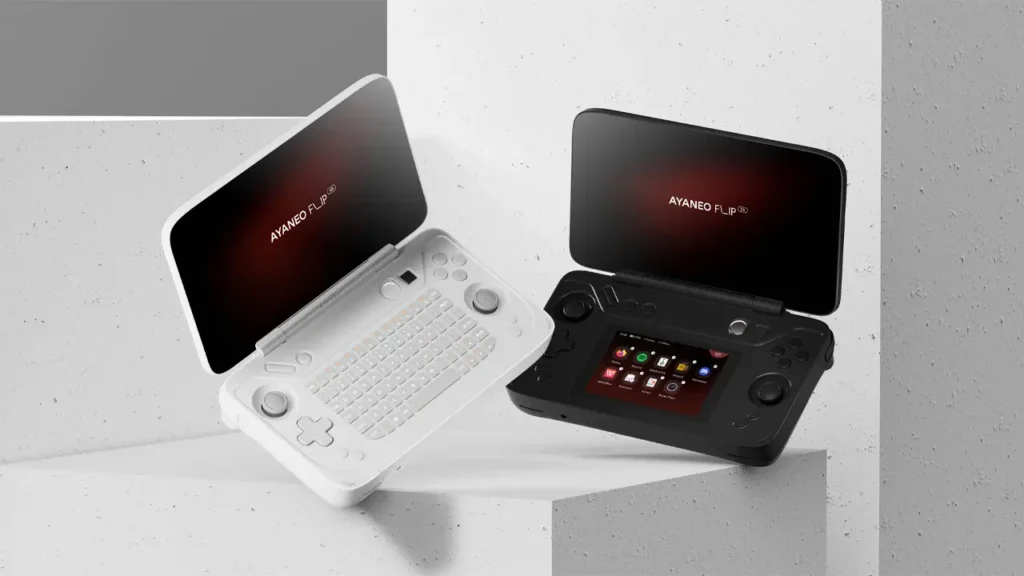
First impressions matter, and the Ayaneo Flip DS absolutely delivers. The moment you pick it up, you know this isn’t your average gaming handheld. It sports a clamshell form factor — much like the classic Nintendo DS — but executed with premium materials and engineering precision that feels like a significant step up from anything in its class.
The hinge is one of the standout engineering achievements here. It locks into multiple positions: fully closed for portability, around 120 degrees for tabletop use, around 135 degrees for comfortable handheld play, and fully flat at 180 degrees. It holds completely firm in each position, which is exactly what you want from a device built around the concept of two screens working together. A wobbly or fragile hinge would sink the whole idea, so it’s reassuring that AYANEO got this right.
In terms of Ayaneo Flip DS specs related to build, the device uses a compact clamshell footprint that makes it significantly more pocketable than rivals like the Steam Deck or Lenovo Legion Go. The buttons, joysticks, and D-pad are all positioned in the lower half of the device beneath the secondary screen, and while they are smaller than what you’d find on a traditional handheld, they still feel well-built and responsive. The joysticks in particular impressed reviewers who expected them to feel compromised, but they turned out to be completely usable.
One thing worth noting is the weight. The Ayaneo Flip DS is slightly lighter than the Steam Deck OLED, but because the weight is distributed differently in a clamshell form, longer play sessions can cause a little hand strain. It’s a trade-off that comes with the territory of packing this much technology into a compact folding design.
Overall, the build quality signals a device that AYANEO is proud of. It doesn’t feel like a prototype or an experiment — it feels like a finished, premium product designed with care.
BestChina3DPrinters
Expert Reviews & Rankings
Independent 3D Printer Reviews
Your trusted source for Chinese 3D printer reviews, rankings, and comparisons. We buy, test, and review every printer so you can make informed decisions.
Dual Screen Experience Ayaneo Flip DS
This is, without question, the most exciting and unique aspect of the entire device. The Ayaneo Flip DS dual screen setup makes it the world’s first flip dual-screen Windows handheld gaming console, and that’s not a title AYANEO takes lightly.
The primary 7-inch display sits on the top half of the clamshell, while a secondary 3.5-inch touchscreen sits in the lower half, just above the controls. The secondary screen has a resolution of 960×640 pixels and a 3:2 aspect ratio — a deliberate choice that nods to classic handheld gaming proportions.
What makes this dual screen setup genuinely clever rather than just a gimmick is how AYANEO implemented it through their AYASpace 2.0 software. The secondary screen isn’t just a static information display. It functions as a Windows native extended screen, meaning your PC literally recognizes it as a second monitor. That opens up a surprising number of use cases.
You can game on the top screen while browsing a strategy guide or watching a YouTube video on the bottom. You can use it to display real-time performance data like TDP, fan speed, CPU and GPU usage, and RAM consumption. You can launch applications directly from the bottom screen using custom shortcuts. You can even flip between Wi-Fi, Bluetooth, and other system settings without ever pausing your game.
AYANEO also built in a dedicated “Dual Screen Key” — a physical button that lets you toggle AYASpace’s secondary screen applications with a single click, or double-click to restore default window arrangements between the two screens. This elegantly solves what could have been a very messy window management problem on a keyboard-less device.
For retro gaming fans, the dual screen experience reaches its peak when playing Nintendo DS or 3DS emulation, where the two-screen layout feels genuinely authentic. Reviewers described the 3DS emulation experience as feeling closer to the original console than anything else they had tried. Nintendo Wii U emulation, which splits the game between the TV and the GamePad screen, also benefits enormously from this setup.
Display Quality Ayaneo Flip DS
The main 7-inch display on the Ayaneo Flip DS is a 1080p IPS panel with a 120Hz refresh rate, 400 nits of brightness, and 100% sRGB color coverage. In practical terms, this means games look sharp, colors are vibrant and accurate, and motion is smooth. Touch input is also supported, giving you another input option beyond the analog sticks and buttons.
The 120Hz refresh rate is particularly welcome for fast-paced games, where the extra frames translate to noticeably smoother animation compared to the 60Hz screens found on the base Steam Deck. Combined with a full 1080p resolution, the visual fidelity on this display is genuinely excellent for a handheld.
The secondary 3.5-inch screen holds its own too, with its 960×640 resolution looking crisp at that size and the 3:2 aspect ratio feeling natural for both system management tasks and retro gaming content. It also supports touch input, which is how most users will interact with AYASpace controls and quick settings.
One real-world note from reviewers: the secondary screen can get noticeably warm during extended sessions, particularly around the hinge area. It’s not hot enough to interfere with gameplay, but it’s something to be aware of during marathon sessions.
Performance & Hardware Ayaneo Flip DS
Here is where the Ayaneo Flip DS AMD Ryzen handheld really flexes its muscles. The device is powered by the AMD Ryzen 7 7840U processor paired with the integrated Radeon 780M GPU, with an optional upgrade to the AMD Ryzen 7 8840U in higher-tier configurations.
| Specification | Details |
|---|---|
| Processor | AMD Ryzen 7 7840U / 8840U |
| GPU | AMD Radeon 780M (integrated) |
| TDP | Up to 28W |
| RAM | Up to 64GB LPDDR5X @ 6400 MT/s |
| Storage | Up to 2TB PCIe 4.0 M.2 2230 SSD |
| Main Display | 7″ IPS 1080p 120Hz Touchscreen, 400 nits |
| Secondary Display | 3.5″ IPS Touchscreen, 960×640, 3:2 ratio |
| Battery | 45Wh / 6000mAh |
| Operating System | Windows 11 |
| Connectivity | Wi-Fi 6E, Bluetooth 5.2 |
| Ports | USB 4 Type-C x2, UHS-II MicroSD, OcuLink |
| Form Factor | Clamshell (dual screen) |
The AMD Ryzen 7 7840U is no slouch. With a TDP of up to 28W, it delivers performance that comfortably outpaces the Steam Deck’s custom APU in demanding scenarios. In modern AAA titles, the Flip DS runs circles around the Steam Deck at equivalent settings. Reviewers noted that the Flip DS’s gaming performance sits roughly on par with the ASUS ROG Ally using its Ryzen Z1 Extreme chip — which is impressive company to keep.
With up to 64GB of LPDDR5X RAM running at 6400 MT/s and up to 2TB of PCIe 4.0 SSD storage, the top-tier configurations are genuinely overkill for handheld gaming — but in a good way. Load times are quick, multitasking between the two screens is smooth, and there’s headroom for everything from AAA titles to demanding emulation.
The OcuLink port is also worth highlighting. It allows the Flip DS to connect to an external GPU dock, effectively turning this handheld into a desktop-grade gaming machine when you need that extra graphical horsepower at home.
Operating System Ayaneo Flip DS
The Ayaneo Flip DS Windows 11 handheld experience is one of its most compelling selling points — and one of its occasional frustrations, depending on your perspective.
Windows 11 gives you total freedom. Your entire Steam library, Xbox Game Pass, Epic Games Store, GOG, emulators, productivity apps, web browsers — everything works, because it’s a full PC. There are no compatibility layers, no workarounds, no waiting for games to be verified. If it runs on Windows, it runs on the Flip DS.
AYANEO’s AYASpace 2.0 software sits on top of Windows and acts as the controller-friendly launcher that smooths over Windows’ traditionally awkward interface on a device with no physical keyboard. It handles performance profiles, fan curves, TDP limits, quick launch shortcuts, and all the system monitoring you could want — and thanks to the secondary screen, most of these controls are just a glance and a tap away without ever interrupting your game.
The flip side is that Windows 11, by its nature, has more background overhead than a lean custom OS like Valve’s SteamOS. Updates, telemetry, and system processes all consume battery and CPU cycles in ways that SteamOS simply doesn’t. For users willing to tweak settings and learn the platform, Windows 11 on the Flip DS is incredibly powerful. For those who want a plug-and-play experience, there’s a slightly steeper learning curve compared to the Steam Deck’s console-like interface.
Gaming Experience Ayaneo Flip DS
When it comes to Ayaneo Flip DS gaming performance, the results are impressive across the board. Modern AAA titles that would struggle on the Steam Deck run smoothly here, thanks to the more powerful AMD Ryzen hardware and the higher 28W TDP ceiling.
Games like Cyberpunk 2077, Elden Ring, and other demanding titles achieve playable frame rates that the Steam Deck simply can’t match at equivalent visual settings. The 120Hz display also means that when you do push high frame rates, you actually see and feel the difference.
But the area where the Flip DS truly shines — and where no other handheld can touch it — is retro gaming and emulation. The dual screen layout transforms classic Nintendo DS and 3DS emulation into something magical. The top screen handles the main display, the bottom screen handles the secondary touch display, and it all maps together in a way that feels completely authentic to the original hardware. Wii U emulation is similarly transformed, with the GamePad screen appearing on the Flip DS’s secondary display exactly as it would on the original console.
Beyond emulation, the device handles everything from classic PSX and PS2 titles to GameCube, Wii, and even PlayStation 3 games with varying levels of performance. For pure retro emulation coverage, no handheld on the market offers the combination of hardware power and form factor that the Flip DS does.
The AYASpace quick assistant on the secondary screen also makes gaming more convenient than on any other Windows handheld. Force-closing a game, taking a screenshot, adjusting performance settings, or switching between apps can all be done from the bottom screen without fumbling through Windows menus.
Battery Life & Cooling Ayaneo Flip DS
Here’s where we need to have an honest conversation, because Ayaneo Flip DS battery life is the device’s most significant weakness, and reviewers across the board agree on this point.
The 45Wh battery is modest for a device running Windows 11 with two active screens. Real-world gaming battery life with newer, demanding titles lands around 1.5 to 2 hours. Scaling TDP down and playing lighter indie games stretches this to around 2.5 to 3 hours at best.
By comparison, the Steam Deck OLED’s optimized SteamOS can extract 4 to 8 hours from a similar battery capacity. The difference comes down to operating system efficiency — Windows 11 simply consumes more power at idle and during gaming than Valve’s lean Linux-based SteamOS.
The silver lining is that the Flip DS charges quickly. While gaming, the device recovers around 25% battery every 30 minutes when plugged in. With the device powered off, that climbs to approximately 40% per 30 minutes, meaning a full charge takes well under two hours. The USB 4 Type-C ports also support passthrough charging, so you can play while plugged in without any issues.
On the thermal side, the Flip DS manages temperatures well enough for comfortable play. The device never gets too hot to hold during normal gaming. The one warm spot is around the secondary screen and the left side near the D-pad during demanding sessions, but it’s an inconvenience rather than a dealbreaker.
| Scenario | Estimated Battery Life |
|---|---|
| AAA gaming (high TDP, 28W) | ~1.5 hours |
| Indie gaming (medium TDP) | ~2.5 hours |
| Retro emulation / low TDP | ~3 hours |
| Charging speed (gaming, plugged in) | ~25% per 30 minutes |
| Charging speed (device off) | ~40% per 30 minutes |
If you primarily game at home or near a power outlet, the battery limitation is manageable. If you need true untethered portability for long trips or commutes, it’s worth factoring into your decision.
Comparison with Steam Deck Ayaneo Flip DS
The Ayaneo Flip DS vs Steam Deck comparison is inevitable, because the Steam Deck is still the benchmark by which most handheld gaming PCs are measured. Here’s how they stack up honestly.
The Flip DS wins on raw gaming performance without question. The AMD Ryzen 7 7840U is a generational leap ahead of the Steam Deck’s custom APU, and at higher TDP settings, the Flip DS can run demanding modern games that the Steam Deck struggles with. The 120Hz 1080p display also looks significantly sharper and smoother than the Steam Deck’s 800p panel (or even the OLED’s 90Hz display at 800p).
The dual screen setup is obviously unique to the Flip DS — there is simply no comparison here. For retro gaming, emulation, and multitasking, the Flip DS offers a completely different and often superior experience that the Steam Deck cannot replicate.
Portability also goes to the Flip DS. Its clamshell design protects both screens when closed and results in a smaller overall footprint than the Steam Deck’s wide paddle design.
However, the Steam Deck wins convincingly on battery life and value. The Steam Deck OLED typically lasts two to three times longer per charge under equivalent gaming loads, thanks to Valve’s highly optimized SteamOS. It’s also significantly cheaper — even the premium Steam Deck OLED costs hundreds of dollars less than comparable Flip DS configurations.
The Steam Deck’s SteamOS is also a more polished, console-like experience out of the box. You don’t need to manage Windows updates, configure background processes, or tweak power profiles to get a great experience. It just works.
| Feature | Ayaneo Flip DS | Steam Deck OLED |
|---|---|---|
| Processor | AMD Ryzen 7 7840U / 8840U | Custom AMD APU (Zen 2 + RDNA 2) |
| Display | 7″ IPS 1080p 120Hz + 3.5″ secondary | 7.4″ OLED 800p 90Hz |
| RAM (max) | 64GB LPDDR5X | 16GB LPDDR5 |
| Storage (max) | 2TB PCIe 4.0 SSD | 512GB NVMe SSD |
| Operating System | Windows 11 | SteamOS (Linux) |
| Battery Life (gaming) | 1.5 – 3 hours | 3 – 12 hours |
| Dual Screen | Yes (7″ + 3.5″) | No |
| Form Factor | Clamshell | Traditional handheld |
| Starting Price | ~$739 (early bird) / $939+ retail | ~$549 |
In short: choose the Flip DS if you want more power, dual screens, and Windows flexibility. Choose the Steam Deck OLED if you want better battery life, a lower price, and a simpler gaming experience.
Price & Availability Ayaneo Flip DS
The Ayaneo Flip DS price is one of the more important factors in your decision, and there’s a wide range depending on configuration. The early bird pricing on the company’s Indiegogo campaign started at $739 for the base model with 16GB of RAM and 512GB of storage. Retail pricing through the official AYANEO storefront starts higher, with the range running from approximately $939 to $1,479 depending on RAM and storage choices.
The Ayaneo Flip DS release date was officially set for April 15, 2024, with the AMD Ryzen 7 7840U variant beginning to ship in mid-March 2024 for early backers.
| Configuration | Retail Price (approx.) |
|---|---|
| 16GB RAM / 512GB SSD (Ryzen 7 7840U) | From ~$939 |
| 16GB RAM / 1TB SSD | ~$999 – $1,099 |
| 32GB RAM / 2TB SSD | ~$1,199 – $1,299 |
| 64GB RAM / 2TB SSD (Ryzen 7 8840U) | Up to ~$1,479 |
It’s worth noting that AYANEO has since announced the Flip 1S DS, an upgraded successor that launched on July 10, 2025, featuring a 7-inch 144Hz OLED main display, a larger 4.5-inch secondary screen, the AMD Ryzen AI 9 HX 370 processor, and a starting pre-sale price of $799. If you’re shopping today and the original Flip DS catches your eye at a discounted price, it remains a compelling purchase. If you want the absolute latest and best version of the concept, the Flip 1S DS is where AYANEO has taken the formula next.
Final Verdict Ayaneo Flip DS
The Ayaneo Flip DS is one of the most genuinely original gaming handhelds to arrive in years. It doesn’t just copy a concept — it actually executes the dual screen Windows handheld idea in a way that makes real sense for both retro gaming fans and productivity-minded players. The AMD Ryzen hardware is fast, the main display is excellent, the AYASpace software integration with the secondary screen is cleverly done, and the overall build quality is premium.
Its weaknesses are real — battery life is the biggest one, and the price puts it firmly in enthusiast territory rather than mainstream gaming. But for a certain kind of gamer: someone who grew up with a Nintendo DS, who loves emulation, who wants the power of a full Windows PC in their pocket, and who doesn’t mind paying for something genuinely different — the Ayaneo Flip DS is hard to beat.
It’s not a device for everyone. But for the right person, it might just be the most interesting handheld ever made.
