1. Introduction
If you have been searching for a bambu lab p1s review that cuts through the marketing noise and gives you straight, honest information — you have landed in exactly the right place. The 3D printing world has seen some remarkable machines over the past few years, but few have made as much of an impression as the Bambu Lab P1S. It has become one of the most talked-about printers in the enthusiast community, and for very good reasons. Whether you are someone stepping into the hobby for the first time, a maker who wants to level up their workshop, or a professional looking for a reliable, high-speed machine for prototyping, the P1S positions itself as a genuinely capable all-rounder.
What makes this printer so exciting is the combination of things it brings together: blistering speed, a fully enclosed build chamber, multi-color printing support through the AMS system, and a surprisingly approachable user experience. It does not ask you to spend hours tuning and calibrating — it asks you to hit print and let it do its thing. That philosophy resonates with a lot of people, and this review will walk you through every aspect of the machine in detail so you can decide if the P1S belongs in your workspace.
2. Overview of the Bambu Lab P1S 3D Printer
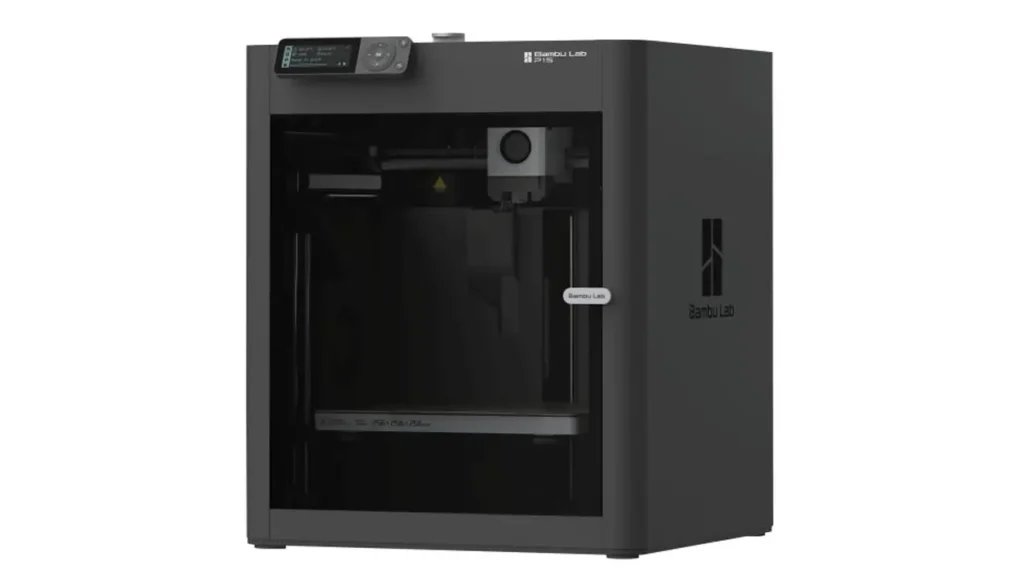
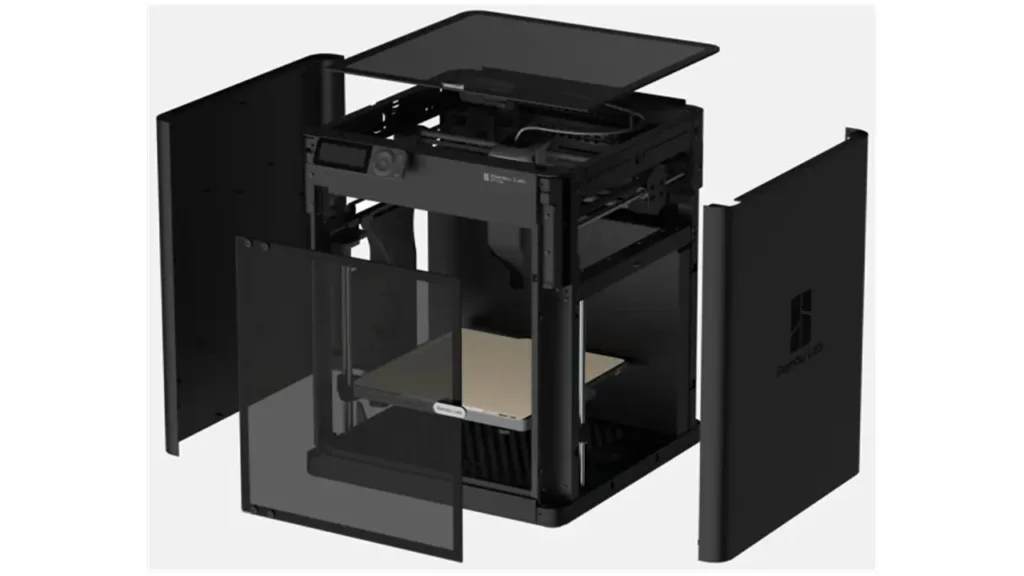
The bambu lab p1s 3d printer sits in the middle of Bambu Lab’s lineup, occupying the space between the more affordable A1 series and the flagship X1 Carbon. It is an evolution of the P1P, which was itself a well-regarded machine — but the P1S improves on its predecessor in meaningful ways. The P1S is an upgraded version of the P1P, adding an integrated enclosure with a see-through glass door, along with an air filter and additional fans to aid in part cooling and build chamber temperature management. These features allow the P1S to more effectively print temperature-sensitive filament types such as ABS and ASA.
The P1S hits a sweet spot, offering affordable CoreXY speed for a wide range of materials and access to Bambu Lab’s popular AMS system to print in up to 16 colors. It is the kind of machine that feels premium the moment you take it out of the box. The build quality is solid, the design is clean, and every detail has clearly been thought through with the end user in mind.
The design is much less industrial-looking thanks to the enclosure. There is a light that shines within the enclosure to make it easier to view a print job, and the enclosure keeps everything tucked away nicely. This enclosed aesthetic is not just about looks — as we will explore, it has a direct functional impact on what the printer can handle.
The P1S uses a CoreXY motion system, which is one of the key reasons for its exceptional speed and print quality. In CoreXY machines, the toolhead moves in both the X and Y directions using a belt system, while the build plate only moves vertically. This reduces the mass of moving parts and allows for much higher speeds without sacrificing accuracy. Combined with Bambu Lab’s advanced vibration compensation algorithms, the result is a printer that punches well above its weight class.
BestChina3DPrinters
Expert Reviews & Rankings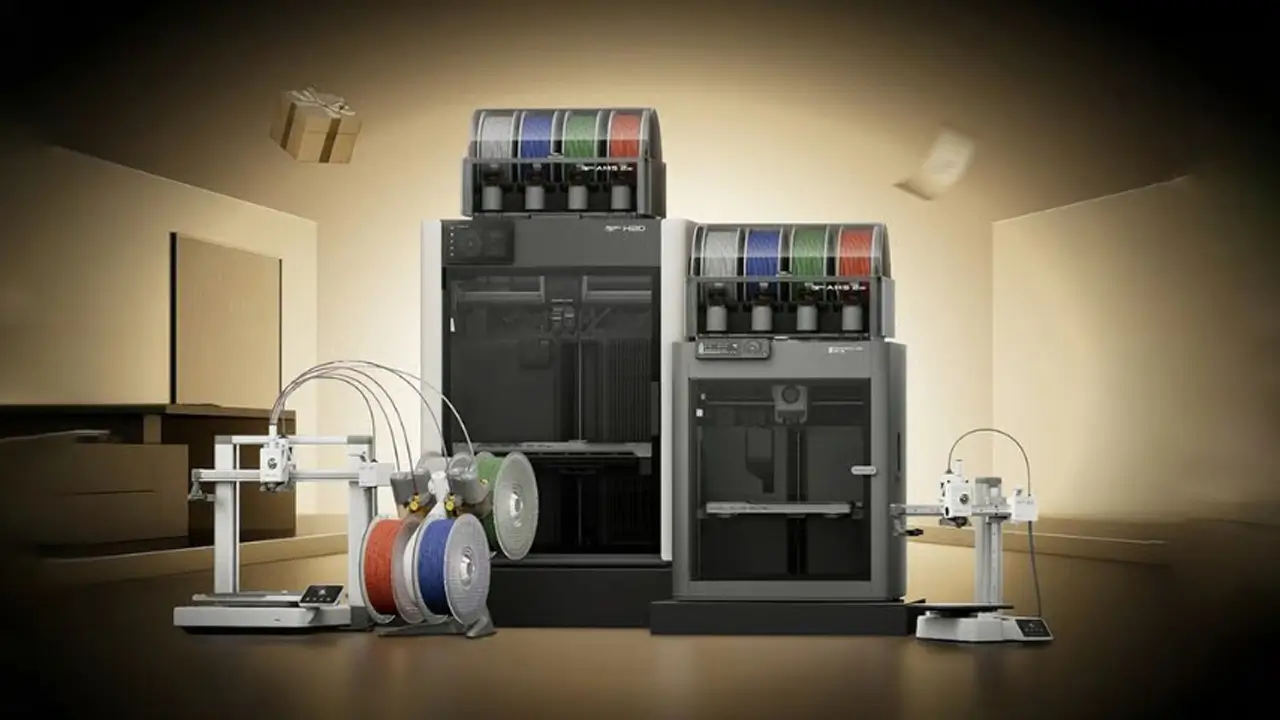
Independent 3D Printer Reviews
Your trusted source for Chinese 3D printer reviews, rankings, and comparisons. We buy, test, and review every printer so you can make informed decisions.
3. Key Specifications
Let’s dig into the bambu lab p1s specs in detail. Numbers matter when you are making a purchasing decision of this size, so here is a complete breakdown of what the machine offers straight from official sources:
| Specification | Details |
|---|---|
| Technology | Fused Deposition Modeling (FDM), CoreXY |
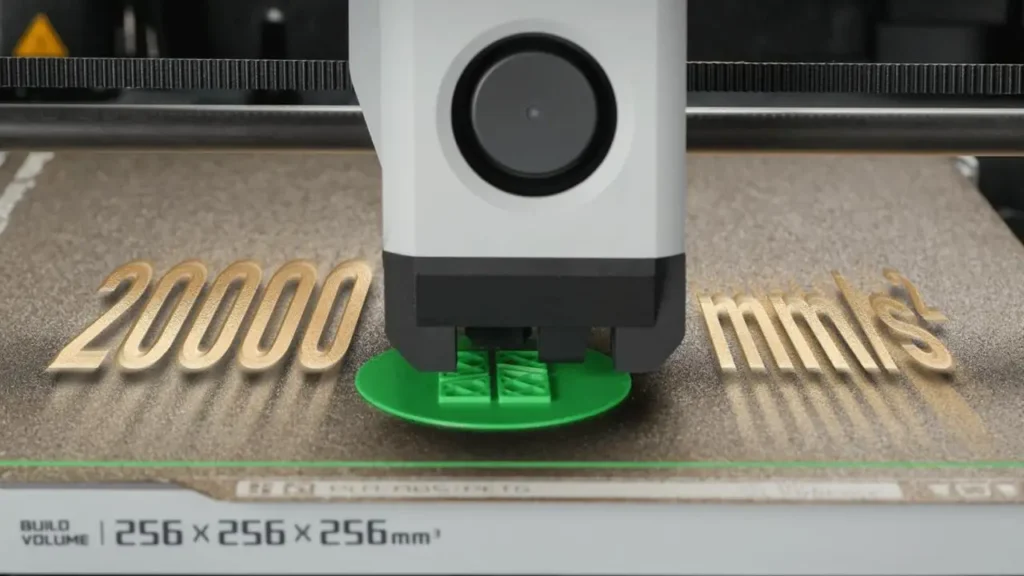
| Build Volume | 256 × 256 × 256 mm³ |
| Max Print Speed | 500 mm/s |
| Max Acceleration | 20,000 mm/s² |
| Max Hotend Temperature | 300°C |
| Max Bed Temperature | 100°C |
| Layer Resolution | 0.05 – 0.35 mm |
| Nozzle Diameter (stock) | 0.4 mm (optional: 0.2 mm – 0.8 mm) |
| Extruder Type | Direct Drive |
| Enclosure | Fully Enclosed with Glass Door and Top |
| Camera | Built-in 1080p (Live View + Timelapse) |
| Connectivity | Wi-Fi (2.4 GHz and 5 GHz), Bambu Bus |
| Storage | Built-in 8 GB eMMC + USB Port |
| Air Filtration | Activated Carbon Filter |
| Noise Level | ~50 dB (standard mode) |
| Machine Dimensions | 389 × 389 × 458 mm |
| Net Weight | 12.95 kg |
| Power Consumption | 1000W @ 220V / 350W @ 110V |
| Slicer Software | Bambu Studio (native), OrcaSlicer |
| AMS Compatible | Yes (up to 4 AMS units = 16 colors) |
These specs paint a picture of a seriously capable machine that does not cut corners where it matters. The 256 × 256 × 256 mm build volume gives you a generous 10-inch cube to work with, which is enough for the vast majority of projects most hobbyists and enthusiasts will tackle. The 300°C hotend means you have real flexibility when it comes to materials, and the 100°C heated bed ensures great adhesion across a wide range of filament types.
4. Speed Performance – 500mm/s Reality
The bambu lab p1s speed 500mm/s headline figure is one of the most attention-grabbing things about this printer, but it is worth understanding what that number actually means in real-world use. The 500 mm/s figure is the maximum theoretical speed — and the good news is that the P1S genuinely can reach it. The toolhead accelerates from zero to 500 mm/s in just 0.025 seconds, thanks to the 20,000 mm/s² acceleration specification. That is an extraordinary figure by any standard.
However, printing at the absolute maximum speed all the time is not always the right approach. Bambu Studio, the native slicer, offers three speed modes to choose from. The standard mode is conservative and optimized for quality. The sport mode pushes speeds up by roughly 124% compared to standard, while the ludicrous mode maxes everything out at 164% faster than standard settings. Most users find that the sport mode delivers an excellent balance — noticeably faster than entry-level machines while still producing clean, detailed prints.
In practical terms, the speed advantage is real and significant. A standard Benchy — the iconic stress-test boat model used across the 3D printing community — prints in approximately 18 minutes at full speed on the P1S, compared to around 26 minutes at normal speed. Most everyday prints complete in one to two hours, which is roughly four times faster than what budget or entry-level printers can achieve. For anyone who has ever stared at a printer running a 12-hour job, that kind of time saving is genuinely transformative.
It is also important to note that the P1S does not sacrifice quality for speed. This is where Bambu Lab’s engineering really shines. Before each print, the printer measures the resonant frequencies of the X and Y axes and applies input shaping — an algorithm that actively counteracts vibrations that would otherwise create ringing or ghosting artifacts in prints. Combined with the Pressure Advance feature, which adjusts filament flow in real time during acceleration and deceleration, the result is exceptionally clean output even at high speeds.
5. AMS Ecosystem Explained
The bambu lab p1s AMS system — AMS standing for Automatic Material System — is one of the most compelling differentiators of the entire Bambu Lab lineup. While many printers can technically print with a single filament, the AMS takes things to a completely different level by enabling seamless, automated switching between multiple filaments within a single print job.
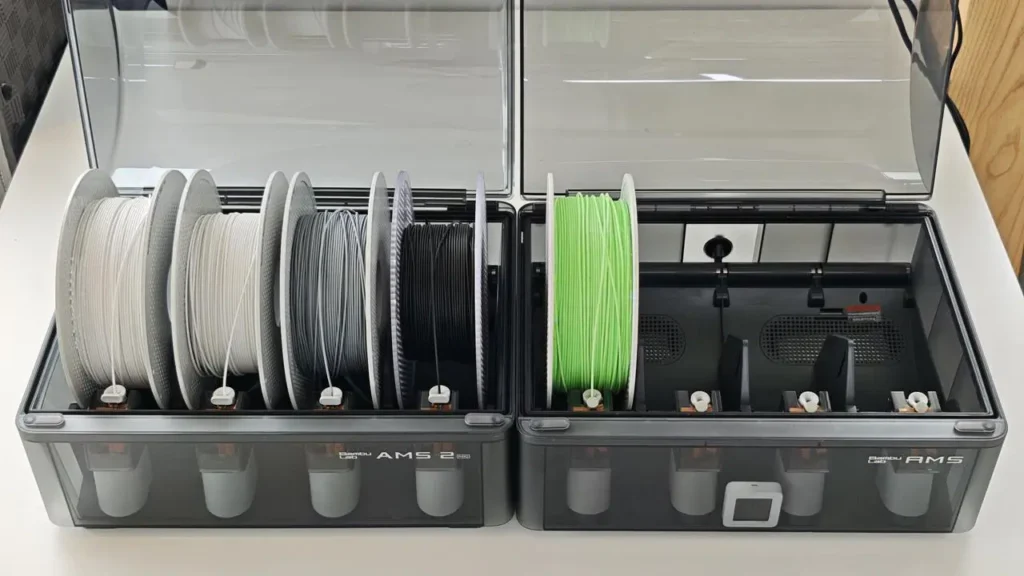
Each AMS unit holds four spools of filament. The system can be chained together — up to four AMS units can connect to a single P1S, giving you access to 16 different filaments simultaneously. This is not just about color, either. You can mix materials within the same print, though color swapping is by far the most popular application.
The AMS is also smart in ways that make day-to-day printing much more reliable. It features optical sensors that detect filament presence in each feeder and hub. If a spool runs out mid-print, the system automatically switches to another spool of the same color or pauses and alerts you. A tension module monitors for tangles in real time — if it detects excess drag on the filament, it pauses the print rather than letting a tangle ruin hours of work. During filament changes, the AMS retracts, cuts, and purges filament automatically to prevent oozing or color contamination between layers.
The AMS 2 Pro, Bambu Lab’s updated version of the system, is also compatible with the P1S, giving users access to the latest improvements in filament management and reliability. The AMS sits neatly on top of the printer or beside it, making the overall footprint quite compact for what is essentially a multi-material printing station.
6. Multi-Material Printing Capabilities
bambu lab p1s multi material printing is one of the areas where this machine genuinely excites people — and once you see a multi-color print come off the bed, it is very easy to understand why. The combination of the P1S and AMS transforms what would otherwise be a single-color workhorse into a creative powerhouse.
With four filaments loaded (or up to 16 with multiple AMS units), you can print objects in multiple colors without touching the machine during the job. Bambu Studio’s color painting tools let you assign colors to different regions of a model visually and intuitively. The process is far more accessible than older multi-material solutions, which often required complex manual setup or external hardware.
There is one honest trade-off to be aware of: multi-color printing generates purge waste. Every time the printer switches colors, it purges the old filament before loading the new one, which creates small blobs of mixed-color material that are discarded. This is an inherent limitation of the purge-based approach rather than a flaw specific to Bambu Lab’s implementation. The waste is relatively modest, and the cost of filament is manageable — but it is worth factoring in if you are doing a lot of multi-color work.
Real-world multi-material print examples from the community include a multi-color figurine printed in under three hours, multi-part articulated models, and functional parts in mixed materials like PLA combined with TPU for flexible joints. The AMS handles these switching sequences reliably, and the automated management of the process makes what sounds complex feel surprisingly routine in practice.
7. Print Quality and Precision
bambu lab p1s print quality is the area that arguably matters most, and it is where the machine earns its reputation most convincingly. The combination of a CoreXY motion system, direct-drive extruder, input shaping, and Pressure Advance means the P1S produces output that rivals machines costing significantly more.
At 0.08 mm layer height using the standard 0.4 mm nozzle, surface detail is excellent — smooth, accurate, and consistent across different materials. The auto bed leveling system is one of the best implementations available at this price point. There is no manual tramming or Z-offset adjustment needed. The printer handles all of that automatically, ensuring a perfect first layer every single time.
The direct-drive extruder is a particularly important detail. It gives the printer superior control over filament extrusion and retraction — especially valuable when printing flexible materials like TPU, which would give a Bowden-style extruder significant trouble. The motor is connected directly to the extruder, eliminating the slack and delay associated with longer filament paths. The result is precise, consistent extrusion that translates directly into cleaner prints and better detail reproduction.
Vibration compensation deserves a special mention here. The active XY vibration compensation algorithm measures the printer’s own resonant frequencies and applies corrective shaping to the motion profile. This eliminates the wavy, rippled artifacts — commonly called ringing or ghosting — that appear in prints when a printer’s frame or motion system vibrates at high speed. On the P1S, even at aggressive speed settings, ringing is impressively well controlled.
8. Filament Compatibility
bambu lab p1s filament compatibility is broader than many people expect for a printer at this price point, and the fully enclosed design is the reason why. Without an enclosure, temperature-sensitive materials like ABS and ASA are notoriously difficult to print — ambient air drafts cause uneven cooling, leading to warping, cracking, and delamination. The P1S’s sealed chamber solves this problem elegantly.
Here is a complete overview of officially supported materials:
| Filament Type | Support Level | Notes |
|---|---|---|
| PLA | Optimal | Easiest to print, best for beginners |
| PETG | Optimal | Strong, flexible, good for functional parts |
| TPU | Optimal | Flexible filament; direct drive handles it well |
| ABS | Superior | Enclosure required; use carbon filter |
| ASA | Superior | UV-resistant, great for outdoor parts |
| PVA | Supported | Water-soluble support material |
| PET | Supported | Food-safe applications |
| PA (Nylon) | Supported | High strength; moisture management needed |
| PC (Polycarbonate) | Supported | High temp resistance; advanced users |
| Carbon/Glass Fiber Reinforced | Upgrade Required | Hardened nozzle + hotend upgrade needed |
One important note on fiber-reinforced filaments: it is not recommended to print carbon fiber or glass fiber composites on the stock P1S without first upgrading the extruder and hotend. The abrasive nature of these materials will wear down the standard stainless steel nozzle quickly. An upgrade to a hardened nozzle is straightforward and affordable, and once done, the P1S handles these advanced composites very capably.
The activated carbon filter built into the enclosure plays a meaningful role here, too. When printing ABS or ASA, which can release noticeable fumes and odors, the filter helps scrub the air before it exits the machine. This makes the P1S a much friendlier machine for indoor use compared to open-frame printers running the same materials.
9. Setup and User Experience
bambu lab p1s setup is one of the areas where Bambu Lab has genuinely raised the bar for the entire 3D printing industry. From the moment you open the box to your first completed print, the experience is polished, guided, and fast. The box itself has a QR code printed on the inside flap that links to an unboxing and setup video, so even complete beginners know exactly where to start.
The in-box contents are generous and practical: the printer itself, a textured PEI flex plate, a spare hotend, two spare nozzle wiping pads, a microSD card pre-loaded with test models, a sample of green PLA on a full-size spool, an unclogging pin tool, a scraper, and a paper getting-started guide. Everything you need to begin printing is included.
Physical setup takes roughly 15 minutes. There is no assembly required — the P1S arrives pre-assembled. You remove the packaging, connect the power cable, attach the AMS if you have one, and you are essentially ready to go. The printer walks you through a brief calibration routine on first boot, after which the auto bed leveling system takes over. There is no manual tramming, no Z-offset fiddling, and no test-and-adjust loops. The printer handles all of that automatically every single time.
The control interface has two primary forms. The machine itself has a small monochrome display and a D-pad button interface for basic operations. However, Bambu Lab clearly expects most users to interact with the printer through either Bambu Studio on a computer or the Bambu Handy app on a smartphone or tablet. Both are genuinely well-designed. Bambu Studio is a full-featured slicer with an intuitive layout, good preset management, and excellent integration with the AMS for multi-color setups. The Bambu Handy app lets you start and stop prints, monitor the live camera feed, receive notifications, and manage multiple printers from anywhere.
The built-in 1080p chamber camera is a standout feature. You can check on your print remotely from the app at any time, and the camera also captures timelapse videos of completed prints — a feature that the maker community has embraced enthusiastically. The timelapse quality is smooth and satisfying to watch, and it saves automatically to the microSD card.
Overall, the user experience is among the best in the consumer 3D printing space. It respects your time, removes friction wherever possible, and rewards you with consistent results.
10. Price and Comparison with Competitors
The bambu lab p1s price sits at approximately $599 for the base printer alone. The combo version, which includes a single AMS unit, is priced higher — typically around $849–$899 depending on the retailer and any active promotions. This puts it in the upper-mid tier of the consumer 3D printer market, which is a fair reflection of what you are getting.
For context, here is how the P1S stacks up against its most natural competitor within the Bambu Lab family — the bambu lab p1s vs x1 carbon comparison that many buyers wrestle with:
| Feature | Bambu Lab P1S | Bambu Lab X1 Carbon |
|---|---|---|
| Price (approx.) | ~$599 | ~$1,099 |
| Build Volume | 256 × 256 × 256 mm³ | 256 × 256 × 256 mm³ |
| Max Print Speed | 500 mm/s | 500 mm/s |
| Max Acceleration | 20,000 mm/s² | 20,000 mm/s² |
| Enclosure | Yes (plastic sides, glass door/top) | Yes (metal sides, glass door/top) |
| Bambu Micro Lidar | No | Yes |
| AI-Assisted Detection | No | Yes |
| Display | Small monochrome + D-pad | 5-inch color touchscreen |
| AMS Compatible | Yes (up to 16 colors) | Yes (up to 16 colors) |
| Carbon Fiber Filament | Upgrade required | Better native support |
| Target Audience | Enthusiasts, hobbyists, educators | Advanced users, R&D, professionals |
| Air Filtration | Activated Carbon Filter | G3, H12 + Carbon Filter |
The comparison reveals something interesting: the P1S and X1 Carbon share the same maximum print speed and build volume. Both reach 500 mm/s with 20,000 mm/s² acceleration, and both offer the same cubic build space. Where the X1 Carbon pulls ahead is in its Micro Lidar sensor for advanced AI-assisted print monitoring, a significantly better 5-inch color touchscreen, and a more robust filtration system. Its enclosure also uses metal side panels rather than plastic, giving it a more premium feel.
For most enthusiasts, the honest answer is that the P1S delivers approximately 90% of what the X1 Carbon offers at roughly 55% of the price. The Micro Lidar is a genuinely useful feature — it automatically detects print failures and first-layer issues — but it is not something that most people cannot live without. The P1S still has excellent auto bed leveling and vibration compensation that handle the majority of print reliability concerns.
The P1S is the smarter buy for hobbyists, makers, educators, and anyone who wants a capable, fast, multi-material-ready machine without spending over a thousand dollars. The X1 Carbon makes more sense for users who work with advanced composite materials regularly, want the AI detection features, or simply want the absolute best that Bambu Lab’s enclosed CoreXY lineup has to offer.
Final Verdict
The bambu lab p1s review conclusion is a simple one: this is one of the best consumer 3D printers available today. It combines genuine 500 mm/s print speed, a fully enclosed design for advanced material compatibility, seamless AMS multi-color printing, excellent print quality through smart vibration and pressure compensation, and a user experience that removes virtually every barrier that traditionally made 3D printing frustrating. Setup takes 15 minutes. Printing is largely autonomous. The results are consistently impressive.
It is not perfect — the small monochrome display is a step behind what competitors offer at this price, multi-color printing generates purge waste, and fiber-reinforced materials require an additional nozzle upgrade. But these are minor considerations in the context of what the P1S gets right.
For anyone serious about 3D printing who wants speed, quality, multi-color capability, and genuine ease of use in a single enclosed package, the Bambu Lab P1S is an outstanding choice that will serve you well for years to come.
Tronxy 3D Printers
Shenzhen, China
Reliable FDM Printers
Affordable and reliable 3D printers from Tronxy. Wide range of models for beginners and enthusiasts, with sturdy construction and consistent performance for everyday printing.