
Why the Ayaneo Kun 2 Is Trending in 2026
If you’ve been keeping an eye on the world of portable gaming PC 2026, one name keeps coming up again and again: Ayaneo Kun 2. And honestly, it’s not hard to see why. The handheld gaming market has exploded over the past few years, transforming from a niche hobby into a fully legitimate segment of the PC gaming ecosystem. Players no longer want to be chained to a desk or even a couch — they want the full PC experience in their hands, on the train, at a café, or tucked into a backpack.
AYANEO, the Chinese hardware maker that has been quietly building one of the most ambitious handheld gaming lineups in the industry, has been at the forefront of this revolution since before the Steam Deck made the category mainstream. Their devices have consistently pushed the envelope on what a handheld can do — bigger screens, more powerful chips, more sophisticated cooling, and a level of build quality that feels genuinely premium.
The Ayaneo Kun 2 represents the natural evolution of that mission. Building on the legacy of the original AYANEO Kun — a device that turned heads with its enormous 8.4-inch display and massive 54W TDP performance headroom — the Kun 2 takes everything that made the original remarkable and asks: what if we went even further? The result is a device that is sparking serious conversations about whether a handheld can genuinely replace a laptop for a growing number of gamers and power users.
In this article, we’re going to break down everything you need to know about the Ayaneo Kun 2 — its design, its specs, its performance, its cooling, how it stacks up against the competition, and most importantly, whether it’s worth your hard-earned money. Let’s dive in.

2. What Is the Ayaneo Kun 2 and How Does It Differ from the Ayaneo 2S Handheld Gaming PC?
Before we get into the weeds of performance numbers and thermal benchmarks, it’s worth taking a step back and understanding what AYANEO is actually building here — and why the Kun 2 is a fundamentally different product from something like the Ayaneo 2S handheld gaming PC.
The AYANEO 2S is a compact 7-inch handheld that earned widespread praise from the gaming community for its near-bezel-free screen design, refined IPS display quality, and balanced approach to portability and performance. It’s sleek, relatively pocketable, and represents the kind of handheld you’d carry everywhere without thinking twice. It features high-precision hall sensor joysticks, NS-level HD linear motors for rich haptic feedback, dual six-axis gyroscopes for motion control, and a Master Controller setup that AYANEO filed six separate patents for. In many ways, the 2S is the everyday carry champion of the AYANEO lineup.
The Kun 2, however, is playing a completely different game. Where the 2S is designed to slide into your life with minimal friction, the Kun 2 is unapologetically maximal. It’s bigger, heavier, more powerful, and more feature-packed — and it makes absolutely no apologies for any of that. This is a device designed for the gamer who refuses to compromise on anything, ever.
The core philosophy difference comes down to this: the 2S is optimized for portability-first, performance-second. The Kun 2 flips that equation entirely. Performance is the non-negotiable priority, and everything else — size, weight, battery capacity, cooling complexity — is engineered to support that goal. AYANEO has built the Kun 2 to unlock nearly the same APU power levels as a desktop Mini-PC, which is an extraordinary claim for any handheld device.
Both devices run Windows 11 natively, which gives them a crucial advantage over Linux-based competitors — you get full access to the entire PC game library, your existing software ecosystem, and all the flexibility of a real Windows machine. But the Kun 2 takes that Windows experience and supercharges it with hardware that can actually push modern titles hard, rather than just running them acceptably.
BestChina3DPrinters
Expert Reviews & Rankings
Independent 3D Printer Reviews
Your trusted source for Chinese 3D printer reviews, rankings, and comparisons. We buy, test, and review every printer so you can make informed decisions.
3. Design and Ergonomics: Holding a Powerhouse
Let’s talk about how the Ayaneo Kun 2 actually feels in your hands, because for a device this ambitious, physical design is absolutely central to the experience.
The Kun 2 follows AYANEO’s signature diagonal handle layout — a design philosophy borrowed from professional-grade gaming controllers that places the thumbsticks in an offset position for a more natural hand position during extended play sessions. The grips are generously sized, which is both a blessing and a consideration depending on your hand size. For players with medium to large hands, the ergonomics are outstanding. The device simply fills your palms in a satisfying, confidence-inspiring way.
The build quality is immediately apparent the moment you pick it up. AYANEO uses premium materials throughout, and the fit and finish is on a level you don’t typically see from Chinese hardware makers at this price point. The face buttons are large and rounded, made from conductive silicone material that delivers a shorter stroke and snappier tactile response compared to typical handheld controls. Extended gaming sessions of two, three, or four hours feel manageable rather than fatiguing, which speaks to how carefully AYANEO has thought about the ergonomics.
On the rear of the device, you’ll find four fully customizable back buttons — LC1, LC2, RC1, and RC2 — positioned ergonomically so your fingers fall naturally onto them without any awkward reaching. These can be mapped to virtually any function via AYANEO’s AYASpace 2 software, giving competitive players a genuine edge in fast-paced titles. There’s also a built-in kickstand on the back, which lets the Kun 2 stand upright on a desk for TV-style play or work tasks.
The Kun 2 is available in three colorways: Silver Wing, Black Feather, and White Silk. Each finish has a distinctive character — the Silver Wing is striking and futuristic, the Black Feather is understated and professional, and the White Silk is clean and modern. RGB lighting accents are built into the thumbstick rings and the central AYANEO logo button, adding a gaming aesthetic that can be customized or disabled entirely through AYASpace 2.
One honest consideration worth mentioning: the Kun 2 is not a light device. At close to 950 grams, it’s heavier than virtually every other handheld gaming PC on the market. That’s the honest tradeoff for the larger battery, more complex cooling system, and bigger display. If you’re looking for something you can hold up in bed for two hours without your arms getting tired, this isn’t the device for that use case. But if you’re playing on a desk, couch, or with the kickstand deployed, the weight becomes a total non-issue.
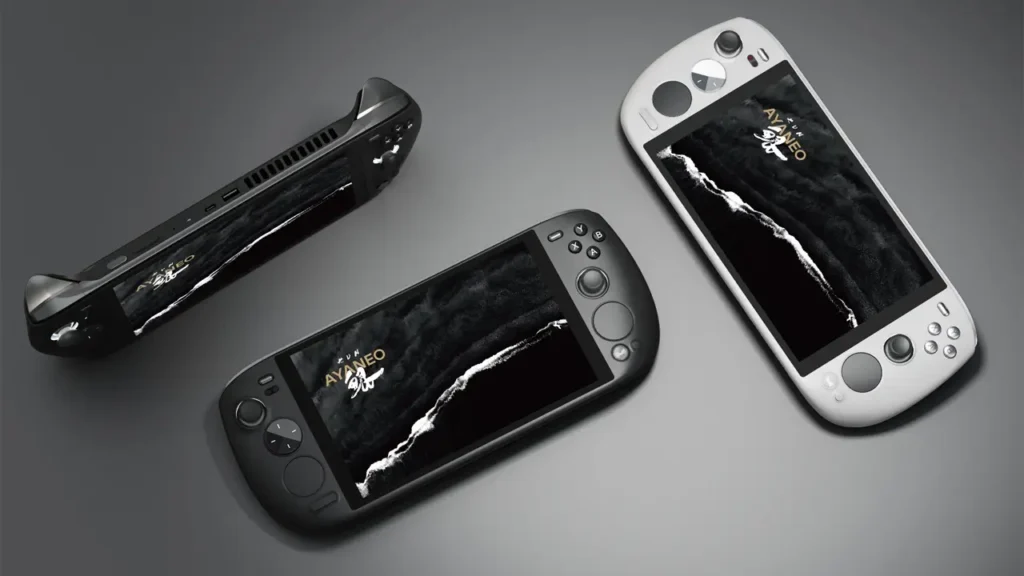
4. The Display: A New Level of Portable Gaming
The display is one of the most immediately impressive things about the Ayaneo Kun 2, and it’s a major reason why so many people consider it the best handheld gaming PC in its class.
AYANEO has equipped the Kun 2 with an 8.4-inch IPS LCD touchscreen running at a resolution of 2560 x 1600 pixels — that’s 2.5K resolution on a handheld device, delivering a pixel density of approximately 359 PPI. Text is sharp, game environments are richly detailed, and the overall visual experience is genuinely stunning when you first turn it on.
Brightness reaches up to 500 nits, which is exceptional for a handheld in this category. Most competing devices struggle to hit 400 nits, which means the Kun 2 handles outdoor or brightly lit environments significantly better than its rivals. Colors are vibrant with 90% DCI-P3 color coverage, giving the display the kind of cinematic quality that makes both gaming and media consumption a pleasure.
The display uses full OCA lamination technology, which bonds the glass directly to the panel and eliminates the air gap that causes internal reflections on cheaper screens. The result is a display that feels more vivid, more precise to the touch, and more transparent than laminated alternatives — a quality difference that’s immediately visible when you hold the two side by side.
One particularly clever feature is the dedicated 800p gaming mode. At 800p resolution with adjusted performance settings, the Kun 2 can push significantly higher frame rates while reducing the GPU workload — ideal for competitive multiplayer titles where responsiveness matters more than visual fidelity. Being able to flip between 2.5K cinematic quality and 800p high-performance mode with a software toggle gives players real flexibility that most handhelds simply don’t offer.
The 10-point multi-touch support means the Kun 2 also functions as a legitimate Windows touch device, which is more useful than it sounds. Navigating menus, using touch-optimized apps, or just scrolling through a browser feels natural and responsive. Combined with the dual touchpads that support full gesture control and custom key mapping, the Kun 2 offers more input flexibility than any other handheld gaming PC currently available.

5. Performance: Can It Replace a Laptop?
This is the question that comes up in every conversation about the Ayaneo Kun 2 performance, and the answer is more nuanced — and more exciting — than you might expect.
The Kun 2 is built around the AMD Ryzen 7 7840U APU, featuring 8 Zen 4 cores and 16 threads, with a base clock of 3.3 GHz and boost capability up to 5.1 GHz. The integrated AMD Radeon 780M GPU brings RDNA 3 architecture with 12 Compute Units running at up to 2.7 GHz. This combination represents the most powerful silicon that AMD has put into this class of device, and it shows in real-world use.
What makes the Kun 2 truly special from a performance standpoint is its configurable TDP system. Most handhelds lock you into a single power envelope. The Kun 2 gives you three distinct modes:
| Mode | TDP | Use Case |
|---|---|---|
| Efficiency Mode | 15W | Everyday tasks, indie games, long battery life |
| Balanced Mode | 30W | Mid-range AAA titles, good battery balance |
| Performance Mode | 54W | Maximum AAA performance, plugged in or short sessions |
That 54W ceiling is what separates the Kun 2 from the competition. The ROG Ally and Steam Deck typically operate in the 15W to 25W range. The Lenovo Legion Go pushes slightly higher. But 54W is desktop-adjacent territory, and at that power level, the Ryzen 7 7840U performs on par with many mid-range gaming laptops.
Memory options are equally generous. The Kun 2 is available with 16GB, 32GB, or 64GB of LPDDR5X RAM running at 7500 MHz — the highest-speed memory spec available for this platform. For the 64GB configuration in particular, this is more RAM than most gaming laptops ship with, making the Kun 2 a genuinely capable productivity machine for video editors, developers, and power users alongside its gaming credentials.
Storage options range from 512GB up to 4TB via PCIe 4.0 NVMe M.2 2280 SSDs, with multiple upgrade slots available for future expansion. Load times are exceptional, and the fast storage bandwidth means game streaming, content creation, and large file transfers are handled without hesitation.
Can it replace a laptop? For gaming? Absolutely and enthusiastically yes. For general productivity? For most users — yes. The Kun 2 running at full Windows 11 with 32GB or 64GB of RAM connected to an external monitor, keyboard, and mouse is genuinely indistinguishable from a capable desktop setup. The windows handheld gaming console category has officially graduated from “interesting experiment” to “legitimate laptop alternative,” and the Kun 2 is the device that makes that case most convincingly.

6. Cooling System: Why It Makes All the Difference
Any device that claims to sustain 54W of continuous performance output had better have a serious plan for thermal management — and the Ayaneo cooling system inside the Kun 2 is one of the most sophisticated ever engineered into a handheld form factor.
AYANEO calls the Kun 2’s thermal solution the “Kunpeng” cooling system, and the engineering behind it is genuinely impressive. At the core is a PC-grade large-sized high-pressure turbine cooling fan — not a laptop fan, not a phone fan, but a fan designed to the specifications of a small desktop PC. This fan moves air at a rate of 6.5 cubic feet per minute, with an exhaust area of 480 square millimeters.
The heat dissipation fins are equally remarkable. The Kun 2 uses 59 individual cooling fins, each just 0.2mm thick, with a combined total heat dissipation surface area of 32,775 square millimeters. That’s an extraordinary amount of thermal surface area packed into a handheld chassis, and it directly enables the sustained high-power performance that the Kun 2 is designed to deliver.
Triple copper heat pipes route heat away from the processor and GPU die efficiently, ensuring that heat spikes during demanding gaming sessions are absorbed and distributed quickly before they have a chance to cause thermal throttling. In practice, this means the Kun 2 can sustain its 54W performance mode for extended periods without the performance cliff that affects lesser-cooled devices.
What makes this particularly impressive from an engineering standpoint is how AYANEO has managed to package all of this thermal hardware into a device that still feels and functions like a handheld gaming console rather than a portable radiator. The fan noise at maximum output is audible but not distracting — and at the 15W and 30W power modes, the cooling system operates near-silently.
The adjustable TDP system and the cooling hardware work in concert through AYASpace 2 software. Users can set performance profiles per game or application, letting the system automatically ramp power and cooling up or down based on what’s running. It’s a level of control that feels genuinely sophisticated and reflects AYANEO’s understanding that their users are enthusiasts who want to tune their experience rather than accept a one-size-fits-all approach.

7. How Does It Compare to Competitors?
The ayaneo vs steam deck conversation is one of the most common debates in handheld gaming circles, and it’s worth addressing directly and honestly.
| Feature | Ayaneo Kun 2 | Steam Deck OLED | ASUS ROG Ally | Lenovo Legion Go |
|---|---|---|---|---|
| Display | 8.4″ IPS 2.5K 120Hz | 7.4″ OLED 1280×800 | 7″ IPS 1080p | 8.8″ IPS 2560×1600 |
| Max TDP | 54W | 15W | 25W | 25W |
| Battery | 75Wh | 50Wh | 40Wh | 49.2Wh |
| Max RAM | 64GB LPDDR5X | 16GB LPDDR5 | 16GB LPDDR5 | 16GB LPDDR5X |
| OS | Windows 11 | SteamOS (Linux) | Windows 11 | Windows 11 |
| Touchpads | Dual (gesture support) | Dual | None | One (right side) |
| Starting Price | $999 | $549 | $699 | $699 |
The Steam Deck OLED is a phenomenal device, but it operates in a fundamentally different tier. Valve’s handheld runs SteamOS rather than Windows, which limits its compatibility with certain titles and software ecosystems. Its 15W TDP ceiling means it cannot match the raw performance of the Kun 2 in demanding scenarios. However, the Steam Deck OLED’s display is genuinely beautiful, its price is dramatically lower, and its software experience is more polished and user-friendly for casual players. If budget is a primary concern or you primarily play Steam titles, the Steam Deck remains a compelling choice.
The ASUS ROG Ally is probably the Kun 2’s closest mainstream rival in the Windows handheld space. It’s lighter, more affordable, and more pocketable. But its smaller battery, lower maximum TDP, and less comprehensive control layout mean it concedes ground to the Kun 2 on almost every performance metric that enthusiasts care about.
The Lenovo Legion Go is perhaps the most direct physical competitor, with a similarly large display and detachable controller design. However, the Legion Go’s cooling system doesn’t match the engineering depth of the Kun 2, and its build quality has been criticized in several reviews. The Kun 2 wins on thermal management, RAM options, and overall build feel.

8. Real Gaming Experience: What It’s Actually Like to Play
Numbers and specifications only tell part of the story. Reading an ayaneo 2s review or any hardware breakdown will give you the benchmarks — but what does the Ayaneo Kun 2 actually feel like to play on?
The short answer is: it feels like playing on a powerful gaming PC that happens to fit in your hands, and that sensation never entirely wears off.
Booting up a demanding open-world title like Cyberpunk 2077 or Elden Ring at the Kun 2’s full 54W performance mode delivers frame rates and visual quality that would have been unthinkable on a handheld device just a few years ago. Running these titles at medium-to-high settings on the 2.5K display produces a genuinely cinematic experience. The large screen size means you’re not squinting at tiny environmental details — the game world feels expansive and immersive in a way that smaller 7-inch handhelds simply cannot replicate.
For competitive multiplayer games — think Valorant, CS2, or Rocket League — the Kun 2 is equally capable. Switching to the 800p gaming mode delivers the high frame rates that competitive play demands, and the hall-effect joysticks ensure there’s no drift or dead zone imprecision to fight against. The four rear buttons become second nature after a few sessions, freeing up your face buttons for in-game actions rather than system functions.
The dual touchpads are a genuinely useful addition for strategy games, real-time tactics titles, and any game that benefits from precise cursor control. Running a grand strategy game like Crusader Kings III or a city builder on a handheld PC feels surprisingly natural with the Kun 2’s touchpad setup — something that joystick-only handhelds struggle with considerably.
Battery life in real gaming scenarios varies meaningfully by power mode. At 15W efficiency mode running lighter titles, you can realistically expect four to five hours of gaming. At 30W balanced mode with mid-range AAA titles, expect around two to three hours. At the full 54W performance mode pushing maximum graphical quality, plan for sessions of around 60 to 90 minutes before needing to reach for a charger. That’s the honest trade-off of a device this powerful, and the 75Wh battery is impressively large for what it’s asked to do.
The AYASpace 2 software deserves special mention here. It’s the central hub for customizing every aspect of the Kun 2 experience — performance profiles, button mapping, gyroscope settings, display configuration, fan curves, and more. For enthusiasts who love to tune and optimize, AYASpace 2 is genuinely excellent. For more casual users, the default profiles work well without any intervention needed.

9. Price and Market Positioning
Let’s talk about ayaneo kun price, because it’s a topic that can’t be avoided when reviewing a device that positions itself at the premium end of the market.
The Ayaneo Kun 2 starts at $999 for the entry-level 16GB RAM / 512GB storage configuration. From there, the pricing scales with your memory and storage choices:
| Configuration | Early Bird Price | Retail Price |
|---|---|---|
| 16GB RAM + 512GB SSD | $999 | $1,209 |
| 32GB RAM + 1TB SSD | $1,159 | $1,359 |
| 32GB RAM + 2TB SSD | $1,259 | $1,459 |
| 64GB RAM + 4TB SSD | $1,699 | $1,949 |
Is the pricing justified? That depends entirely on what you’re comparing it to and what you value.
Compared to the Steam Deck at $549, the Kun 2 is significantly more expensive — but it’s also significantly more powerful, ships with full Windows 11, and offers a much larger and sharper display. You’re essentially paying for a fundamentally different class of device.
Compared to a gaming laptop in the $1,000 to $1,500 range, the Kun 2 is actually competitive when you factor in what it offers: built-in gaming controls, a handheld form factor, a large high-resolution touchscreen, and the same raw processing power as many mid-range portable gaming machines. Viewed through that lens, the Kun 2 starts to look less like an expensive handheld and more like an affordable gaming laptop with a unique form factor advantage.
For early buyers who catch AYANEO’s crowdfunding campaigns, the early bird pricing represents genuinely strong value — though as always with crowdfunding hardware, patience and research are your friends.
10. Final Verdict: Who Should Buy the Ayaneo Kun 2?
We’ve covered a lot of ground in this review, so let’s bring it all together and answer the core question: should you buy the Ayaneo Kun 2?
The Ayaneo Kun 2 is the right device for you if you fall into one or more of these categories:
You’re a serious PC gamer who also wants the freedom to play anywhere. The Kun 2 doesn’t ask you to make meaningful sacrifices on gaming performance in exchange for portability — it genuinely delivers both. If you’ve been eyeing a gaming laptop but find the idea of detachable gaming controls and a handheld form factor more appealing, the Kun 2 makes a powerful case.
You want Windows without compromise. SteamOS on the Steam Deck is excellent, but it’s not Windows. If your game library, your workflow, or your software ecosystem depends on Windows 11, the Kun 2 delivers it fully and natively with no workarounds needed.
You’re a productivity-minded gamer who wants one device to do it all. With 32GB or 64GB of RAM, a fast PCIe 4.0 SSD, and the ability to connect to external monitors, keyboards, and mice via USB4, the Kun 2 can be your primary computing device. Game on it in handheld mode, then dock it at your desk for work. It’s a genuinely versatile machine.
You appreciate premium build quality and engineering. AYANEO sweats the details — from the hall-effect sensors to the 59-fin cooling array to the dual touchpads with gesture support. If you care about craftsmanship in your hardware, the Kun 2 delivers it in abundance.
The Ayaneo Kun 2 is not the right choice if you’re on a tight budget, if you prioritize ultra-lightweight portability above all else, or if you primarily play titles available on Steam and prefer the polished simplicity of SteamOS. In those cases, the Steam Deck OLED remains a hard device to argue against.
But for everyone else — the enthusiasts, the power users, the gamers who refuse to settle — the Ayaneo Kun 2 represents the current pinnacle of what a Windows handheld gaming PC can be. It’s big, bold, powerful, and uncompromising. In other words, it’s exactly what it set out to be.
If the best handheld gaming PC experience currently available is what you’re after, the Ayaneo Kun 2 belongs at the top of your list. Full stop.
