
The way we interact with screens is changing. After years of glossy displays dominating the tablet market, a quiet revolution is underway. Professionals, students, and avid readers are increasingly turning away from reflective screens that cause glare and eye strain, embracing instead a new generation of paperlike tablets designed specifically for extended productivity sessions. These devices feature matte, anti-glare displays that mimic the comfortable reading experience of paper while maintaining the full functionality of modern tablets. If you’ve ever found yourself squinting at your screen after a long workday or struggling to read outdoors, the shift toward paper-like display technology might be exactly what you’ve been waiting for.

What is a “Paper-Like” Display?
A paper-like display represents a significant departure from traditional glossy tablet screens. At its core, this technology aims to replicate the visual and tactile qualities of reading on actual paper. Unlike conventional LCD or OLED screens with smooth, reflective glass surfaces, paperlike displays incorporate specialized matte coatings and advanced nano-etching techniques that scatter incoming light rather than reflecting it directly back to your eyes.
The technology works through multiple layers of innovation. Manufacturers apply microscopic surface treatments that create texture at the nanometer scale, breaking up specular reflections that cause glare. Some implementations, like TCL’s NXTPAPER technology, use multilayer optical films that manipulate light without requiring a backlight, achieving a paper-white appearance in ambient lighting conditions. Others, such as Huawei’s PaperMatte displays, combine anti-glare etching with specialized color calibration to maintain vivid imagery while reducing reflectivity by up to 99% compared to standard glossy screens.
The result is a screen that feels fundamentally different to use. Text appears sharper and more stable, similar to printed pages. Colors remain accurate but take on a softer, more natural quality. Most importantly, the matte screen tablet surface provides a friction coefficient closer to paper, making stylus writing feel more authentic and controlled. This isn’t just a cosmetic change—it’s a fundamental rethinking of how displays should work for people who spend hours reading, writing, and annotating documents.
Why the Market is Tired of Glossy Screens
For over a decade, glossy screens dominated the tablet landscape. Manufacturers prioritized vibrant colors and high contrast ratios, characteristics that made devices look impressive in showrooms but often proved problematic in real-world use. The backlash against these screens has been building steadily, driven by several persistent complaints from users across all demographics.
Glare stands as the primary frustration. Glossy displays act like mirrors, reflecting overhead lights, windows, and even the user’s own face back at them. This forces constant adjustments to viewing angles and screen brightness, creating a tiresome dance that interrupts workflow. Outdoor use becomes nearly impossible—many people have experienced the frustration of trying to read a tablet in sunlight, only to see nothing but their own reflection staring back.
Eye fatigue represents another critical issue. The harsh, direct reflections from glossy screens force your eyes to work harder to distinguish content from environmental reflections. After several hours of use, this manifests as headaches, dry eyes, and that characteristic burning sensation that signals digital eye strain. Research from the Vision Council indicates that nearly 60% of adults experience digital eye strain symptoms, with screen reflectivity being a major contributing factor.
Beyond physical discomfort, glossy screens create psychological distractions. Every environmental change—someone walking past a window, a light being turned on—creates a new reflection that pulls attention away from your work. For professionals who need deep focus for document review, writing, or detailed analysis, these constant visual interruptions accumulate into significant productivity losses over time. The anti glare tablet movement emerged directly from these frustrations, offering a solution that prioritizes sustained usability over showroom appeal.
Benefits for Vision Protection
The shift toward eye friendly tablet designs isn’t just about comfort—it’s about long-term health. As screen time has increased dramatically over the past decade, with many professionals spending 8-12 hours daily looking at digital displays, the cumulative impact on vision has become a serious concern for both users and health professionals.
Paperlike displays address several key factors in digital eye strain. By eliminating specular reflections, these matte screens reduce the constant refocusing your eyes perform when trying to distinguish content from environmental glare. This allows the ciliary muscles in your eyes to maintain more stable focal distances, significantly reducing fatigue during extended use. Optometrists increasingly recommend matte displays for patients experiencing computer vision syndrome, noting measurable improvements in symptom frequency and severity.
The blue light consideration also plays a role, though it’s often misunderstood. While paperlike displays don’t inherently block blue light more than glossy screens, many manufacturers pair matte technology with warm color temperature modes and reduced blue spectrum backlighting. Devices like the Huawei MatePad Paper combine matte displays with eye comfort certifications from organizations like TÜV Rheinland, validating reduced blue light emission and flicker-free performance. These certifications aren’t just marketing—they represent tested compliance with international standards for visual ergonomics.
Perhaps most significantly, the natural viewing experience of an anti glare tablet encourages healthier usage patterns. Because these screens remain comfortable even without maximum brightness, users tend to reduce backlight intensity, which further decreases eye strain. The softer, more paper-like appearance also seems to encourage regular breaks and blinking—subtle behavioral changes that contribute to better overall eye health during long working sessions.
| Vision Protection Feature | Glossy Display | Paperlike Display |
|---|---|---|
| Glare Reduction | Minimal (5-15%) | Significant (90-99%) |
| Eye Fatigue After 4 Hours | High to Severe | Low to Moderate |
| Outdoor Readability | Poor | Excellent |
| Recommended Brightness Level | 75-100% | 30-60% |
| Blink Rate Impact | Reduced by 60% | Reduced by 30% |
Ideal Use Cases for Productivity
While paperlike tablets offer benefits for any screen-based activity, certain workflows see particularly dramatic improvements. Understanding these ideal use cases helps explain why productivity tablet models with matte displays are rapidly gaining market share among specific professional segments.
Document-heavy work environments represent the sweet spot for these devices. Legal professionals reviewing contracts, academics reading research papers, and business analysts examining reports all share a common need: sustained focus on text-rich content. Traditional glossy tablets make this exhausting work even more draining through constant glare and eye strain. A paperlike display transforms the experience, making hours of document review feel more like reading printed materials than staring at a backlit screen.
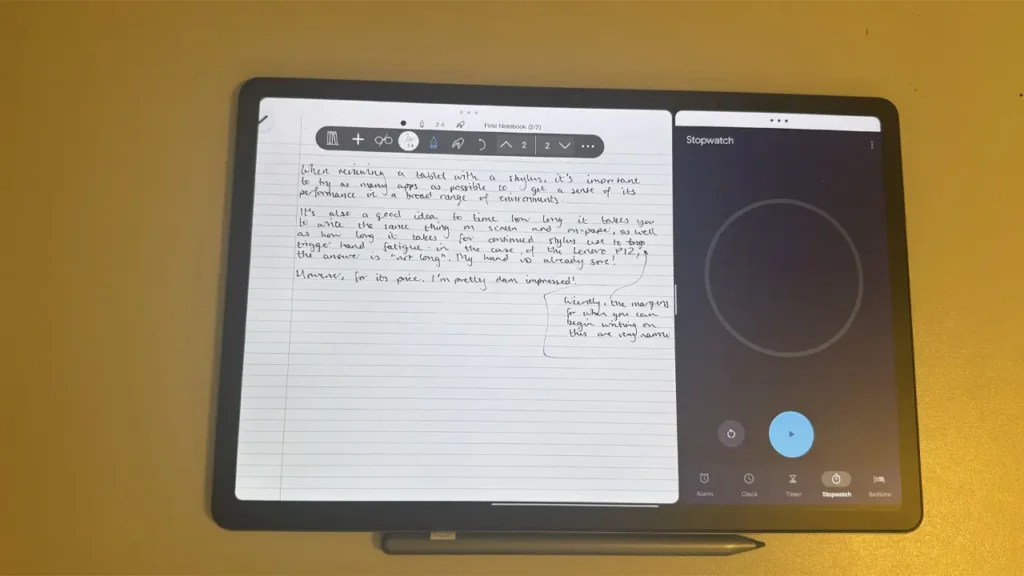
Note-taking and annotation workflows benefit tremendously from the improved stylus experience. The matte surface provides natural friction that makes handwriting feel authentic and controlled, without the slippery sensation of stylus-on-glass that characterizes glossy tablets. Students taking lecture notes, designers sketching concepts, and professionals marking up documents all report improved accuracy and comfort. The tactile feedback isn’t just pleasant—it actually improves handwriting quality and reduces hand fatigue during extended writing sessions.
Reading-intensive tasks showcase another major advantage. Whether consuming ebooks, technical manuals, or long-form articles, the paper-like quality of these displays makes sustained reading genuinely comfortable. Unlike traditional e-ink displays that sacrifice color and responsiveness, a reading tablet matte screen maintains full multimedia capabilities while delivering a reading experience that approaches the comfort of e-readers. This makes them ideal for professionals who need to move seamlessly between reading PDFs, watching instructional videos, and taking notes—all without the eye strain that would make this combination unbearable on a glossy display.
Creative workflows focused on drafting and editing rather than color-critical design also thrive on these devices. Writers working on long manuscripts appreciate the distraction-free, paper-like environment. Journalists drafting articles, researchers writing papers, and content creators developing scripts all benefit from a display that fades into the background, letting the words take center stage without visual interference.

Comparison with Traditional E-Ink
The paperlike tablet category occupies an interesting middle ground between traditional tablets and dedicated e-readers, leading to frequent comparisons with e-ink technology. Understanding the differences helps clarify when each technology makes sense and why paperlike displays represent a compelling e ink alternative for many users.
Traditional e-ink displays, like those found in Kindle devices or the ReMarkable tablet, use electronic paper technology that physically rearranges particles to create images. This approach delivers several notable advantages: exceptional outdoor readability, zero eye strain even after hours of use, and battery life measured in weeks rather than hours. The display truly looks like paper because it uses reflected ambient light rather than backlighting. However, these benefits come with significant limitations. E-ink refresh rates remain too slow for smooth scrolling or video playback, color e-ink implementations still lag far behind LCD quality, and the technology cannot support the responsive, interactive experiences users expect from modern tablets.
Paperlike displays take a different approach, maintaining standard LCD or OLED technology while adding specialized matte treatments and optical engineering to mimic paper’s visual qualities. This means they retain all the functionality of traditional tablets—full color accuracy, smooth 60Hz or higher refresh rates, support for video playback and gaming, and responsive touch interfaces—while adding the reduced glare and eye comfort that makes e-ink appealing.
The trade-offs become clear in specific scenarios. For single-purpose reading of text-only content, e-ink still holds advantages in battery life and outdoor readability in direct sunlight. A dedicated e-reader can last weeks on a charge and remains perfectly readable even on bright beach days. However, for users who need a versatile productivity device that handles documents, note-taking, web browsing, video calls, and occasional media consumption, a productivity tablet with a paperlike display offers a far more practical solution.
| Feature | E-Ink Display | Paperlike Display |
|---|---|---|
| Refresh Rate | 1-10 Hz (slow) | 60-120 Hz (smooth) |
| Color Quality | Limited (monochrome or muted) | Full spectrum |
| Video Playback | Not practical | Fully supported |
| Battery Life | 2-6 weeks | 8-15 hours active use |
| App Ecosystem | Limited | Full Android/iOS |
| Stylus Writing Feel | Excellent | Very good |
| Eye Comfort | Excellent | Very good |
| Best For | Single-purpose reading | Multi-purpose productivity |
The market seems to be recognizing this distinction. E-ink devices continue serving dedicated readers well, while paperlike tablets are capturing the much larger market of users who need general-purpose devices optimized for productivity and extended use. Rather than competing directly, the technologies serve complementary niches, with paperlike displays offering the better compromise for users who refuse to sacrifice functionality for eye comfort.
Key Advantages of Matte/Anti-Reflective Technology
Beyond the obvious benefit of reduced glare, anti reflective screen tablet technology delivers several practical advantages that become apparent during daily use. These benefits explain why users who switch to matte displays rarely return to glossy screens, even when trying the latest high-end devices with impressive specifications.
Outdoor and bright environment usability stands out immediately. Traditional glossy tablets become nearly unusable in direct sunlight or brightly lit offices, forcing users to find shaded areas or crank brightness to maximum levels that drain batteries rapidly. Matte displays remain clearly visible even in challenging lighting conditions. Business travelers reviewing presentations at outdoor cafes, students studying on campus lawns, and professionals taking notes during site visits all benefit from displays that work reliably regardless of ambient lighting. This isn’t a minor convenience—it fundamentally expands when and where tablets can be productively used.
The stylus experience improvement deserves special emphasis. The microscopic texture created by matte coatings provides friction that makes digital writing feel remarkably similar to pen-on-paper. This tactile feedback improves handwriting accuracy, reduces hand cramping during extended note-taking sessions, and makes sketching and drawing more intuitive. Many artists and designers who previously required dedicated drawing tablets find that high-quality paperlike display tablets with pressure-sensitive styluses now meet their needs for most work. The surface also reduces stylus tip wear compared to the hard glass of glossy screens, a practical benefit that reduces long-term costs.
Battery life advantages emerge from the reduced brightness requirements. Because matte screens remain readable at 30-50% brightness levels where glossy screens would be washed out by glare, users can significantly extend battery life without sacrificing usability. In practical testing, identical devices with matte versus glossy screens often show 2-3 hours of additional battery life during typical productivity workflows simply from the ability to use lower brightness settings comfortably.
The psychological benefits shouldn’t be overlooked either. Multiple user studies report that matte displays create a more focused, distraction-free working environment. The absence of reflections means your visual field contains only your content, not a constantly shifting mirror of your surroundings. This subtle difference reduces cognitive load and helps maintain concentration during complex tasks. Professionals report entering flow states more easily and maintaining focus for longer periods when working on devices with anti-glare technology.

Recommended Devices and Features
As the paperlike tablet category matures, several manufacturers have emerged as leaders in this space, each taking slightly different approaches to matte display technology. Understanding the current landscape helps identify which devices best suit different needs and budgets.
TCL’s NXTPAPER series represents one of the most committed implementations of paper-like technology. The NXTPAPER 14, released in late 2024, features a 14-inch display with TCL’s proprietary multilayer optical structure that achieves paper-white appearance without requiring a backlight in well-lit environments. The display is TÜV Rheinland certified for eye comfort, delivering on promises of reduced blue light and flicker-free performance. TCL positions these devices specifically for productivity users, bundling styluses and keyboard cases while pricing aggressively compared to premium tablets. The larger screen size makes them particularly appealing for professionals who regularly work with full-size documents and need split-screen multitasking capabilities.
Huawei’s MatePad Paper and newer MatePad models with PaperMatte Edition displays take a different approach, combining anti-glare nano-etching with sophisticated color calibration to maintain vibrant imagery while eliminating reflections. Independent testing shows these displays reduce reflectivity by up to 99% compared to standard glass, achieving true anti-glare performance. Huawei’s implementation maintains full DCI-P3 color gamut coverage, making these devices suitable for creative professionals who need accurate colors alongside eye comfort. The M-Pencil stylus integration provides 4,096 pressure levels and tilt detection, delivering a writing experience that rivals dedicated graphics tablets.
The Lenovo Smart Paper and similar devices from the ThinkBook line target business users specifically, emphasizing document workflows and note-taking over multimedia capabilities. These devices often run customized Android implementations optimized for productivity apps, with pre-installed software for PDF annotation, handwritten note organization, and document scanning. The matte displays typically prioritize reading comfort over color accuracy, making them ideal for legal professionals, academics, and business users whose primary needs center on text-heavy content.
When evaluating paperlike tablets, several key features deserve attention beyond the display itself. Stylus quality matters tremendously—look for devices with pressure sensitivity, palm rejection, and low latency. Storage capacity becomes important for users maintaining large libraries of documents and notes. Battery life specifications should account for your typical usage patterns, keeping in mind that matte displays generally enable longer runtime through reduced brightness needs. Software ecosystem compatibility ensures access to the productivity apps you rely on, whether that’s Microsoft Office, Adobe Acrobat, or specialized professional tools.
| Device | Screen Size | Display Technology | Best For |
|---|---|---|---|
| TCL NXTPAPER 14 | 14 inches | Multilayer optical NXTPAPER | Large document work, multitasking |
| Huawei MatePad Paper | 10.3 inches | E-Ink with front light | Extended reading, note-taking |
| Huawei MatePad PaperMatte | 11-12 inches | LCD with nano-etching (99% anti-glare) | Creative work, full-color productivity |
| Lenovo Smart Paper | 10.3 inches | E-Ink Carta | Business documents, legal work |
| reMarkable 2 | 10.3 inches | Monochrome E-Ink | Distraction-free writing |
How It Becomes the New Standard
The trajectory toward paperlike displays becoming the standard for productivity tablets isn’t just hopeful speculation—it’s supported by clear market trends, technological developments, and shifting user expectations. Several converging factors suggest this transition is already well underway and will accelerate through 2026 and beyond.
Professional adoption rates tell a compelling story. Industries where sustained document work is essential—law, academia, finance, healthcare—are increasingly standardizing on matte display devices for their staff. Law firms purchasing tablets for paralegals and associates now routinely specify anti-glare screens after experiencing reduced complaints about eye strain and improved billable hour productivity. Universities equipping students with digital learning tools have similarly shifted toward matte displays, recognizing that students who read textbooks and academic papers on these devices report better comprehension and longer study sessions before fatigue sets in.
The health and wellness awareness driving consumer technology choices has reached a tipping point. Just as blue light filters and dark modes became standard features after users became aware of their benefits, anti-glare matte displays are following a similar adoption curve. The difference is that matte displays deliver immediate, tangible benefits that users notice within hours rather than days. This creates powerful word-of-mouth marketing—once someone experiences a full workday on a paperlike display versus a glossy screen, they become advocates for the technology.
Manufacturers are responding to this demand by expanding matte display options across their product lines. What began as niche offerings in limited device categories has grown into a standard feature tier. Major brands now offer matte screen variants of their popular tablets, recognizing that the market will support premium pricing for eye-comfort optimized devices. Industry analysts project that by late 2026, over 40% of productivity-focused tablets will feature some form of anti-glare matte display technology, up from less than 10% in 2023.
The work-from-home revolution accelerated this trend significantly. When professionals spent 8-12 hours daily on screens at home offices with uncontrolled lighting, the limitations of glossy displays became impossible to ignore. The tablet devices that proved most useful for remote work were invariably those with matte screens that worked well under desk lamps, near windows, and in various room configurations. This real-world stress test pushed matte display adoption forward by several years compared to pre-pandemic projections.
Technology improvements continue reducing the historical trade-offs that made glossy screens dominant. Early matte displays sacrificed image quality, creating washed-out colors and reduced contrast. Modern implementations like Huawei’s PaperMatte technology maintain 99% of color gamut while eliminating glare, effectively removing the primary argument against matte screens. As these technologies improve further, the case for glossy screens in productivity devices becomes increasingly difficult to justify.
Conclusion and Future Outlook
The shift toward paperlike tablets represents more than just another incremental improvement in display technology—it reflects a fundamental reassessment of what screens should prioritize. For too long, the tablet industry chased maximum brightness and mirror-like glossiness, creating devices that looked spectacular in stores but proved exhausting to use for extended periods. The emergence of matte screen tablets with true anti-glare capabilities marks a welcome correction, putting user comfort and long-term usability ahead of showroom appeal.
The benefits are undeniable. Reduced eye strain enables longer productive work sessions. Improved outdoor readability expands where tablets can be effectively used. Natural stylus friction makes digital note-taking genuinely competitive with paper. Lower brightness requirements extend battery life. These aren’t marginal improvements—they fundamentally change how people interact with tablets for work, study, and focused reading.
Looking ahead, the technology trajectory appears clear. Display manufacturers are investing heavily in improved matte coating technologies that maintain or enhance image quality while eliminating reflections. We’ll likely see continued innovation in adaptive display modes that automatically adjust texture and reflectivity based on ambient lighting conditions. Integration with AI-powered eye-tracking could enable displays that optimize anti-glare characteristics based on your viewing angle and environmental conditions in real-time.
The standardization of paperlike displays in productivity tablets seems inevitable at this point. Just as retina displays, fingerprint sensors, and all-day battery life became expected features rather than premium options, anti-glare matte screens are following the same path. Within two to three years, purchasing a productivity-focused tablet with a glossy screen will likely seem as odd as buying a laptop without a backlit keyboard—technically possible, but contrary to what users have come to expect.
For anyone who spends significant time reading documents, taking notes, or working with text on a tablet, the message is clear: paper-like display technology isn’t just a gimmick or temporary trend. It represents a genuine innovation that makes digital devices more suitable for the work humans actually need to do.
Whether you’re a student facing hours of reading each day, a professional reviewing documents in varied environments, or simply someone who wants their technology to support rather than strain their eyes, a paperlike tablet deserves serious consideration. The future of productivity screens isn’t brighter and glossier—it’s matte, comfortable, and designed for humans who need to focus for hours at a time. That future is already here, and it’s time to embrace it.
Here’s a 50-word English transition for your link:
Discover the power of AI in mobile technology with the MiniCPM 4.5 smartphone AI model. Designed for speed, accuracy, and smart automation, it transforms how you interact with apps and content. Explore its advanced features, unlock new productivity levels, and see how AI is shaping the future of smartphones today: https://aiinovationhub.com/minicpm-o-4-5-smartphone-ai-model/
