
Finding a tablet that doesn’t push you toward endless gaming sessions or doom-scrolling can feel surprisingly difficult these days. Most devices are built to keep you hooked on visually intense content, which is fine if that’s what you want—but what if you’re looking for something designed around reading, working, or just giving your eyes a break?
That’s where the TCL NXTPAPER 14 Pro tablet comes in. It’s not trying to be the fastest gaming machine or the flashiest multimedia beast. Instead, it focuses on a different set of priorities: eye comfort, practical productivity, and a built-in feature that lets you switch to an e-ink-like reading mode with the press of a physical button. It’s a rare approach in the tablet market, and it’s worth understanding what that actually means before you decide if it’s right for you.
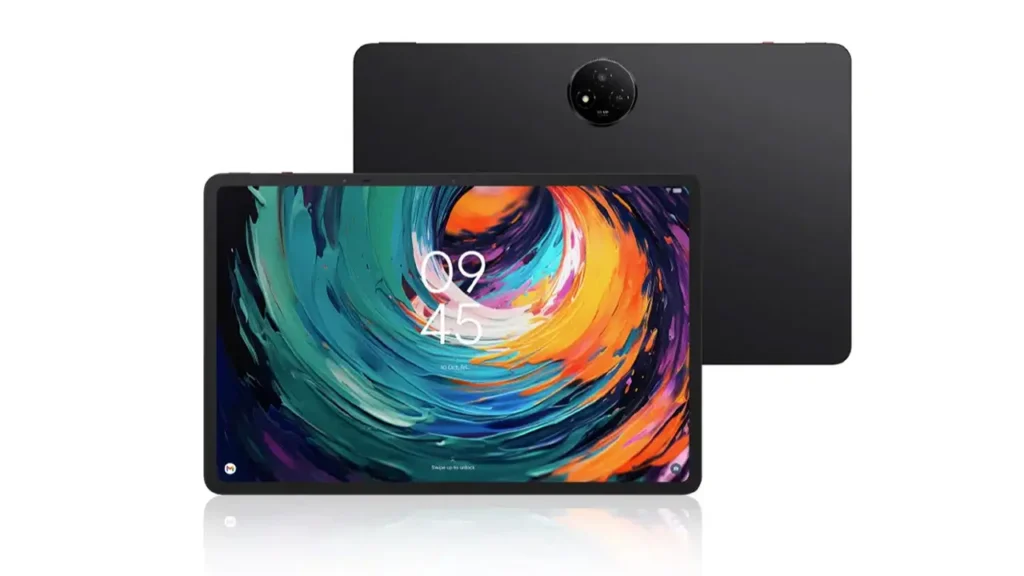
What Makes TCL NXTPAPER Technology Unique
TCL NXTPAPER technology isn’t e-ink in the traditional sense—let’s clear that up right away. Real e-ink displays, like those found in Kindle or Kobo devices, use electrophoretic technology that physically moves particles to create an image. The result is a paper-like appearance with virtually no eye strain, but also slow refresh rates and no color.
NXTPAPER takes a different route. It’s still an LCD-based display, but TCL has engineered it to mimic many of the visual qualities of paper. The screen uses a special layered structure that reduces glare, softens backlight emission, and creates a matte texture that’s closer to reading a physical book than staring at a glossy tablet. The display also reflects ambient light more naturally, which means you can read comfortably in bright environments without cranking up the brightness.
The TCL NXTPAPER 14 Pro display goes further by offering multiple color temperature modes and a dedicated reading mode that strips away distractions. It’s not just about dimming the screen—it’s about reshaping how the content is presented so your eyes don’t have to work as hard to process it. This makes it particularly useful for people who spend hours reading documents, articles, or e-books and want something gentler than a standard tablet but more versatile than a dedicated e-reader.
What TCL has done here is find a middle ground: you get the flexibility of a full Android tablet with app support, multitasking, and media playback, but you also get a display that prioritizes comfort over vibrancy. It’s a trade-off, and whether it’s the right one depends entirely on how you plan to use the device.
Dedicated E-Ink Mode Button Explained
One of the standout features of the TCL NXTPAPER 14 Pro tablet is the physical button that instantly switches the display into e-ink mode. This isn’t a software toggle buried in settings—it’s a real, tactile button on the side of the device that you can press anytime you want to shift the screen into reading mode.
When you press it, the display transitions to a high-contrast, monochrome view that closely resembles the look of an e-ink screen. The backlight is adjusted, colors are removed, and the overall presentation becomes much easier on the eyes for extended reading. You can press the button again to return to full-color mode when you’re done.
This tablet with e-book mode button approach is surprisingly practical. If you’re reading a PDF or an article in your browser and want to reduce visual fatigue, you don’t need to fumble through menus or adjust settings manually. Just hit the button, and the transformation is instant. It’s especially useful when switching between tasks—say, reading a long report and then jumping back to a video call or a spreadsheet.
The button isn’t just a gimmick. It reflects a design philosophy that recognizes how people actually use tablets. You’re not always doing the same thing, and having a quick, hardware-based way to shift between modes makes the device feel more responsive to your needs. It’s a small touch, but it makes a noticeable difference in daily use.
TCL NXTPAPER 14 Pro Display and Visual Comfort
The display itself is a 14-inch panel, which is larger than most tablets in the consumer space. That size gives you more room to work with documents, read side-by-side pages, or view detailed content without zooming in constantly. The resolution is sharp enough for text-heavy tasks, though it’s not aimed at pixel-peepers who want ultra-high-definition imagery.
The screen uses an anti-glare coating that genuinely works. You can use this tablet outdoors or near a window without dealing with harsh reflections that make the content unreadable. The matte finish also reduces fingerprint smudges, which is a minor but appreciated benefit if you’re handling the device frequently throughout the day.
TCL has tuned the color output to be less saturated than typical tablet displays. Some people might find this less appealing for watching movies or browsing photos, but it’s intentional. The goal is to reduce the intensity of blue light and harsh contrast shifts that contribute to eye strain. The display won’t wow you with punchy colors, but it won’t exhaust you after a few hours of use either.
Brightness levels are adjustable across a wide range, and the tablet handles different lighting conditions well. In dim environments, you can lower the brightness significantly without the screen becoming grainy or difficult to read. In bright settings, it holds up better than you might expect for a display that’s optimized for reading rather than outdoor visibility.
One thing to note: this is not a high-refresh-rate display. If you’re used to 120Hz screens with buttery-smooth scrolling, the TCL NXTPAPER 14 Pro specs will feel more conventional. It’s a 60Hz panel, which is perfectly fine for reading and productivity but won’t deliver the same fluidity you’d get from a premium multimedia tablet.

Eye Comfort Tablet for Long Reading Sessions
Eye comfort is the central promise of this device, and it’s worth examining what that actually means in practice. The TCL NXTPAPER 14 Pro tablet doesn’t claim to eliminate eye strain entirely—no device can do that—but it does reduce several of the common factors that contribute to discomfort during long screen sessions.
First, the reduced blue light emission makes a noticeable difference, especially in the evening. Blue light can interfere with sleep patterns and cause short-term strain, so having a display that naturally emits less of it is helpful if you’re someone who reads before bed or works late into the night.
Second, the matte texture of the screen reduces the need for your eyes to constantly refocus. Glossy screens reflect light unevenly, which forces your eyes to adjust more frequently. The NXTPAPER display minimizes this effect, creating a more stable visual experience that’s easier to maintain over time.
Third, the e-ink mode removes color entirely, which simplifies the visual input your brain has to process. This can be surprisingly restful, especially when you’re reading dense text or technical documents. It’s not just about aesthetics—it’s about reducing cognitive load.
That said, this is still a backlit LCD screen. It’s not the same as reading ink on paper or using a true e-ink device like a Kindle Paperwhite. If you’re extremely sensitive to screen-related eye strain, you might still experience some discomfort, though likely less than with a standard tablet. The eye comfort tablet TCL approach is about harm reduction, not elimination.
For most people, the difference is meaningful. If you regularly spend multiple hours reading on a tablet, the TCL NXTPAPER 14 Pro will likely feel gentler than comparable devices. Just don’t expect it to perform miracles if you’re reading non-stop for eight hours straight—your eyes will still need breaks.
TCL Tablet for Reading vs Traditional E-Readers
So how does this TCL tablet for reading stack up against dedicated e-readers? The comparison is tricky because they serve overlapping but distinct purposes.
Traditional e-readers like the Kindle Oasis or Kobo Libra excel at one thing: pure, distraction-free reading. Their e-ink displays are unmatched for outdoor visibility and long-term comfort. They have weeks-long battery life, they’re lightweight, and they do exactly one job extremely well.
The TCL NXTPAPER 14 Pro, on the other hand, is a full Android tablet. That means you can install apps, browse the web, watch videos, edit documents, and do all the things a regular tablet can do. The reading experience is more versatile—you’re not locked into a single ecosystem or file format. You can read PDFs with complex layouts, annotate documents, switch between reading and note-taking, and access content from any app you choose.
The trade-off is battery life. E-readers can last weeks because e-ink displays use almost no power when the image isn’t changing. The TCL NXTPAPER 14 Pro is a backlit LCD device, so you’re looking at hours, not weeks. It’s still respectable for a tablet, but it’s not in the same category as a dedicated e-reader.
Another difference is weight and portability. E-readers are typically lighter and easier to hold for extended periods. The 14-inch size of the TCL tablet makes it better for desk use or lap reading, but less convenient if you’re standing on a train or lying in bed. It’s a bigger device with more functionality, and that comes with added bulk.
If your only goal is reading novels or long-form content, an e-reader is still the best tool for the job. But if you want a device that can handle reading, productivity, light media consumption, and occasional web browsing—all while being easier on your eyes than a standard tablet—the TCL NXTPAPER 14 Pro occupies a useful middle ground.
TCL NXTPAPER 14 Pro Specs Overview
Here’s a breakdown of the core specifications for the TCL NXTPAPER 14 Pro tablet:
| Specification | Details |
|---|---|
| Display Size | 14 inches |
| Display Type | NXTPAPER LCD with anti-glare coating |
| Resolution | 2240 x 1440 pixels |
| Processor | MediaTek MT8771 (octa-core) |
| RAM | 8GB |
| Storage | 256GB (expandable via microSD) |
| Battery Capacity | 10,000 mAh |
| Operating System | Android 14 |
| Connectivity | Wi-Fi 6, Bluetooth 5.3, USB-C |
| Special Features | Dedicated e-ink mode button, stylus support |
| Weight | Approximately 725 grams |
| Audio | Quad speakers with Dolby Atmos |
The processor is mid-range, which means it handles everyday tasks smoothly but won’t compete with flagship tablets in terms of raw performance. That’s fine for the intended use cases—reading, web browsing, document editing, and light multitasking. If you’re planning to run demanding apps or heavy games, this isn’t the device for that.
The 8GB of RAM is sufficient for most productivity workflows, and the 256GB of storage gives you plenty of room for books, documents, and media files. The microSD expansion is a nice touch if you need more space down the line.
Battery life is solid. The 10,000 mAh capacity should get you through a full day of mixed use, and potentially longer if you’re primarily using the e-ink mode for reading. Charging is via USB-C, and while fast charging isn’t the fastest on the market, it’s adequate.
The quad-speaker setup is a pleasant surprise. Even though this tablet isn’t designed as a media powerhouse, the audio quality is respectable for video calls, podcasts, or occasional movie watching. It’s not going to replace a dedicated speaker, but it’s better than many tablets in this category.

Non-Gaming Tablet TCL: Who Is It For
The non-gaming tablet TCL positioning is deliberate, and it’s important to understand what that means in practical terms. This device isn’t trying to compete with gaming-focused tablets or high-performance multimedia slates. It’s designed for people who want a tablet that encourages focus, reduces distractions, and supports long-form content consumption without the visual fatigue that comes with more aggressive displays.
So who benefits most from this approach?
Students and Researchers: If you’re reading academic papers, textbooks, or lengthy articles, the eye-friendly display and e-ink mode make extended study sessions more comfortable. The larger screen size is also helpful for viewing complex diagrams or side-by-side documents.
Professionals: People who spend their workdays reviewing contracts, reports, or technical documentation will appreciate the reduced eye strain. The tablet handles PDFs well, and the stylus support (if you opt for one) makes annotation straightforward.
Casual Readers: If you read a lot but don’t want the limitations of a dedicated e-reader, this tablet gives you access to any reading app you want—whether that’s Kindle, Google Play Books, news apps, or web-based content—all while being gentler on your eyes than a standard tablet.
Minimalists and Digital Detoxers: The e-ink mode button makes it easy to strip away the visual noise of the modern web. If you’re trying to reduce screen time or limit distractions, having a physical toggle to shift into a more restrained visual mode can be genuinely helpful.
People Sensitive to Eye Strain: If you’ve noticed that using tablets or phones for extended periods gives you headaches, dry eyes, or general discomfort, the TCL NXTPAPER 14 Pro is designed to address those issues. It won’t solve every problem, but it’s built around the idea of minimizing the factors that contribute to strain.
This tablet isn’t for everyone. If you prioritize gaming performance, high-refresh-rate displays, or ultra-vivid colors for media consumption, you’ll find better options elsewhere. But if your tablet use leans toward productivity, reading, and general-purpose tasks, the TCL 14 Pro tablet review feedback suggests it’s a solid choice that fills a gap in the market.
Practical Use Cases: Work, Study, Reading
Let’s look at some real-world scenarios where the TCL NXTPAPER 14 Pro tablet makes sense:
Long-Form Reading: You’re settling in for a few hours of reading—maybe a novel, maybe a collection of essays. You press the e-ink mode button, and the screen shifts to a high-contrast, paper-like view. The glare disappears, the backlight softens, and you can read for longer without your eyes feeling tired. When you’re done, you press the button again, and the tablet is back to full color for whatever you want to do next.
Document Review: You’re working through a lengthy contract or technical manual. The 14-inch screen gives you enough space to view full pages without constant zooming. The anti-glare coating means you can work near a window without reflections obscuring the text. If you have a stylus, you can mark up the document directly, which is faster than switching between apps or devices.
Distraction-Free Writing: You open a writing app, hit the e-ink mode button, and suddenly the visual noise of the interface fades away. You’re left with just your words on a simple, paper-like background. It’s not a complete writing-focused device, but the mode helps you concentrate without the pull of colorful notifications or distracting UI elements.
Research and Note-Taking: You’re studying for an exam or preparing a presentation. You open multiple tabs or split-screen apps—one for reference material, one for note-taking. The larger screen makes this more practical than on a smaller tablet, and the eye comfort features mean you can keep working without needing frequent breaks.
Casual Media Consumption: The tablet isn’t optimized for video, but it handles it fine. The quad speakers provide decent audio, and the screen is large enough for a comfortable viewing experience. When you’re done watching, you can flip back to reading mode without switching devices.
Travel Companion: On a long flight or train ride, the tablet serves as a reading device, a document editor, and an entertainment hub. The battery life holds up well, and the versatility means you don’t need to pack multiple devices.
The common thread in all these scenarios is flexibility. The TCL NXTPAPER 14 Pro doesn’t force you into a single use case—it adapts to what you need at any given moment, with a bias toward making reading and text-focused work as comfortable as possible.

Final Thoughts on TCL 14 Pro Tablet
The TCL NXTPAPER 14 Pro tablet is an interesting device because it deliberately avoids chasing the same goals as most tablets on the market. It’s not the fastest, it’s not the flashiest, and it’s not trying to be your primary gaming or entertainment machine. Instead, it focuses on eye comfort, practical productivity, and giving you a more thoughtful reading experience.
The dedicated e-ink mode button is a genuinely useful feature that makes the tablet feel more responsive to how people actually use these devices. You’re not locked into one mode or another—you can shift between them instantly, depending on what you’re doing. That kind of flexibility is rare, and it’s executed well here.
The display itself won’t appeal to everyone. If you’re used to high-saturation OLED screens or buttery-smooth high-refresh-rate panels, the NXTPAPER approach will feel muted and less visually exciting. But that’s the point. The trade-off is a screen that’s easier on your eyes over long periods, which is valuable if you spend hours reading or working on a tablet.
The specs are mid-range, which is fine for the intended use cases. This isn’t a device for power users or gamers, and it doesn’t pretend to be. It’s a tool for reading, writing, studying, and general productivity, and it handles those tasks competently.
The TCL NXTPAPER 14 Pro tablet fits into a niche that doesn’t get a lot of attention: people who want the versatility of a full Android tablet but don’t want the visual fatigue that comes with most displays. If that describes you, this device is worth considering. If you’re looking for a high-performance multimedia machine, you should look elsewhere. It’s all about knowing what you need and whether this particular set of compromises aligns with that.
Looking beyond hardware innovation, AI is rapidly reshaping how digital content is created. From smart displays to intelligent media tools, the future is clearly automated. A strong example is the WAN 2.6 AI Video Generator, which can create videos with sound using AI — explore how it works here:
https://aiinovationhub.com/wan-2-6-ai-video-generator-with-sound/
