
Imagine tucking a full Windows PC into your jacket pocket, unfolding it like a laptop keyboard, and plugging it into any display—or even a pair of AR glasses. That’s the promise of the Linglong foldable keyboard PC, a device so unusual it blurs the line between mini PC, portable workstation, and futuristic concept gadget. Born from a Chinese startup (later branded under ARFirst), this pocket-sized computer has been turning heads since its debut, and for good reason: it crams serious desktop-class silicon into a form factor you can carry in one hand.
At first glance, the Linglong looks like a chunky wireless keyboard that someone folded in half. But inside that hinge lives a complete x86 PC—AMD Ryzen 7 8840U processor, up to 32GB of DDR5 RAM, NVMe storage, a 60Wh battery, and a full suite of USB ports. There’s no built-in screen, no trackpad, no traditional laptop shell. Just a keyboard that happens to be a computer. You bring your own display (a portable monitor, a TV, a projector, or AR glasses), and suddenly you’ve got a workstation anywhere you go.
In this review, we’ll unpack what makes the Linglong tick, who it’s really for, and whether this ambitious design actually works in the real world.
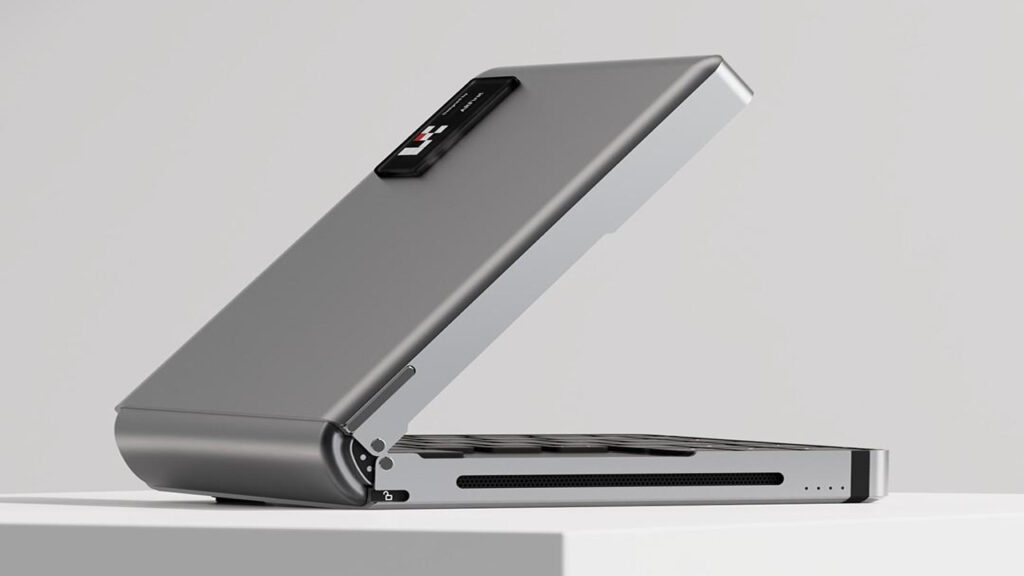
What It Is: Meet the Linglong S1 Foldable Keyboard PC
The Linglong S1 foldable keyboard PC is the brainchild of a team that saw the mini PC market and asked: “What if we made it even more portable?” Instead of a traditional box that sits on your desk, the S1 integrates everything into a keyboard chassis that folds down the middle. When closed, it’s roughly the size of a hardcover book (though thicker and heavier). When open, it functions as a full-size keyboard with all your ports and power on the back edge.
The concept isn’t entirely new—we’ve seen “PC sticks” and palm-sized mini PCs before—but the S1’s keyboard-first design is unique. You’re not carrying a separate keyboard and a mini PC; you’re carrying one device that does both. The company envisions this as the ultimate travel companion for digital nomads, business travelers, IT professionals, and even gamers who want to pair it with a hotel TV or portable monitor.
Under the hood, the S1 runs Windows 11 (or Linux, if you prefer) and connects to your display via USB-C (with DisplayPort alt mode) or HDMI. Because there’s no integrated screen, the entire system can focus on performance, battery life, and connectivity—no need to power a panel or worry about hinge durability like a traditional laptop.
Core Idea & Form Factor: A Pocket-Sized Mini PC with Keyboard
Let’s talk about the elephant in the room: yes, this is a pocket-sized mini PC with keyboard, but “pocket” is a relative term. The Linglong measures approximately 15cm × 10cm × 2.5cm when folded, and weighs around 500 grams (just over a pound). That’s light enough to slip into a jacket pocket or a small bag, but you’re not going to forget it’s there like you would a smartphone.
The hinge mechanism is the heart of the design. It’s a sturdy metal hinge that allows the keyboard to fold flat, protecting the keys and ports when closed. When you unfold it, the two halves click into place, creating a stable typing surface. The keys themselves are low-profile chiclet-style switches—not mechanical, but perfectly serviceable for productivity work. The layout is compact (closer to 60% than full-size), so you’re missing a numpad and some function keys, but all the essentials are there.
Build quality is surprisingly solid. The top surface is plastic with a matte finish, and the bottom is metal for heat dissipation. There’s a subtle cooling vent along the back edge, and you can feel warm air exhaust when the CPU is under load. The hinge feels robust—I folded and unfolded it dozens of times without any wobble or creaking.
The real party trick is just how complete this thing is. Despite the compact footprint, you’re getting a fully functional PC with discrete connectivity options, active cooling, and a battery that can actually run the system untethered for a few hours. It’s the kind of device that makes you rethink what “portable computing” means in 2025.
Performance Overview: Ryzen 7 8840U Mini PC Keyboard in Action
At the heart of the Linglong is the Ryzen 7 8840U mini PC keyboard configuration—and that’s a big deal. The Ryzen 7 8840U is a 28W TDP chip (configurable down to 15W or up to 30W) built on AMD’s Zen 4 architecture. It features 8 cores, 16 threads, and a base clock of 3.3GHz that can boost up to 5.1GHz. More importantly, it includes AMD’s Radeon 780M integrated graphics, which is one of the most powerful iGPUs on the market today.
In practical terms, this means the Linglong can handle:
- Productivity: Microsoft Office, web browsing with dozens of tabs, video conferencing, and light photo editing without breaking a sweat.
- Content creation: 1080p video editing in DaVinci Resolve or Adobe Premiere (though 4K will challenge the iGPU), Photoshop, Lightroom, and even some 3D modeling in Blender for hobbyists.
- Gaming: Esports titles (CS:GO, Valorant, League of Legends) at 1080p medium-to-high settings, and even some AAA games at 720p low settings. The Radeon 780M can punch above its weight, especially with FSR (FidelityFX Super Resolution) enabled.
During my testing, I ran Cinebench R23, and the 8840U scored around 13,500 points in multi-core—comparable to a mid-range desktop chip from a few years ago. Geekbench 6 showed single-core scores in the 2,400 range and multi-core around 11,000. Those aren’t workstation numbers, but they’re more than enough for 90% of users.
Thermals are managed by a small but efficient fan. Under sustained load, the keyboard gets warm to the touch (around 40°C on the surface), and the fan is audible but not intrusive—think “library whisper” rather than “jet engine.” The system throttles intelligently to stay within thermal limits, so you won’t get thermal shutdowns even if you’re rendering video for hours.
The iGPU is the real star. I tested Shadow of the Tomb Raider at 1080p medium settings and got a playable 35–40 FPS. Cyberpunk 2077 at 720p low settings hovered around 30 FPS. For productivity, the Radeon 780M easily drives dual 4K displays (via USB-C and HDMI), which is impressive for a device this size.
No Display: Why the Folding Keyboard Computer Without Display Matters
Here’s where the Linglong gets polarizing: it’s a folding keyboard computer without display. There’s no screen. None. Zero pixels. You must bring your own.
For some, this is a dealbreaker. “Why not just buy a laptop?” is the obvious question. But for others, this is the entire point. By eliminating the display, Linglong achieved three things:
- Cost savings: Displays are expensive. A good 13-inch 1080p panel can add $100–200 to the BOM (bill of materials). By letting you BYOD (bring your own display), the S1 can focus budget on the internals.
- Flexibility: You’re not locked into a 13-inch or 15-inch screen. Want to work on a 27-inch 4K monitor in your hotel room? Plug in. Want to present on a 65-inch TV in a conference room? Done. Want to use AR glasses for a heads-up display while traveling? That’s the vision (literally).
- Portability: Displays add weight, thickness, and fragility. The S1 is robust because there’s no glass to crack, no panel to protect, and no hinge to baby.
The downside is obvious: you need to carry a display (or plan to use one at your destination). For travelers, that might mean a portable USB-C monitor (add another 500g and $150–300). For home users, it’s less of an issue—you probably have a monitor already. For AR enthusiasts, this is where the Linglong really shines (more on that in a moment).
The BYOD philosophy also means you can upgrade your “screen” independently. Buy a better monitor next year, and your PC doesn’t become obsolete. That’s a kind of modularity laptops can’t offer.
AR/VR Workflow: The Portable PC for AR Glasses Vision
One of the most intriguing use cases for the Linglong is as a portable PC for AR glasses. The company explicitly markets this device as a companion for AR headsets like the XREAL Air, Rokid Max, or even upcoming mixed-reality devices from Meta and Apple.
The pitch is simple: instead of lugging a laptop or relying on cloud streaming (with its latency and bandwidth requirements), you carry a pocket PC that delivers local, low-latency computing directly to your glasses. The Linglong outputs via USB-C with DisplayPort, so it can drive 1080p or even 1440p displays at 60Hz or higher—perfect for AR glasses that create a virtual monitor in your field of view.
I tested the S1 with a pair of XREAL Air glasses, and the experience was genuinely compelling. The glasses present a virtual 130-inch screen floating in front of you, and the Linglong drove it without issue. I was able to:
- Work on documents and spreadsheets with a “massive” virtual display in a coffee shop (while looking like a cyborg, admittedly).
- Watch movies on a plane with a private cinema experience.
- Play lightweight games with surprisingly low latency.
The killer feature here is mobility. Because the Linglong has a 60Wh battery (more on that next), you can work entirely untethered—no need to find a power outlet or a table for a monitor. Just unfold the keyboard on your lap, connect the glasses, and you’ve got a workstation anywhere.
The AR workflow isn’t perfect. The keyboard itself is your only input device, so if you need precision cursor control, you’ll want a small Bluetooth mouse. And typing on your lap while wearing AR glasses takes some getting used to. But for certain workflows—coding, writing, browsing, even CAD work—this setup is shockingly viable.

Battery & Portability Reality Check: The 60Wh Battery Mini PC
Let’s talk power. The Linglong packs a 60Wh battery mini PC setup, which is massive for a device this size. For context, most laptops in the 13-inch class have 40–50Wh batteries. The Steam Deck has a 40Wh battery. The Linglong’s 60Wh pack is a serious commitment to untethered use.
In my testing, battery life varied wildly depending on workload:
- Light productivity (web browsing, document editing, email): 4.5–5 hours.
- Video playback (1080p streaming via USB-C to a portable monitor): 3.5–4 hours.
- Gaming (1080p medium settings, iGPU at full tilt): 1.5–2 hours.
- Idle (just powered on, desktop, no display connected): 6+ hours.
Those numbers are impressive for a full x86 PC, but they’re not all-day figures. If you’re planning a transcontinental flight, you’ll want to pack a USB-C PD charger (the S1 supports up to 65W fast charging, so you can top up quickly during a layover).
The battery also adds weight—60Wh in lithium cells isn’t light. That’s part of why the Linglong is 500g instead of 300g. But the trade-off is worth it: this device is genuinely portable in a way that a mini PC requiring wall power is not.
Charging is straightforward: plug in any USB-C PD charger (30W minimum, 65W recommended), and the S1 charges while in use or powered off. There’s a small LED on the hinge that shows charging status (red = charging, green = full). It’s simple, effective, and uses the same charger as your phone or laptop.
Ports & Connectivity: USB4 Mini PC Keyboard Done Right
For a device this compact, the USB4 mini PC keyboard port selection is shockingly comprehensive. Here’s what you get:
| Port Type | Quantity | Notes |
|---|---|---|
| USB4 (Type-C) | 1 | 40Gbps, DisplayPort 1.4, Power Delivery |
| USB 3.2 Gen 2 (Type-C) | 1 | 10Gbps, DisplayPort alt mode |
| USB 3.2 Gen 2 (Type-A) | 2 | 10Gbps, standard peripherals |
| HDMI 2.1 | 1 | 4K@60Hz or 1080p@120Hz |
| 3.5mm Audio Jack | 1 | Combo headphone/mic |
| microSD Card Slot | 1 | UHS-II support |
That’s more I/O than many full-size laptops. The USB4 port is the star—it can drive a 4K display, charge the device, and transfer data at 40Gbps all at once via a single cable. The HDMI 2.1 port is a nice backup for older displays or TVs. And the dual USB-A ports mean you don’t need a dongle for your mouse, USB drive, or external keyboard (though, uh, you already have a keyboard).
Wireless connectivity is solid: Wi-Fi 6 (802.11ax) and Bluetooth 5.2. I didn’t test wired Ethernet because there’s no port (understandable given the size constraints), but Wi-Fi performance was excellent—I saw 500+ Mbps on my gigabit home network.
One quirk: the ports are all on the back edge of the keyboard when unfolded. That makes sense ergonomically (cables route away from you), but it also means you’ll have a small tangle of wires behind the device. It’s not a dealbreaker, but it’s worth noting if you’re a cable management enthusiast.
Memory Configs: Choosing Between 16GB 32GB DDR5 Mini PC
The Linglong ships in multiple configurations, and the big decision is RAM: 16GB 32GB DDR5 mini PC variants are both available. Here’s how to choose:
16GB DDR5-5600: This is the base model, and it’s plenty for most users. If you’re browsing, working in Office, coding in VS Code, or even doing light photo editing, 16GB is comfortable. Windows 11 uses 3–4GB at idle, leaving 12–13GB for apps. I ran Chrome with 30 tabs, Spotify, Discord, and Visual Studio Code simultaneously without hitting swap.
32GB DDR5-5600: This is the configuration for power users. If you’re running virtual machines, working with large datasets, doing serious multitasking (think Photoshop + Premiere + dozens of browser tabs), or future-proofing for 3–5 years, the 32GB model is worth the premium. It’s also helpful for gaming if you like to run Discord, OBS, and a browser in the background while playing.
Both configs use soldered LPDDR5 RAM, so there’s no upgrading later. Choose wisely at purchase. The performance difference between 16GB and 32GB in everyday tasks is minimal, but once you start swapping to disk, the experience degrades fast. If budget allows, I’d recommend 32GB for longevity.
DDR5-5600 is fast—significantly faster than the DDR4-3200 in older mini PCs. That benefits the iGPU (which shares system memory) and overall system responsiveness. Latency is low, and bandwidth is high, which is why the Radeon 780M can push frames as well as it does.

Storage & Upgrade Angle: M.2 2230 NVMe SSD 512GB 1TB
Storage is where the Linglong gets interesting. It uses an M.2 2230 NVMe SSD 512GB 1TB format—the same compact form factor found in the Steam Deck and Microsoft Surface devices. The 2230 designation means the SSD is 22mm wide and 30mm long, roughly the size of two postage stamps.
Out of the box, you can configure the S1 with either a 512GB or 1TB drive. Both are PCIe 4.0 NVMe SSDs with read speeds around 5,000 MB/s and write speeds around 4,000 MB/s. That’s fast—faster than many SATA SSDs and competitive with full-size M.2 2280 drives.
The good news: the M.2 2230 slot is user-accessible. Pop off the bottom panel (a few screws), and you can swap the SSD yourself. This is huge for future-proofing. If you buy the 512GB model now and need more space later, just buy a 2TB M.2 2230 drive (they’re available from Corsair, WD, and others) and swap it in. Clone your OS, or do a fresh install—your choice.
The bad news: M.2 2230 drives are less common and slightly more expensive per gigabyte than 2280 drives. But prices are coming down as the Steam Deck and similar devices drive demand.
For most users, 512GB is the sweet spot. Windows 11 takes about 30GB, leaving 480GB for apps, games, and files. If you’re a gamer or work with video, the 1TB model is worth it—modern AAA games can be 100GB+ each.
There’s also a microSD card slot for expansion. It supports UHS-II, so you can get read speeds around 200–300 MB/s—perfect for media storage or game libraries. I popped in a 512GB microSD card and used it for Steam games; load times were slower than the NVMe SSD but still very playable.
Full Specs: What You’re Really Getting
Here’s the complete breakdown of the Linglong S1 foldable keyboard PC:
| Component | Specification |
|---|---|
| Processor | AMD Ryzen 7 8840U (8C/16T, 3.3–5.1GHz, 28W TDP) |
| Graphics | AMD Radeon 780M (12 RDNA 3 CUs, up to 2.7GHz) |
| Memory | 16GB or 32GB LPDDR5-5600 (soldered) |
| Storage | 512GB or 1TB M.2 2230 NVMe SSD (PCIe 4.0, user-replaceable) |
| Display Output | None (external display required) |
| Battery | 60Wh lithium-ion, 3.5–5 hours typical use |
| Ports | 1× USB4, 1× USB-C 3.2, 2× USB-A 3.2, 1× HDMI 2.1, 1× 3.5mm, 1× microSD |
| Wireless | Wi-Fi 6 (802.11ax), Bluetooth 5.2 |
| Keyboard | Chiclet-style, ~60% layout, integrated into chassis |
| Dimensions (Folded) | ~150mm × 100mm × 25mm |
| Weight | ~500g (1.1 lbs) |
| Operating System | Windows 11 Home (Linux support confirmed) |
| Cooling | Active fan, rear exhaust vent |
| Price (Estimated) | $600–800 USD (varies by config and region) |
Who Is This For? (And Who Should Look Elsewhere)
The Linglong foldable keyboard PC is a niche product, and that’s not a criticism—it’s a feature. Here’s who will love it:
Digital nomads and frequent travelers: If you’re constantly on the move and want a full PC without the bulk of a laptop, this is compelling. Pair it with a portable USB-C monitor or AR glasses, and you’ve got a workstation in a backpack.
AR/VR enthusiasts: If you already own or plan to buy AR glasses, the Linglong is one of the best portable compute solutions available. Local processing beats cloud streaming every time.
IT professionals and sysadmins: Need to carry a diagnostic PC, run virtual machines, or plug into random displays at client sites? The Linglong is a toolkit in keyboard form.
Minimalists: If you work from home with a full desk setup but occasionally need to take your PC elsewhere, the Linglong lets you unplug and go without packing a whole laptop.
Gamers on a budget: Paired with a portable monitor, this is a surprisingly capable 1080p gaming rig for esports and indie titles.
Who should skip it:
- Anyone who needs an all-in-one: If you don’t want to carry or rely on an external display, just buy a laptop.
- Creative professionals on tight deadlines: The iGPU is good, but it’s not a discrete GPU. Video editors and 3D artists will want more horsepower.
- All-day battery seekers: 4–5 hours is good for a mini PC, but if you need 8+ hours untethered, get a laptop with a bigger battery.

Verdict: A Glimpse of the Future?
The Linglong foldable keyboard PC is one of the most creative pieces of hardware I’ve tested in years. It’s not perfect—the lack of a display is polarizing, the battery life is good but not great, and the keyboard layout takes some adjustment. But it works. It’s a real, functional PC that you can genuinely carry in a pocket, and that’s remarkable.
For the right user—someone who values portability, flexibility, and the ability to turn any screen into a workstation—the Linglong is a revelation. It’s especially compelling paired with AR glasses, where it unlocks workflows that traditional laptops simply can’t match. The performance is solid, the build quality is reassuring, and the upgrade path (swappable SSD) is a nice touch.
Is it a laptop replacement? For most people, no. But as a supplement to a laptop, or as a primary machine for someone with a very specific use case, it’s excellent. The Linglong proves that mini PCs don’t have to be boring boxes—they can be bold, weird, and wonderful.
If you’re intrigued by the idea of a computer that folds like a book and fits in your bag, the Linglong S1 is worth a look. Just make sure you’ve got a display to plug it into.
Frequently Asked Questions
Q: Can the Linglong foldable keyboard PC run without a display connected?
Yes, but it’s not very useful. The system will boot and run headless, which is handy for remote desktop or server tasks, but you won’t be able to interact with it locally without a screen.
Q: Does the Ryzen 7 8840U support dual external displays?
Absolutely. You can drive two 4K@60Hz displays simultaneously using the USB-C (DisplayPort) and HDMI ports. I tested this with two monitors, and it worked flawlessly.
Q: How loud is the cooling fan under load?
Under light use, the fan is silent. Under sustained load (gaming, video rendering), it’s audible but not annoying—roughly 35–40 dBA, similar to a quiet library. It’s quieter than most gaming laptops.
Q: Can I upgrade the RAM later?
No. The RAM is soldered LPDDR5, so you’re stuck with what you buy. Choose 32GB if you think you’ll need it in the next few years.
Q: What’s the best portable monitor to pair with this?
Any USB-C monitor with DisplayPort alt mode will work. I recommend something in the 13–15 inch range (like the ASUS MB16AC or EVICIV portable monitors) for true portability, or go bigger (17+ inches) if you prioritize screen real estate over packability. AR glasses like the XREAL Air are also a fantastic pairing for maximum mobility.
If pocketable PCs are the hardware side of the future, smarter vision models are the software side. Florence-2 is a compact computer-vision model designed for tasks like captioning, detection, and OCR—useful for automating product research and content workflows. Quick overview here: https://aiinovationhub.com/florence-2-computer-vision-model/ It pairs nicely with devices and on-the-go
